

dots vs Muse: OpenAI의 에이전트인가, Meta의 에이전트인가?
OpenAI의 dots는 ChatGPT Pro 안에서 업무를 처리하고, Meta의 Muse는 일상 심부름을 맡으며 무료로 시작할 수 있습니다. 가격, 이용 범위, 안전, 개인정보 차이를 비교합니다.
한눈에 보기
쇼핑, 청구서, 가족 일정 같은 생활 잡무를 맡길 개인 에이전트를 원하고, 써 보는 데 돈을 내고 싶지 않다면 Muse를 고르세요. 이미 ChatGPT Pro를 결제하고 있거나, 업무가 Slack, Microsoft Teams, ChatGPT에 연결한 도구를 중심으로 돌아간다면 dots를 고르세요. dot은 업무용으로 만들어졌으며 Pro에 추가 비용 없이 포함됩니다.
둘 다 2026년 9월에 출시되었고, 둘 다 자체 클라우드 컴퓨터에서 작업하며 휴대폰이 꺼져 있어도 계속 일하고, 둘 다 검토할 거리를 메시지로 알려 줍니다. 큰 차이는 가격, 이용할 수 있는 곳, 그리고 누구를 위한 것인지입니다.
각각 누구를 위한 것인가
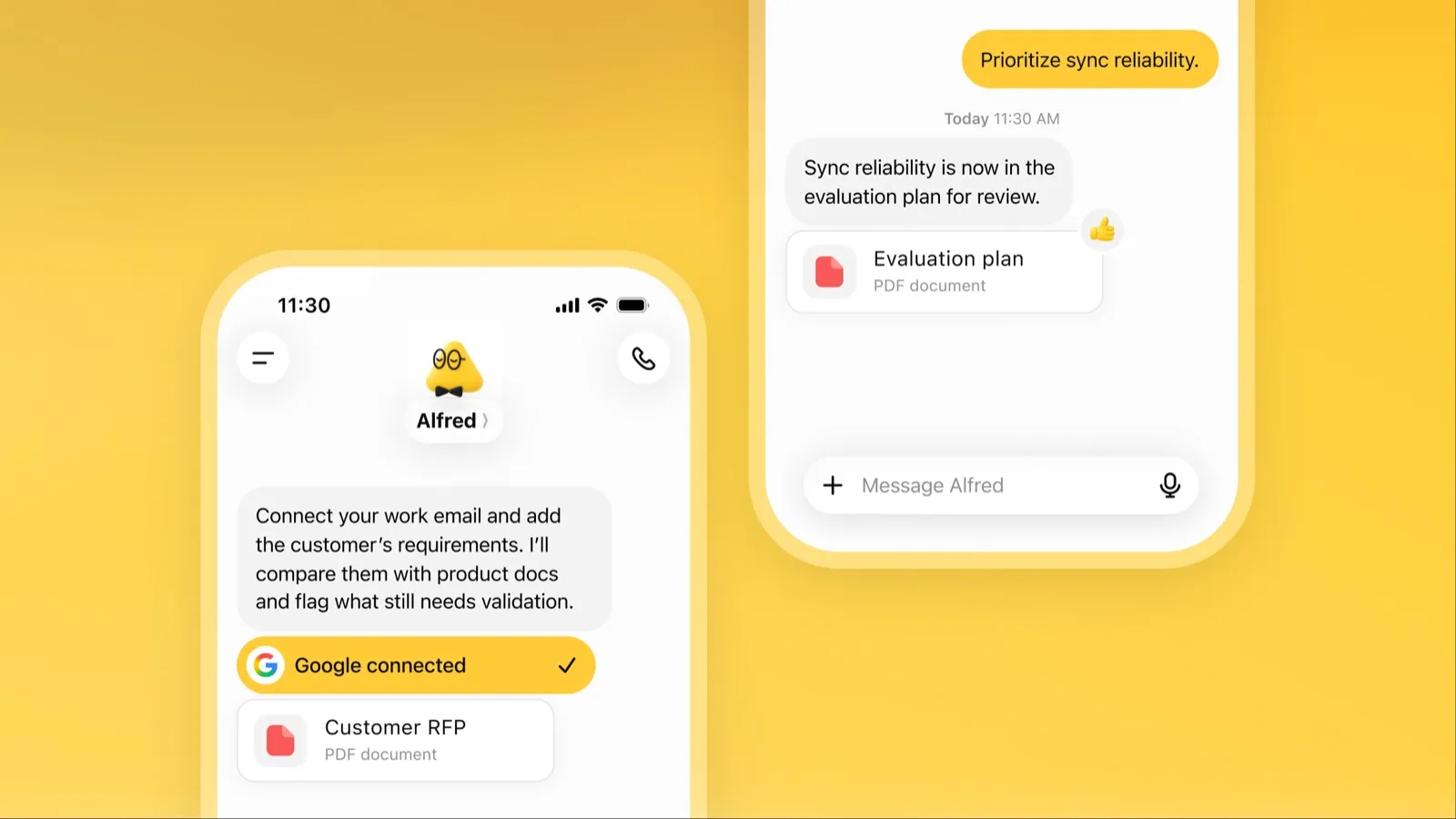
dot은 ChatGPT 안에서 항상 켜져 있는 OpenAI의 에이전트입니다. ChatGPT 메모리에서 출발해 ChatGPT 플러그인으로 4,000개 이상의 앱에 연결되고, Codex와 ChatGPT Work에 작업을 넘겨 조사, 데이터 분석, 문서 작성, 소프트웨어 개발을 합니다(OpenAI). 한가할 때는 연결된 앱을 읽기 전용으로 조사해 검토할 작업을 가져옵니다.
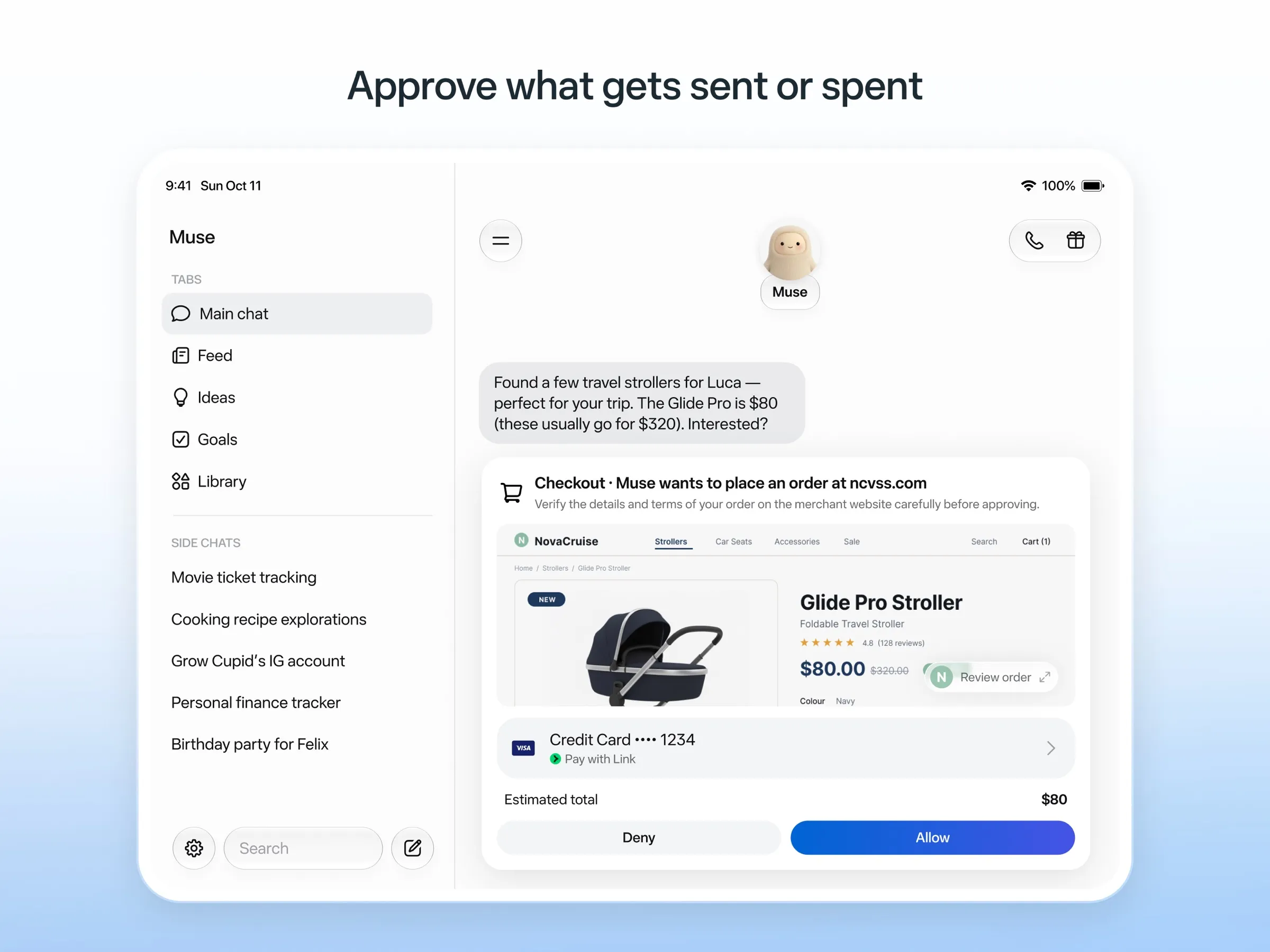
Muse는 Meta의 소비자용 에이전트입니다. Meta가 든 예시는 차 팔기, 청구 금액 낮추기, 여행 예약, 레시피를 장보기 목록으로 바꾸기 등입니다(Meta). 이메일, 캘린더, Instagram에 연결되며, 연동이 없는 사이트에는 브라우저를 사용합니다.
어디서 이용하나
dot에는 웹, 데스크톱, 모바일의 ChatGPT에서 메시지를 보내거나 전화를 걸 수 있고, Slack과 Microsoft Teams에서도 메시지를 보낼 수 있으며, 이 모든 곳에서 하나의 메모리를 씁니다(채널). iMessage나 Android RCS로 문자를 보내는 기능은 미국 Pro 사용자 전용 베타입니다.
Muse는 iPhone, Android, Mac용 자체 앱과 웹에서 쓸 수 있으며, WhatsApp에서의 채팅은 제한적인 테스트 단계입니다(WhatsApp). Muse는 Meta AI 챗봇이 아니며, 둘은 별개의 앱입니다.
저희 체크리스트에서 가장 큰 차이가 바로 이것입니다. dot은 Slack에서 정식으로 쓸 수 있어 채팅 앱 안에 있는 것으로 인정되지만, Muse의 WhatsApp 채널은 아직 테스트 중입니다.
가격과 이용 가능 여부
| dots | Muse | |
|---|---|---|
| 무료 | 없음 | 있음, 한도 비공개, 카드 필요 |
| 가장 저렴한 시작 | ChatGPT Pro, 월 $100 | 사용량을 늘리려면 Power, 월 $20 |
| 국가 | Pro는 EEA, 영국, 스위스 제외 | 미국, 캐나다, 일본, 싱가포르, 멕시코 |
| 모델 | GPT-6 Astra | Muse Spark, 유료 요금제는 Muse Wonder |
ChatGPT Pro 구독자라면 dot에 추가 비용이 없고, dot과의 채팅은 ChatGPT 한도에 포함되지 않습니다(요금). 그 외의 사람에게는 Muse가 훨씬 저렴하게 써 볼 수 있습니다.
안전
Muse의 설계가 더 자세합니다. 인터넷으로 내보내는 모든 것은 별도의 Sentinel 에이전트가 승인하고, 이메일을 보내거나 구매하기 전에 확인을 요청하며, 감사 기록을 남기고, 일회용 카드 번호로 결제합니다. 그럼에도 초기 사용자와 언론은 권한을 넘어선 사례를 보고했습니다(The Guardian).
dots는 Custom Rules와 Auto-review로 민감한 작업을 통제하며, 일부 단계는 항상 사용자에게 남겨 둡니다. dot의 컴퓨터를 열어 직접 조작할 수도 있습니다. 작업을 중지해도 이미 완료한 작업은 되돌려지지 않습니다(문서).
개인정보
둘 다 기본적으로 콘텐츠를 학습에 사용하며 거부할 수 있습니다. OpenAI는 Pro에 대해 “콘텐츠가 모델 학습에 사용됩니다”라고 밝히고 있습니다(요금). 다만 DataCamp에 따르면 Business, Enterprise, Edu 콘텐츠는 기본적으로 사용되지 않습니다. Meta는 거부하지 않으면 Muse와의 상호작용을 모델 학습에 사용하며, Muse 대화는 광고 시스템과 공유하지 않는다고 밝힙니다.
결론
- 이미 ChatGPT Pro를 쓰거나, 팀이 Slack이나 Teams에서 일한다면: dots.
- 심부름을 도와줄 존재가 필요하지만 아직 돈은 내고 싶지 않다면: Muse.
- 유럽에 있다면: Muse는 이용할 수 없고, Pro의 dots는 EEA, 영국, 스위스를 제외합니다. 지원 지역의 Business Premium 워크스페이스만 이용할 수 있습니다. 최고의 AI 어시스턴트를 참고하세요.
가격
dots
ChatGPT Pro 100
월 US$100
- First dot included at no extra cost
- Chatting with your dot does not count toward ChatGPT usage limits
- Not available in the EEA, the UK or Switzerland
ChatGPT Pro 200
월 US$200
- Everything in Pro 100 with more included usage
ChatGPT Pro 500
월 US$500
- Highest included usage of the Pro plans
Business Premium
별도 문의
- Dot included in supported ChatGPT regions, subject to workspace eligibility
- Price not listed alongside dots
Muse
Free
무료
- Runs on Muse Spark
- Free up to a usage limit that refreshes
- Meta does not publish the size of the free allowance
- Payment card required to sign up
Power
월 US$20
- 500M Muse tokens per week
- Muse Wonder model
Maximum
월 US$100
- 3B Muse tokens per week
- Muse Wonder model
dots
장점
- Runs on its own cloud computer and browser and keeps working when your devices are off
- Connects to over 4,000 apps through ChatGPT plugins and can hand work to Codex and ChatGPT Work
- Reachable in ChatGPT, Slack and Microsoft Teams, and you can call it, with one memory across channels
- Researches your connected apps on its own and brings you finished work or decisions to review
- Custom Rules and Auto-review gate sensitive actions, and some steps always stay with you
단점
- No free, Go or Plus access: it needs ChatGPT Pro from $100 a month or Business Premium
- Pro access excludes the EEA, the UK and Switzerland
- One dot per user for now; teams of dots are only planned
- Texting over iMessage or RCS is a US-only beta, and your dot cannot call you yet
- Stopping a task does not undo actions it already took, and tasks it starts in Codex or ChatGPT Work count toward those limits
Muse
장점
- Free tier, and no technical setup: you message it like a person in the app or on the web
- Runs on its own cloud computer and keeps working after you close the app
- Asks before sending email or buying, and shows an audit trail of what it did and plans to do
- Purchases go through a one-time card number with Link's purchase protections, so the agent never sees your real card
- Connects to email, calendar and Instagram, and can use a browser for sites without an API
단점
- Only in the US, Canada, Japan, Singapore and Mexico so far, and Meta says Muse is still in limited testing
- Requires a payment card even for the free tier, and the stronger Muse Wonder model is for paid plans only
- Your interactions train Meta's AI models unless you opt out
- Free usage limit is not published, so it is hard to know when you will hit it
- Early users and press reported it overstepping permissions, such as reading messages it was not meant to
- Requires a Meta account and asks for broad access to email, calendars and payments
기능
| dots | Muse | |
|---|---|---|
| 웹 검색 | 예 | 예 |
| 이미지 생성 | 예 | 예 |
| 음성 모드 | 예 | 예 |
| 파일 업로드 | 예 | 예 |
| 메모리 | 예 | 예 |
| 대신 작업 수행 | 예 | 예 |
| 앱 연동 | 예 | 예 |
| 스스로 작업 | 예 | 예 |
| 먼저 메시지를 보냄 | 예 | 예 |
| 여러 봇 운영 | 아니요 | 알 수 없음 |
출처
dots
- ChatGPT: Dots feature page2026. 11. 8. 확인
- ChatGPT docs: Meet dots2026. 11. 8. 확인
- ChatGPT docs: Dot channels (Slack, Teams, calls, texting beta)2026. 11. 8. 확인
- ChatGPT pricing: Dots on Pro only; training opt-out2026. 11. 8. 확인
- TechCrunch: OpenAI launches dots, its bubbly agentic avatar2026. 11. 8. 확인
- DataCamp: OpenAI Dots, always-on agents in ChatGPT, explained2026. 11. 8. 확인
- eesel: OpenAI Dots pricing by Pro tier and limits2026. 11. 8. 확인
- ChatGPT docs: Dot computers and apps (cloud browser for research)2026. 11. 8. 확인
- OpenAI Help Center: Images in ChatGPT (image generation on all tiers)2026. 11. 8. 확인
Muse
- Meta: Introducing Muse, the world's first personal AI agent built for everyone2026. 11. 8. 확인
- Muse homepage2026. 11. 8. 확인
- Meta Help Center: About Muse subscriptions2026. 11. 8. 확인
- Meta Help Center: Meta AI, Muse and Vibes are separate apps2026. 11. 8. 확인
- TechCrunch: Meta debuts its Muse AI agent. Will consumers trust it?2026. 11. 8. 확인
- 9to5Mac: Muse personal agent gets apps for iPhone and Mac2026. 11. 8. 확인
- The Guardian TechScape: early Muse users report the agent overstepping permissions2026. 11. 8. 확인
- iPhone in Canada: Meta's Muse AI agent is now available in Canada2026. 11. 8. 확인
- Superpower Daily: Meta launches Muse in Japan (Oct 23, 2026)2026. 11. 8. 확인
- Meta: Muse is now available in Singapore (Oct 27, 2026)2026. 11. 8. 확인
- Mexico News Daily: Meta launches its Muse AI agent in Mexico (Nov 6, 2026)2026. 11. 8. 확인
- Meta Q3 2026 earnings call transcript: Muse Wonder in the paid tier, free tier on Muse Spark2026. 11. 8. 확인
- How to manage reminders and scheduled tasks with Muse2026. 11. 8. 확인
- WhatsApp Help Center: About chatting with your Muse agent through WhatsApp2026. 11. 8. 확인
- TechCrunch: Meta's Muse hits Mac2026. 11. 8. 확인
- Meta AI: Muse features and FAQ (browses the web, generates images)2026. 11. 8. 확인
- Meta Help Center: How your Muse agent browses the web2026. 11. 8. 확인
- Meta Help Center: How to use Muse with artifacts (uploads, image generation)2026. 11. 8. 확인
- Meta Help Center: How to get started with Muse2026. 11. 8. 확인