

Grok Bot vs Muse: 어떤 AI 에이전트를 써야 할까?
Grok Bot은 업무 중심의 여러 Bots를 월 $30부터 실행하고, Meta의 Muse는 일상 심부름용으로 무료로 시작할 수 있는 에이전트입니다. 이용 조건, 안전, 개인정보, 비용 비교.
한눈에 보기
쇼핑, 청구서, 가족 캘린더 같은 일상 심부름을 맡길 무료이자 설정이 필요 없는 에이전트를 원하고, 지원되는 5개국 중 한 곳에 산다면 Muse를 고르세요. 받은편지함 분류, 조사, 브라우저 루틴처럼 반복되는 일을 여러 에이전트에게 맡기고 싶고 그 대가로 월 $30를 낼 의향이 있다면 Grok Bot을 고르세요.
둘 다 2026년에 한 달 간격으로 출시되었고, 둘 다 자체 클라우드 컴퓨터에서 작업하며, 둘 다 민감한 작업 전에는 확인을 요청합니다. 대상으로 하는 사람이 다릅니다.

무엇을 위해 만들어졌나
Grok Bot은 업무 쪽에 가깝습니다. 이름을 붙인 Bots를 만들어 각각 일을 맡기면, 일정이나 이벤트에 따라 루틴을 실행하고, 여러분의 도구에 로그인하며, 서로 메시지를 주고받습니다(Grok Bot). 최대 10분 길이의 녹화된 시연을 보고 작업을 배울 수 있고, 여러분을 대신해 미국 내 업체에 전화를 걸 수도 있습니다(Teslarati). 팀은 Slack에서 Bots를 공유할 수 있습니다.
Muse는 가정생활 쪽에 가깝습니다. Meta가 직접 든 예시는 차 팔기, 청구 금액 낮추기, 여행 예약, 레시피를 장보기 목록으로 바꾸기입니다(Meta). Muse 앱, 웹, 또는 WhatsApp에서 사람에게 하듯 메시지를 보내며, WhatsApp 이용은 일부 국가에서 아직 제한적인 테스트 단계입니다(WhatsApp).
저희 체크리스트에서 Grok Bot은 다섯 가지를 모두 해내고 Muse는 세 가지입니다. WhatsApp이 아직 테스트 중이라 Muse는 채팅 앱 항목을 놓쳤고, Meta는 Muse를 여러 개 실행할 수 있는지 밝히지 않았습니다.
이용 조건과 비용
| Grok Bot | Muse | |
|---|---|---|
| 무료 요금제 | 없음 | 있음, 한도 비공개, 카드 필요 |
| 가장 저렴한 유료 | 월 $30 (X Premium) | 월 $20 (Power) |
| 앱 | macOS, Windows, Linux, iOS, Android, Slack | 웹, iOS, Android, macOS |
| 사용 한도 공개 | 아니요, Grok 및 Cursor와 공유하는 주간 풀 | 유료는 주간 토큰 수로 공개, 무료 한도는 비공개 |
Grok Bot은 단독 가격이 없습니다. The X Subscription의 Premium 이상과 일부 기존 Cursor 및 SuperGrok 요금제에 포함됩니다(요금). Muse는 무료로 시작할 수 있으며, 주간 사용량을 늘리고 더 강력한 Muse Wonder 모델을 쓸 수 있는 Power($20)와 Maximum($100)이 있습니다(Meta 도움말).
안전
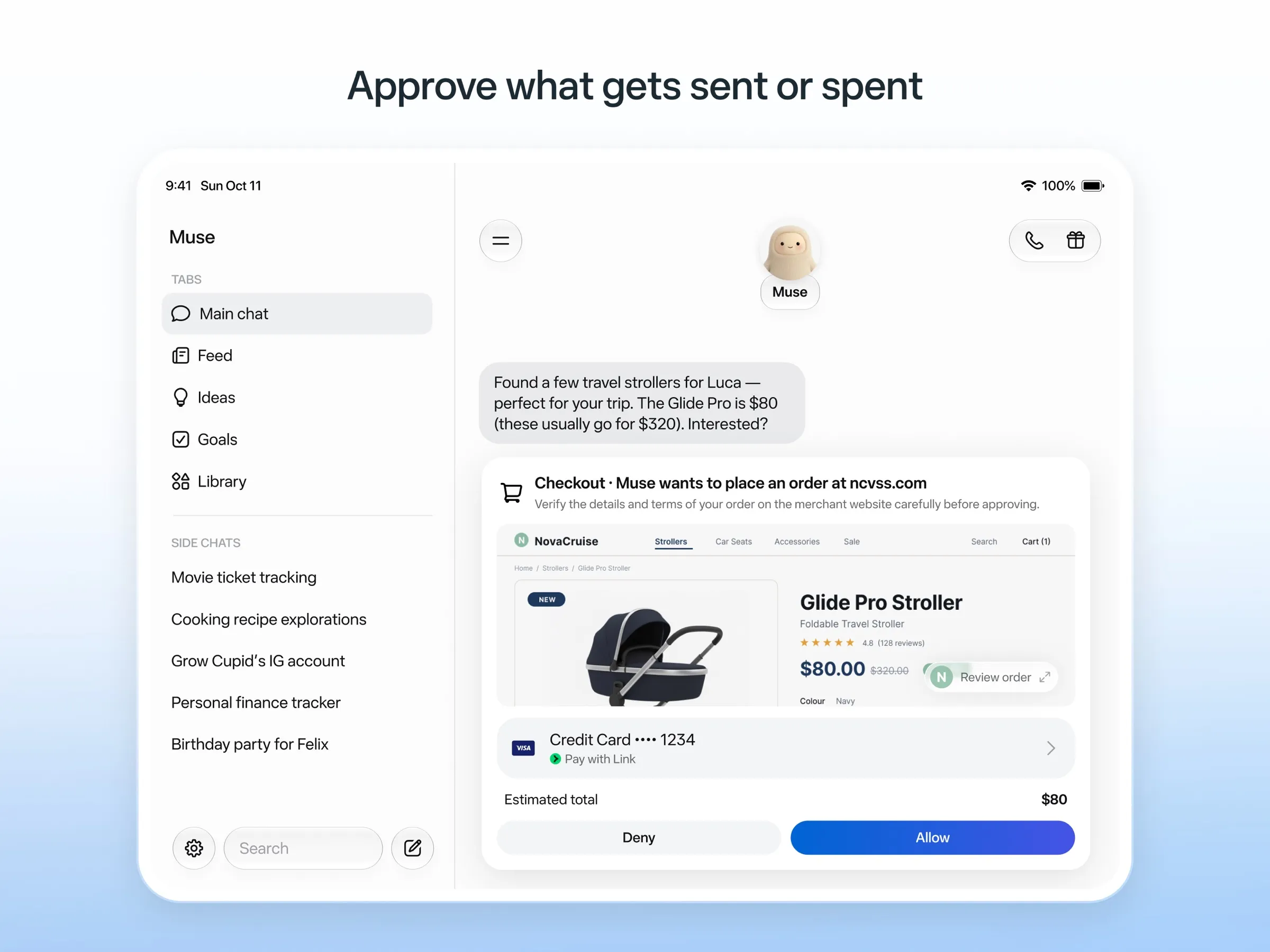
안전 설계는 Muse가 더 자세합니다. Muse가 인터넷으로 내보내는 모든 것은 별도의 Sentinel 에이전트가 승인하고, 이메일을 보내거나 구매하기 전에 확인을 요청하며, 감사 기록을 남깁니다. 구매는 Link by Stripe의 일회용 카드 번호로 이루어지므로 실제 카드를 볼 일이 없습니다(Meta). 그럼에도 초기 사용자와 언론은 읽어서는 안 되는 메시지를 읽는 등 권한을 넘어선 사례를 보고했습니다(The Guardian).
Grok Bot은 민감한 작업 전에 승인을 요청하고, 저장된 로그인 정보를 평문으로 보지 않은 채 사용합니다. 약점은 격리입니다. 한 계정의 모든 Bots는 하나의 컴퓨터, 파일, 로그인 정보를 공유하며, 문서에는 서로 다른 Bots를 보안 경계로 사용하지 말라고 적혀 있습니다. Amazon이 쇼핑을 차단한다는 사용자 보고도 있습니다(Teslarati).
개인정보
Muse는 거부하지 않으면 여러분과의 상호작용으로 Meta 모델을 학습시키지만, Meta는 대화나 컴퓨터 데이터를 광고 시스템과 공유하지 않는다고 밝힙니다. Grok Bot은 데이터로 학습하는 것을 허용할지 묻고, 기본값은 꺼짐입니다(FAQ). 둘 다 셀프 호스팅은 불가능합니다.
결론
- 생활 잡무용 어시스턴트를 원하고 아직 돈은 내고 싶지 않다면: Muse.
- 계정 안에서 지속적인 업무를 처리하거나, 일이 다른 여러 에이전트를 원한다면: Grok Bot.
- 미국, 캐나다, 일본, 싱가포르, 멕시코 외 지역에 있다면: Muse는 아직 이용할 수 없습니다.
- 이미 X Premium, SuperGrok, Cursor를 결제하고 있다면: 포함되어 있으니 Grok Bot부터 써 보세요.
둘 다 맞지 않는다면 Grok Bot 대안, Muse 대안, 최고의 AI 어시스턴트를 참고하세요.
가격
Grok Bot
Premium (The X Subscription)
월 US$30
- Includes Grok Bot
- 4x the usage of the $8 Plus plan, in a weekly pool shared with Grok and Cursor
- Bot's own cloud computer, sign-in to your tools, scheduled routines
Super (The X Subscription)
월 US$100
- 15x Plus usage
- Priority access at peak times
Ultra (The X Subscription)
월 US$200
- 50x Plus usage
- Earliest access to new products and models
Teams
월 US$30
- Price per user, from $30
- Shared Team Bots, including in Slack
- Admin, access, network and audit controls for Grok Bot
Enterprise
별도 문의
- Custom pricing through sales
Muse
Free
무료
- Runs on Muse Spark
- Free up to a usage limit that refreshes
- Meta does not publish the size of the free allowance
- Payment card required to sign up
Power
월 US$20
- 500M Muse tokens per week
- Muse Wonder model
Maximum
월 US$100
- 3B Muse tokens per week
- Muse Wonder model
Grok Bot
장점
- Bots work on their own cloud computer, so tasks keep running when your laptop or phone is closed
- Can operate websites and apps that have no API, using saved logins it never sees in plain text
- Several Bots can run in parallel, message each other and share one workspace
- Routines can run on a schedule or after an event, and a Bot can learn a task from a recorded demonstration of up to 10 minutes
- Can place phone calls to US businesses for you and send a summary afterwards
- Native apps for macOS, Windows, Linux, iOS and Android, plus Slack
단점
- No free plan and no standalone price: the cheapest way in is the $30/month Premium plan
- Usage comes from a weekly pool shared with Grok and Cursor, and SpaceXSI does not publish how much work that pool covers
- No model picker: Grok Bot chooses the model for each task and does not show which one it used
- All Bots on an account share one computer, files and logins; the docs say not to use separate Bots as a security boundary
- Users report Amazon blocks it from shopping as an unauthorized AI agent; Amazon hasn't commented
- Still labelled beta, with no browser version
Muse
장점
- Free tier, and no technical setup: you message it like a person in the app or on the web
- Runs on its own cloud computer and keeps working after you close the app
- Asks before sending email or buying, and shows an audit trail of what it did and plans to do
- Purchases go through a one-time card number with Link's purchase protections, so the agent never sees your real card
- Connects to email, calendar and Instagram, and can use a browser for sites without an API
단점
- Only in the US, Canada, Japan, Singapore and Mexico so far, and Meta says Muse is still in limited testing
- Requires a payment card even for the free tier, and the stronger Muse Wonder model is for paid plans only
- Your interactions train Meta's AI models unless you opt out
- Free usage limit is not published, so it is hard to know when you will hit it
- Early users and press reported it overstepping permissions, such as reading messages it was not meant to
- Requires a Meta account and asks for broad access to email, calendars and payments
기능
| Grok Bot | Muse | |
|---|---|---|
| 웹 검색 | 예 | 예 |
| 이미지 생성 | 예 | 예 |
| 음성 모드 | 예 | 예 |
| 파일 업로드 | 예 | 예 |
| 메모리 | 예 | 예 |
| 대신 작업 수행 | 예 | 예 |
| 앱 연동 | 예 | 예 |
| 스스로 작업 | 예 | 예 |
| 먼저 메시지를 보냄 | 예 | 예 |
| 여러 봇 운영 | 예 | 알 수 없음 |
출처
Grok Bot
- Grok Bot product page and FAQ2026. 11. 8. 확인
- SpaceXSI pricing: The X Subscription plans2026. 11. 8. 확인
- Introducing Grok Bot (launch post, Aug 11, 2026)2026. 11. 8. 확인
- Grok Bot FAQ: plans, platforms, memory, privacy and limits2026. 11. 8. 확인
- Grok Bot docs: Create and manage Bots2026. 11. 8. 확인
- Grok Bot changelog (v0.78.1, Oct 27, 2026)2026. 11. 8. 확인
- Cursor help: Grok Bot plans and usage2026. 11. 8. 확인
- Teslarati: Grok Bot can now call US businesses (Nov 2026)2026. 11. 8. 확인
- Teslarati: Amazon shuts out Grok Bot (Oct 15, 2026)2026. 11. 8. 확인
- Grok Bot docs: Overview (proactive teammate, morning briefing)2026. 11. 8. 확인
- Grok Bot docs: Chat and collaboration (Slack DMs, X Chat rolling out)2026. 11. 8. 확인
- Grok Bot docs: Get started (desktop and mobile apps)2026. 11. 8. 확인
- Grok Bot docs: Skills, routines and automations2026. 11. 8. 확인
- SpaceXSI: Team Bots in public beta (Sep 28, 2026)2026. 11. 8. 확인
- Wikipedia: SpaceXAI (xAI renamed SpaceXAI, then SpaceXSI)2026. 11. 8. 확인
- Cursor: Data Use & Privacy Overview (Privacy Mode and training)2026. 11. 8. 확인
Muse
- Meta: Introducing Muse, the world's first personal AI agent built for everyone2026. 11. 8. 확인
- Muse homepage2026. 11. 8. 확인
- Meta Help Center: About Muse subscriptions2026. 11. 8. 확인
- Meta Help Center: Meta AI, Muse and Vibes are separate apps2026. 11. 8. 확인
- TechCrunch: Meta debuts its Muse AI agent. Will consumers trust it?2026. 11. 8. 확인
- 9to5Mac: Muse personal agent gets apps for iPhone and Mac2026. 11. 8. 확인
- The Guardian TechScape: early Muse users report the agent overstepping permissions2026. 11. 8. 확인
- iPhone in Canada: Meta's Muse AI agent is now available in Canada2026. 11. 8. 확인
- Superpower Daily: Meta launches Muse in Japan (Oct 23, 2026)2026. 11. 8. 확인
- Meta: Muse is now available in Singapore (Oct 27, 2026)2026. 11. 8. 확인
- Mexico News Daily: Meta launches its Muse AI agent in Mexico (Nov 6, 2026)2026. 11. 8. 확인
- Meta Q3 2026 earnings call transcript: Muse Wonder in the paid tier, free tier on Muse Spark2026. 11. 8. 확인
- How to manage reminders and scheduled tasks with Muse2026. 11. 8. 확인
- WhatsApp Help Center: About chatting with your Muse agent through WhatsApp2026. 11. 8. 확인
- TechCrunch: Meta's Muse hits Mac2026. 11. 8. 확인
- Meta AI: Muse features and FAQ (browses the web, generates images)2026. 11. 8. 확인
- Meta Help Center: How your Muse agent browses the web2026. 11. 8. 확인
- Meta Help Center: How to use Muse with artifacts (uploads, image generation)2026. 11. 8. 확인
- Meta Help Center: How to get started with Muse2026. 11. 8. 확인