사용 한도 축소 이후의 Grok Bot 대안
Grok Bot의 주간 한도에 걸렸거나 모델을 직접 고르고 싶나요? Rakazo, Hermes Agent, OpenClaw는 오픈소스이고, Perplexity Teammates와 Manus는 호스팅형입니다.
한눈에 보기
| 어시스턴트 | 무료 요금제 | 오픈 소스 | 직접 호스팅 가능 | 기본적으로 대화를 학습에 사용 | ||
|---|---|---|---|---|---|---|
| Grok Bot | 아니요 | 월 US$30 | 아니요 | 아니요 | 아니요 | |
| Rakazo | 예 | 월 US$10 | 예 | 예 | 아니요 | |
| Hermes Agent | 예 | 월 US$20 | 예 | 예 | 아니요 | |
| OpenClaw | 예 | – | 예 | 예 | 아니요 | |
| Perplexity Teammates | 아니요 | 월 US$200 | 아니요 | 아니요 | 예 | |
| Manus | 예 | 월 US$20 | 아니요 | 아니요 | 알 수 없음 | |
| Lindy | 예 | 월 US$49.99 | 아니요 | 아니요 | 아니요 |







Grok Bot과 가장 가까운 대안은 Rakazo입니다. 여러 봇이 각자 일과 자체 컴퓨터를 갖지만, 오픈소스이고 여러분이 고른 모델로 실행됩니다. 자신의 서버에서 무료 에이전트를 쓰고 싶다면 Hermes Agent나 OpenClaw를 쓰세요. 운영을 다른 곳에 맡기고 싶다면, 호스팅형으로 가장 가까운 것은 Perplexity Teammates이고 가장 저렴하게 써 볼 수 있는 것은 Manus입니다.
고지: Rakazo는 이 사이트를 운영하는 회사가 만듭니다. 나머지와 같은 기준으로 순위를 매겼으며, 단점도 아래에 적었습니다.
이름에 대한 참고: 2026년 8월 이전에 “Grok bot”이라고 하면 보통 X에서 게시물 아래에 태그하는 @grok 계정을 뜻했습니다. 그것은 Grok 챗봇입니다. 이 페이지는 SpaceXSI의 별도 앱인 상시 에이전트 Grok Bot에 관한 것입니다.
사람들이 Grok Bot 대안을 찾는 이유
Grok Bot은 8월에 베타로 출시되었습니다. 아이디어는 훌륭합니다. 일을 맡은 이름 있는 Bots가 상시 클라우드 컴퓨터에서 작업하고, 여러분의 도구에 로그인하며, 자리를 비운 동안 루틴을 실행합니다. 저희 어시스턴트 기준 다섯 가지를 모두 충족합니다. 불만은 비용, 한도, 통제권에 관한 것입니다.
- 일찍 바닥나는 주간 한도. 핼러윈 주말, 사용자들은 아직 며칠이 남았는데 주간 허용량이 100%에 도달한 것을 발견했습니다. 11월 1일 일론 머스크는 “Grok Bot 제공 비용이 수익에 비해 지속 불가능할 정도로 높았다”고 답했지만, 한도가 어떻게 바뀌었는지는 밝히지 않았습니다. 사용자들은 이를 “간접적인 먹튀”라고 불렀습니다.
- 믿을 수 없는 계량기. Cursor 포럼의 긴 스레드에는 주간 사용량 계량기가 실시간으로 77%와 100% 사이를 오간다는 보고가 있습니다. 사용량 풀을 Grok 채팅 및 Cursor와 공유하기 때문에, 코딩을 많이 한 주에는 Bots가 쓸 몫이 부족해질 수도 있습니다.
- 무료 요금제도, 단독 가격도 없다. 가장 저렴한 방법은 The X Subscription의 $30 Premium 등급입니다.
- 모델 선택 불가. Grok Bot은 작업마다 모델을 고르며, 어떤 모델을 썼는지 보여 주지 않습니다.
- 공유 컴퓨터 한 대. 한 계정의 모든 Bots는 하나의 컴퓨터, 파일, 로그인 정보를 공유하며, 문서에는 서로 다른 Bots를 보안 경계로 사용하지 말라고 적혀 있습니다.
순위 선정 방법
여기 소개하는 도구는 모두 이 불만 중 적어도 하나를 해결합니다. 모델을 고를 수 있거나, 가격을 예측할 수 있거나, 무료로 시작할 수 있습니다. 그중에서 평가가 높은 도구를 먼저 두었습니다. 평가는 위 표에 있으며, 체크리스트(계정에서 행동, 자리를 비운 동안 작업, 먼저 연락, 채팅 앱 지원, 여러 봇 실행)와 함께 설정 난이도, 가격, 이용 가능 여부를 따집니다. 평가가 같으면 이름 있는 Bots로 이루어진 Grok Bot의 팀에 더 가까운 쪽을 먼저 두었습니다. dots처럼 월 $100부터인 ChatGPT Pro가 필요하고 모델도 고를 수 없어 어떤 불만도 해결하지 못하는 도구는 제외했습니다.
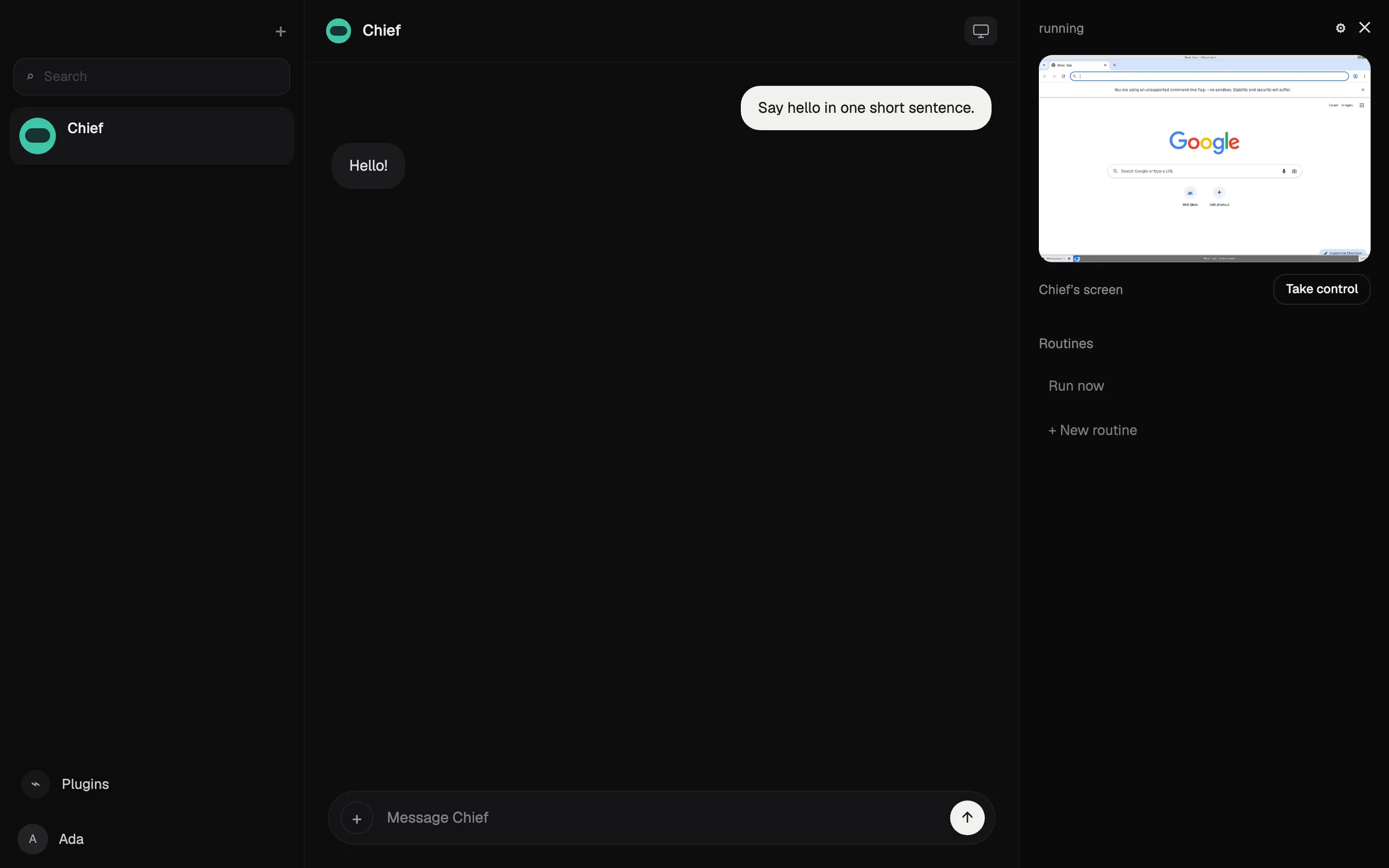
1. Rakazo: 같은 아이디어, 내 모델, 봇마다 컴퓨터
Rakazo는 Grok Bot과 같은 방식으로 작동합니다. 봇을 만들어 각각 일을 맡기면, 각 봇은 메모리, 루틴, 그리고 브라우저, 터미널, 데스크톱을 갖춘 컴퓨터를 받습니다. 봇은 일정, 웹훅, GitHub 이벤트에 따라 실행되고, 서로 작업을 넘겨주며, 여러분이 지정한 작업에는 승인을 요청합니다. Grok Bot과 마찬가지로 저희 체크리스트의 모든 것을 해냅니다.
차이점은 불만 사항과 정확히 맞물립니다. 모델은 봇마다 고릅니다. Claude나 ChatGPT 구독으로 로그인하거나, API 키(Grok 키 포함)를 쓰거나, 로컬 모델을 실행할 수 있습니다. 각 봇은 한 대를 공유하는 대신 자체 샌드박스 컴퓨터를 받습니다. 코드는 Apache-2.0이고 셀프 호스팅은 무료이며, 호스팅 요금제는 컴퓨터 사용 25시간이 포함된 월 $15부터라 한도가 눈에 보이는 숫자입니다. 1위인 이유는 여기서 모든 봇에 컴퓨터를 주는 호스팅 요금제가 있는 유일한 제품이기 때문입니다.
포기하는 것: 완성도. Rakazo는 릴리스가 잦은 베타 단계이고, 호스팅 요금제에서는 Rakazo 크레딧을 사지 않는 한 모델 제공업체에 별도로 비용을 냅니다. Telegram, WhatsApp, iMessage는 셀프 호스팅할 때만 작동합니다. Grok Bot 앱보다 설정이 더 필요하다고 생각하세요.

2. Hermes Agent: 무료, 셀프 호스팅, 쓰면서 학습
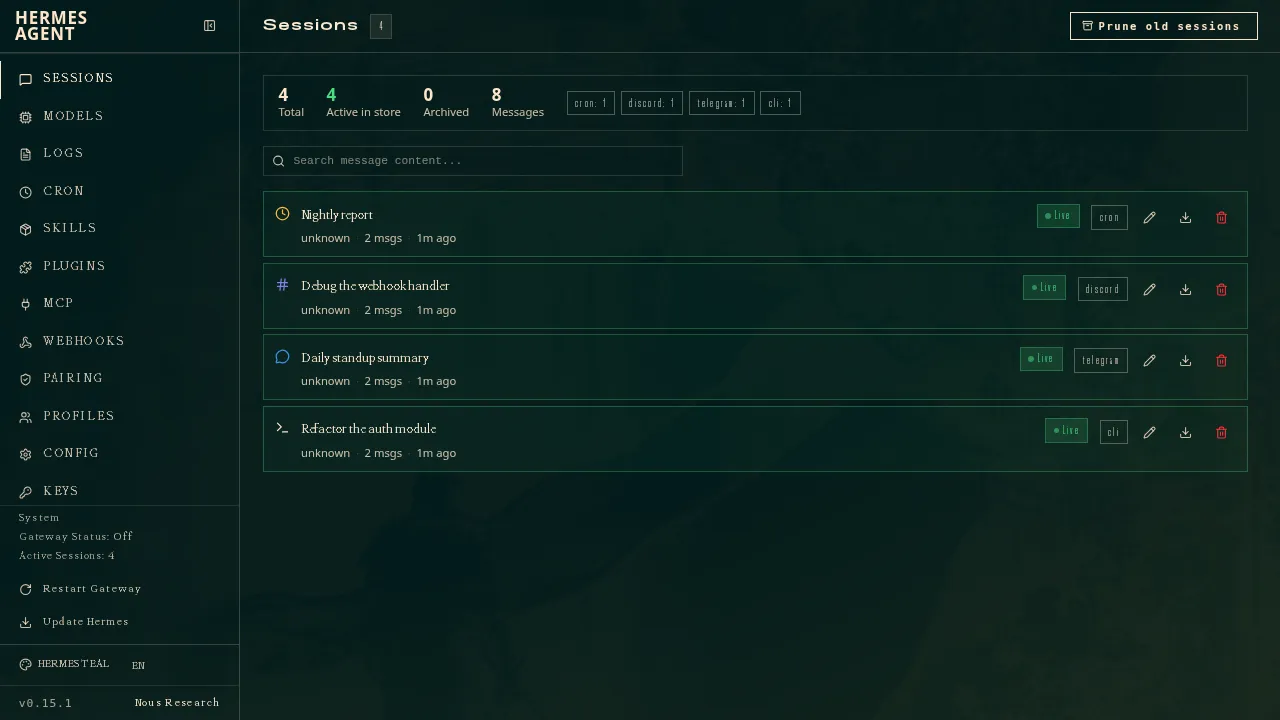
Nous Research의 Hermes Agent는 MIT 라이선스 에이전트로, 복잡한 작업 후 스스로 스킬을 작성하고 다듬으며 세션을 넘어 여러분을 기억합니다. 여러 에이전트를 별도의 프로필로 실행할 수 있고 각각 자체 모델, 메모리, 스킬을 가지므로, Grok Bot의 이름 있는 Bots 팀에 가장 가까운 오픈소스 선택지입니다. Telegram, Discord, Slack, WhatsApp 등 20개 이상의 플랫폼에서 대화할 수 있습니다.
원하는 모델을 쓰거나, 모델과 웹 검색 같은 호스팅 도구, 클라우드 에이전트 하나가 포함된 월 $20의 Nous Portal을 이용하면 월 비용이 고정됩니다.
포기하는 것: 편리함. 설정에는 명령줄과 자체 서버가 필요하고, 네이티브 모바일 앱이 없으며, Portal 요금제에는 클라우드 에이전트가 하나만 포함되어 있어 에이전트 팀을 운영하려면 여전히 자신의 기기가 필요합니다.
3. OpenClaw: 가장 큰 오픈소스 생태계
OpenClaw는 Grok Bot 사용자 대부분이 들어 봤을 오픈소스 에이전트입니다. 무료이고 유료 등급이 없으며, 여러분의 컴퓨터에서 실행되고, 29개 채팅 채널에서 지시를 받으며, 64개의 모델 및 미디어 제공업체나 로컬 모델과 함께 작동합니다. 상태, 메모리, 자격 증명은 여러분의 기기에 남습니다.
포기하는 것: 기본 안전성과 호스팅. 샌드박스가 기본적으로 꺼져 있어서 에이전트가 여러분의 기기에서 직접 행동할 수 있고, 서드파티 스킬 중에는 악성 스킬도 있었습니다. 호스팅 버전이 없어서 자리를 비운 동안 계속 돌리려면 기기를 켜 두어야 합니다. 모델 비용은 직접 부담하며, 비싼 모델로 하루 $100의 청구서가 나온 사례도 있습니다.

4. Perplexity Teammates: 가장 가까운 호스팅형
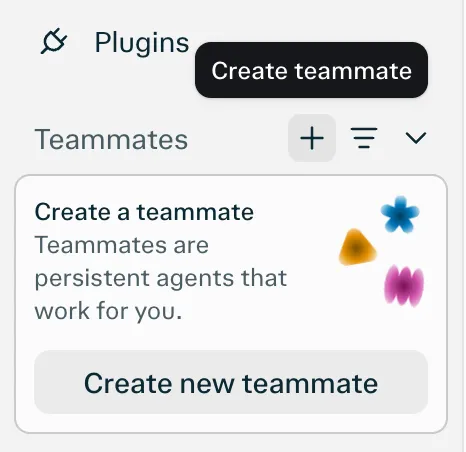
11월 4일 발표된 Perplexity Teammates는 호스팅형 제품 중 Grok Bot과 가장 비슷합니다. 이름, 역할, 모델을 정해 여러 teammate를 만들 수 있고, 각 teammate는 격리된 자체 컴퓨터와 브라우저에서 실행되며 Slack, GitHub, Linear, Gmail을 지켜보다가 의견이 필요하면 메시지를 보냅니다. Grok Bot과 달리 teammate나 작업마다 모델을 고를 수 있고, 각 teammate는 서로 분리되어 있습니다.
포기하는 것: 돈과 성숙도. 월 $200인 Perplexity Max용 리서치 프리뷰이고 현재는 웹 전용이며, 사용량이 작업당 비용이 공개되지 않은 크레딧에서 차감되므로 예측할 수 없는 계량기 문제는 해결되지 않습니다. 유일한 채널이 웹이라 저희 체크리스트의 채팅 앱 항목을 놓칩니다. Slack, GitHub, Linear에서는 teammate를 앱으로 태그합니다.
5. Manus: 무료 요금제, 결과물 중심 설계
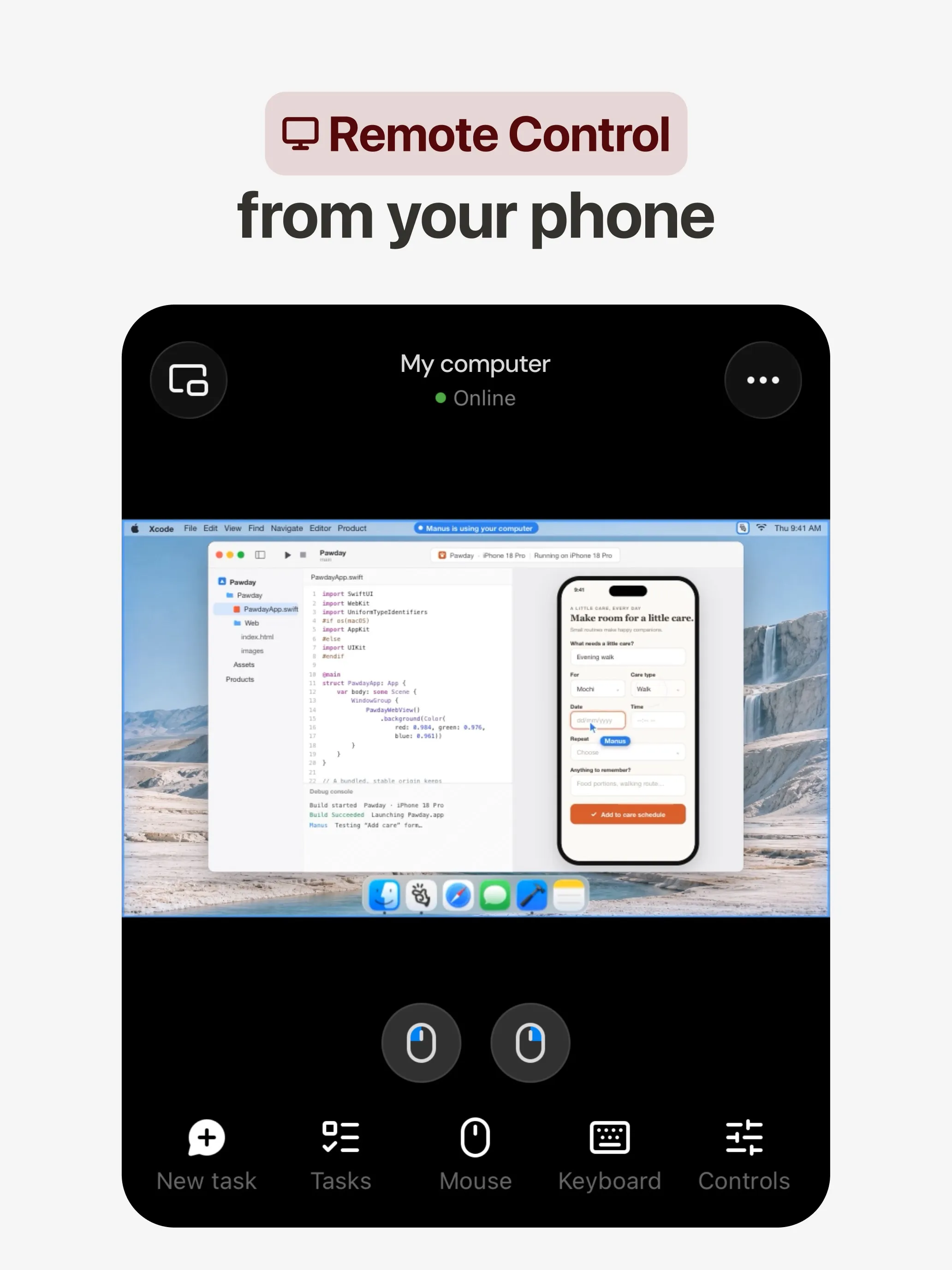
Manus는 자체 환경에서 작업을 계획하고 마무리해 리서치 보고서, 웹사이트, 슬라이드, 동영상 같은 결과물을 건네줍니다. 자동화는 일정이나 Gmail, Slack, Notion의 이벤트로 시작되며, Slack과 Telegram에서 대화할 수 있습니다. Grok Bot에는 없는 무료 요금제가 있습니다.
포기하는 것: Manus는 지속적인 역할을 가진 이름 있는 Bots가 아니라 프로젝트 중심으로 만들어졌습니다. 크레딧은 작업 복잡도에 따라 차감되고 실패한 실행에도 소모되므로, Grok Bot의 사용량 풀과 비슷한 예산 고민이 있습니다.
6. Lindy: 모델을 고를 수 있는 업무용 어시스턴트
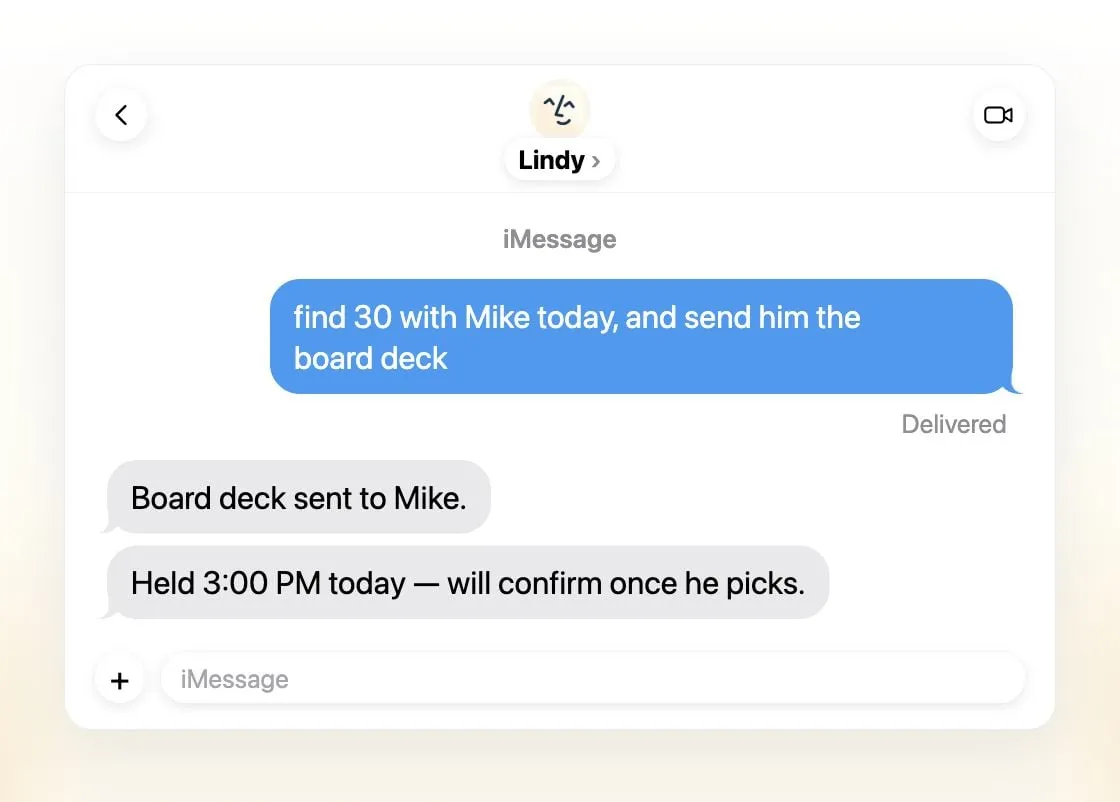
Lindy는 소규모 팀을 위한 비서형 어시스턴트입니다. 이메일을 분류하고, 회의 일정을 잡고, 통화를 준비하고, 매일 브리핑을 보내며, iMessage, SMS, Slack, 전용 전화번호, 웹으로 이용할 수 있습니다. 작업마다 모델을 고를 수 있고, Lindy는 여러분의 데이터로 절대 학습하지 않는다고 밝힙니다.
포기하는 것: Bots 팀. Lindy는 팀당 하나의 공유 어시스턴트이고, 유료 좌석은 사용자당 월 $49.99부터이며, 크레딧은 간단한 요청 2부터 큰 작업 2,500까지 다양해 비용 예측은 여전히 어렵습니다.
무엇을 골라야 할까?
- Grok Bot과 같은 구성을 내 모델과 봇별 컴퓨터로: Rakazo.
- 학습하고 팀으로도 운영할 수 있는 무료 셀프 호스팅 에이전트: Hermes Agent.
- 가장 큰 오픈소스 생태계를 원하고 명령줄이 괜찮다면: OpenClaw.
- 모델을 고를 수 있는 호스팅형 에이전트를 원하고 이미 Perplexity Max를 결제 중이라면: Perplexity Teammates.
- 업무가 결과물로 끝나고 무료 요금제를 원한다면: Manus.
- 주로 받은편지함, 캘린더, 회의 도움이 필요하다면: Lindy.
Grok Bot의 작동 방식은 Grok Bot이란에서 자세히 알아보세요.
대안
월 US$10
Open-source, self-hostable platform for persistent AI bots that each get a job, a computer, memory and routines, using the model you choose.
Rakazo 방문장점
- Open source (Apache-2.0) and fully self-hostable, including with local models
- Choice of model per bot, including existing Claude or ChatGPT subscriptions
- Bots keep working on schedules and triggers with their own cloud computer
- Approval controls over which actions a bot may take on its own
단점
- Still in beta, with frequent releases
- You supply and pay for the model on the hosted plans, unless you buy Rakazo credits
- Telegram, WhatsApp and iMessage/SMS are only available when self-hosted
- More setup than a single chat app
월 US$20
Free, MIT-licensed AI agent from Nous Research that runs on your own machine or server, learns reusable skills, and chats with you on Telegram, Slack and more.
Hermes Agent 방문장점
- Free and MIT licensed, and runs on hardware you control
- Writes and refines its own skills from experience, on top of persistent memory and cross-session search
- One gateway for 20+ chat platforms, including Telegram, Discord, Slack, WhatsApp, Signal and email
- Run several separate agents as profiles, each with its own model, memory and skills, and let them talk in group chats
- Model-agnostic, with a one-command import from OpenClaw
단점
- Setup expects comfort with the command line and with running your own server
- Model costs are on you unless you use free models, and hosted web search, images and speech need a paid Nous Portal plan or your own keys
- iMessage needs a separate BlueBubbles server on a Mac
- No native mobile app; Android support is a command-line install through Termux
Free, MIT-licensed personal AI agent that runs on your own computer and takes orders from WhatsApp, Telegram, iMessage, Slack and 20+ other chat apps.
OpenClaw 방문장점
- Free and MIT licensed, with no paid tier
- Runs on your own hardware; state, memory and credentials stay local, and it sends nothing home except an optional daily version check
- Works in 29 chat channels, including WhatsApp, Telegram, iMessage, Slack, Discord and Microsoft Teams
- Model-agnostic: 64 model and media providers, plus local models
- Large ecosystem of skills and 142 official plugins, and very active development
단점
- Model costs are on you and can run high: testers and users have reported spending over $100 in a day with expensive models
- Sandboxing is off by default and the agent can run commands on the host unless you turn on approvals
- Setup and upkeep expect comfort with the command line; maintainers warn it is risky for non-technical users
- Broad access to email, messages and the system makes prompt injection and malicious third-party skills a real risk
월 US$200
Persistent Perplexity agents, each with its own computer, browser and memory, that own ongoing work and watch Slack, GitHub and Linear. Max-only web preview.
Perplexity Teammates 방문장점
- Run several teammates, each on its own isolated computer and browser with separate sessions
- Watches Slack, GitHub, Linear and other connected tools, acts on changes and reaches out when it needs you
- Pick the model per teammate or task, with Claude Opus 5.5 as the default
- Splits a goal into parallel agent tasks, and teammates in a Project share context and hand work to each other
- You can take over a teammate's desktop and steer it, and it can't view your saved credentials
단점
- Only on Perplexity Max at $200 a month; Pro and Enterprise plans are excluded by default
- Research preview whose behavior may change
- Web only for now; the iOS app is only promised soon
- Usage draws on credits, and parallel agents, large files and frequent automations use more
- No published cap on teammates and no published credit cost per task
월 US$20
General-purpose AI agent that researches, builds websites, slides, videos and games, and runs automations on its own cloud computer.
Manus 방문장점
- Turns one prompt into finished output: research reports, websites, slides, videos and playable games
- Automations can start from a schedule or an event in a connected service such as Gmail, Slack or Notion
- Video Editor and Game Dev let you edit what the agent made instead of regenerating it
- Free plan to try it, with apps for web, iOS, Android, macOS and Windows
단점
- Credit-based pricing makes costs hard to predict, and long or failed runs can use up credits
- Free daily credits are capped at 1,500 a month and only work in the Lite mode
- A built-in training opt-out is listed only for Team plans
- Several plans share the Pro name and differ only by credit amount
월 US$49.99
An AI assistant for work that runs your inbox, calendar and meetings, takes requests by iMessage, Slack, phone or browser, and sends you daily briefs.
Lindy 방문장점
- Texts you first: a personalized first message, alerts on time-sensitive email, and daily briefs
- Reachable almost anywhere: iMessage or SMS, Slack, its own phone number, Gmail via a Chrome extension, and the web
- 1,500+ integrations plus any hosted MCP server, and a browser for tools without one
- Asks for approval before anything with outside impact
- Says it never uses your data to train models, with SOC 2 Type II, GDPR and PIPEDA compliance
단점
- Expensive for individuals: paid seats start at $49.99 per user a month, and free credits last only 7 days
- Credit-based usage is hard to predict, from 2 credits for a simple ask to 2,500 for a big build
- One shared Lindy per team rather than separate assistants for different jobs
- No mobile app; on phones you use iMessage, SMS or calls
- Plan names differ between its pricing page and its docs, so it is hard to tell what each tier includes
기능
| Grok Bot | Rakazo | Hermes Agent | OpenClaw | Perplexity Teammates | Manus | Lindy | |
|---|---|---|---|---|---|---|---|
| 웹 검색 | 예 | 예 | 예 | 예 | 예 | 예 | 예 |
| 이미지 생성 | 예 | 예 | 예 | 예 | 예 | 예 | 예 |
| 음성 모드 | 예 | 예 | 예 | 예 | 알 수 없음 | 예 | 예 |
| 파일 업로드 | 예 | 예 | 예 | 예 | 예 | 예 | 예 |
| 메모리 | 예 | 예 | 예 | 예 | 예 | 예 | 예 |
| 대신 작업 수행 | 예 | 예 | 예 | 예 | 예 | 예 | 예 |
| 앱 연동 | 예 | 예 | 예 | 예 | 예 | 예 | 예 |
| 스스로 작업 | 예 | 예 | 예 | 예 | 예 | 예 | 예 |
| 먼저 메시지를 보냄 | 예 | 예 | 예 | 예 | 예 | 예 | 예 |
| 여러 봇 운영 | 예 | 예 | 예 | 예 | 예 | 알 수 없음 | 아니요 |
출처
Grok Bot
- Grok Bot product page and FAQ2026. 11. 8. 확인
- SpaceXSI pricing: The X Subscription plans2026. 11. 8. 확인
- Introducing Grok Bot (launch post, Aug 11, 2026)2026. 11. 8. 확인
- Grok Bot FAQ: plans, platforms, memory, privacy and limits2026. 11. 8. 확인
- Grok Bot docs: Create and manage Bots2026. 11. 8. 확인
- Grok Bot changelog (v0.78.1, Oct 27, 2026)2026. 11. 8. 확인
- Cursor help: Grok Bot plans and usage2026. 11. 8. 확인
- Teslarati: Grok Bot can now call US businesses (Nov 2026)2026. 11. 8. 확인
- Teslarati: Amazon shuts out Grok Bot (Oct 15, 2026)2026. 11. 8. 확인
- Grok Bot docs: Overview (proactive teammate, morning briefing)2026. 11. 8. 확인
- Grok Bot docs: Chat and collaboration (Slack DMs, X Chat rolling out)2026. 11. 8. 확인
- Grok Bot docs: Get started (desktop and mobile apps)2026. 11. 8. 확인
- Grok Bot docs: Skills, routines and automations2026. 11. 8. 확인
- SpaceXSI: Team Bots in public beta (Sep 28, 2026)2026. 11. 8. 확인
- Wikipedia: SpaceXAI (xAI renamed SpaceXAI, then SpaceXSI)2026. 11. 8. 확인
- Cursor: Data Use & Privacy Overview (Privacy Mode and training)2026. 11. 8. 확인
Rakazo
- Rakazo homepage2026. 11. 8. 확인
- Rakazo pricing2026. 11. 8. 확인
- Rakazo privacy policy2026. 11. 8. 확인
- Rakazo on GitHub (README and license)2026. 11. 8. 확인
- Rakazo changelog2026. 11. 8. 확인
- Rakazo releases2026. 11. 8. 확인
- Rakazo docs: Image and video generation2026. 11. 8. 확인
- Rakazo docs: Memory2026. 11. 8. 확인
- Rakazo docs: Connect apps2026. 11. 8. 확인
- Rakazo docs: Routines2026. 11. 8. 확인
- Rakazo docs: Chat apps2026. 11. 8. 확인
- Rakazo docs: Messaging apps (self-hosting)2026. 11. 8. 확인
- Rakazo docs: Bots and chats (add another bot, bot templates)2026. 11. 8. 확인
- Rakazo docs: Groups (several bots in one chat)2026. 11. 8. 확인
- Rakazo docs: Mobile app (notifications)2026. 11. 8. 확인
- Rakazo privacy policy (updated Sep 14, 2026)2026. 11. 8. 확인
- Rakazo privacy policy source on GitHub2026. 11. 8. 확인
Hermes Agent
- NousResearch/hermes-agent on GitHub (MIT, v0.23.0)2026. 11. 8. 확인
- Hermes Agent homepage and Nous Portal pricing2026. 11. 8. 확인
- Hermes Agent documentation2026. 11. 8. 확인
- Hermes Agent docs: Profiles, running multiple agents2026. 11. 8. 확인
- Hermes Agent docs: Bot Mode2026. 11. 8. 확인
- Hermes Agent docs: Voice mode2026. 11. 8. 확인
- Hermes Agent docs: Vision and image paste2026. 11. 8. 확인
- Hermes Agent docs: iMessage via BlueBubbles2026. 11. 8. 확인
- Nous Research on X: Meet Hermes Agent (February 25, 2026)2026. 11. 8. 확인
- Hermes Agent docs: Session heartbeats and cron watchdogs2026. 11. 8. 확인
- Hermes Agent docs: FAQ (Is my data sent anywhere?)2026. 11. 8. 확인
OpenClaw
- OpenClaw homepage and Foundation section2026. 11. 8. 확인
- OpenClaw integrations: channels, providers and plugins2026. 11. 8. 확인
- openclaw/openclaw on GitHub (MIT, v2026.11.1)2026. 11. 8. 확인
- OpenClaw docs: Sandboxing (off by default)2026. 11. 8. 확인
- Wikipedia: OpenClaw2026. 11. 8. 확인
- Notebookcheck: OpenClaw can burn through hundreds of dollars per day2026. 11. 8. 확인
- OpenClaw docs: Memory overview2026. 11. 8. 확인
- OpenClaw docs: Automations2026. 11. 8. 확인
- OpenClaw docs: Chat channels2026. 11. 8. 확인
- OpenClaw docs: iMessage2026. 11. 8. 확인
- OpenClaw docs: Heartbeat, now a default Proactive check job2026. 11. 8. 확인
- OpenClaw docs: Multi-agent routing2026. 11. 8. 확인
- OpenClaw docs: Platforms (macOS, Windows, Linux, iOS and Android apps)2026. 11. 8. 확인
- OpenClaw docs: Tools (exec, browser, web search)2026. 11. 8. 확인
- OpenClaw docs: Audio and voice notes (inbound transcription)2026. 11. 8. 확인
- OpenClaw docs: Image and media support (inbound media)2026. 11. 8. 확인
Perplexity Teammates
- Perplexity blog: Teammates are agents for complex, ongoing work (November 4, 2026)2026. 11. 8. 확인
- Perplexity Help Center: Perplexity Teammates2026. 11. 8. 확인
- Perplexity Help Center: Perplexity Max ($200 a month)2026. 11. 8. 확인
- Perplexity Help Center: Data Collection at Perplexity2026. 11. 8. 확인
- Perplexity Help Center: Generating Images with Perplexity2026. 11. 8. 확인
Manus
- Manus Plans & Pricing2026. 11. 8. 확인
- Manus Help Center: What is the current membership pricing for Manus?2026. 11. 8. 확인
- Manus Help Center: rules for credit consumption2026. 11. 8. 확인
- Introducing Manus 2.0 (Sep 28, 2026)2026. 11. 8. 확인
- Download Manus: macOS, Windows, iOS and Android2026. 11. 8. 확인
- Tech Xplore/AFP: Manus raises $500 million after Meta acquisition blocked by China2026. 11. 8. 확인
- Wikipedia: Manus (AI agent)2026. 11. 8. 확인
- Manus for Slack: Turn Your Workspace into an Autonomous Engine2026. 11. 8. 확인
- Manus docs: Automations2026. 11. 8. 확인
- Is my data safe when using Manus Agents in Telegram?2026. 11. 8. 확인
- Chatting with Manus Agent on Slack: Channels, DMs, and File Delivery2026. 11. 8. 확인
- Manus Agents in Telegram (available to all users)2026. 11. 8. 확인
- Manus Help Center: What's new in Manus 2.0 (Cue requires an invitation code)2026. 11. 8. 확인
- Manus API docs: Agents (default agent plus agents you create)2026. 11. 8. 확인
- Manus privacy policy (updated Sep 28, 2026)2026. 11. 8. 확인
Lindy
- Lindy homepage2026. 11. 8. 확인
- Lindy pricing2026. 11. 8. 확인
- Lindy docs: What is Lindy?2026. 11. 8. 확인
- Lindy docs: iMessage & SMS2026. 11. 8. 확인
- Lindy docs: Phone Calls2026. 11. 8. 확인
- Lindy docs: Ad Hoc Tasks (research)2026. 11. 8. 확인
- Lindy docs: Pricing and credits2026. 11. 8. 확인
- Lindy Assistant: The AI that runs your work life2026. 11. 8. 확인
- Lindy docs: Set up Lindy (web search, image generation)2026. 11. 8. 확인
- Lindy docs: Files (drop files and folders in for Lindy to use)2026. 11. 8. 확인
- Lindy changelog (Creatives: on-brand images, Sep 16, 2026)2026. 11. 8. 확인