

Grok Bot 與 Muse 比較:該用哪個 AI 代理?
Grok Bot 每月 $30 起,可執行多個專注工作的 Bot;Meta 的 Muse 是可免費開始使用的日常雜事代理。兩者在可用性、安全、隱私和費用上有何不同。
概覽
如果你想要一個免費、不需設定、能處理日常雜事(例如購物、帳單和家庭行事曆)的代理,而且你住在它涵蓋的五個國家之一,就選 Muse。如果你想讓多個代理處理重複性工作,例如整理信箱、研究和瀏覽器例行任務,並且願意每月為此付 $30,就選 Grok Bot。
兩者在 2026 年相隔不到一個月先後推出,都在自己的雲端電腦上工作,也都會在敏感操作前先詢問。但它們的目標使用者不同。

它們為何而生
Grok Bot 偏向工作。你建立有名字的 Bot,為每個 Bot 分派一項工作,它們會依排程或在事件發生後執行例行任務,登入你的工具,並互相傳訊(Grok Bot)。Bot 可以透過最長 10 分鐘的錄製示範學會一項任務,還能替你打電話給美國的商家(Teslarati)。團隊可以在 Slack 中共用 Bot。
Muse 偏向家庭生活。Meta 自己舉的例子是賣車、降低帳單、預訂旅遊,以及把食譜變成採買清單(Meta)。你可以像傳訊息給朋友一樣在 Muse 應用程式、網頁版或 WhatsApp 中傳訊息給它,不過 WhatsApp 存取在部分國家仍在有限測試中(WhatsApp)。
在我們的清單上,五件事 Grok Bot 全都做到,Muse 做到三件。Muse 沒拿到聊天應用程式這一項,因為 WhatsApp 仍在測試中,而且 Meta 沒有說明能否執行多個 Muse。
可用性和費用
| Grok Bot | Muse | |
|---|---|---|
| 免費方案 | 否 | 是,在未公開的額度內;需要綁卡 |
| 最便宜的付費方案 | 每月 $30(X Premium) | 每月 $20(Power) |
| 應用程式 | macOS、Windows、Linux、iOS、Android、Slack | 網頁版、iOS、Android、macOS |
| 是否公布用量限制? | 否,每週額度池與 Grok 和 Cursor 共用 | 付費方案以每週 token 計;免費額度未公布 |
Grok Bot 沒有單獨的價格:它包含在 Premium 以上的 The X Subscription 中,也包含在部分舊版 Cursor 和 SuperGrok 方案中(價格)。Muse 可免費開始使用,Power 為 $20,Maximum 為 $100,可取得更多每週用量和更強的 Muse Wonder 模型(Meta 說明)。
安全
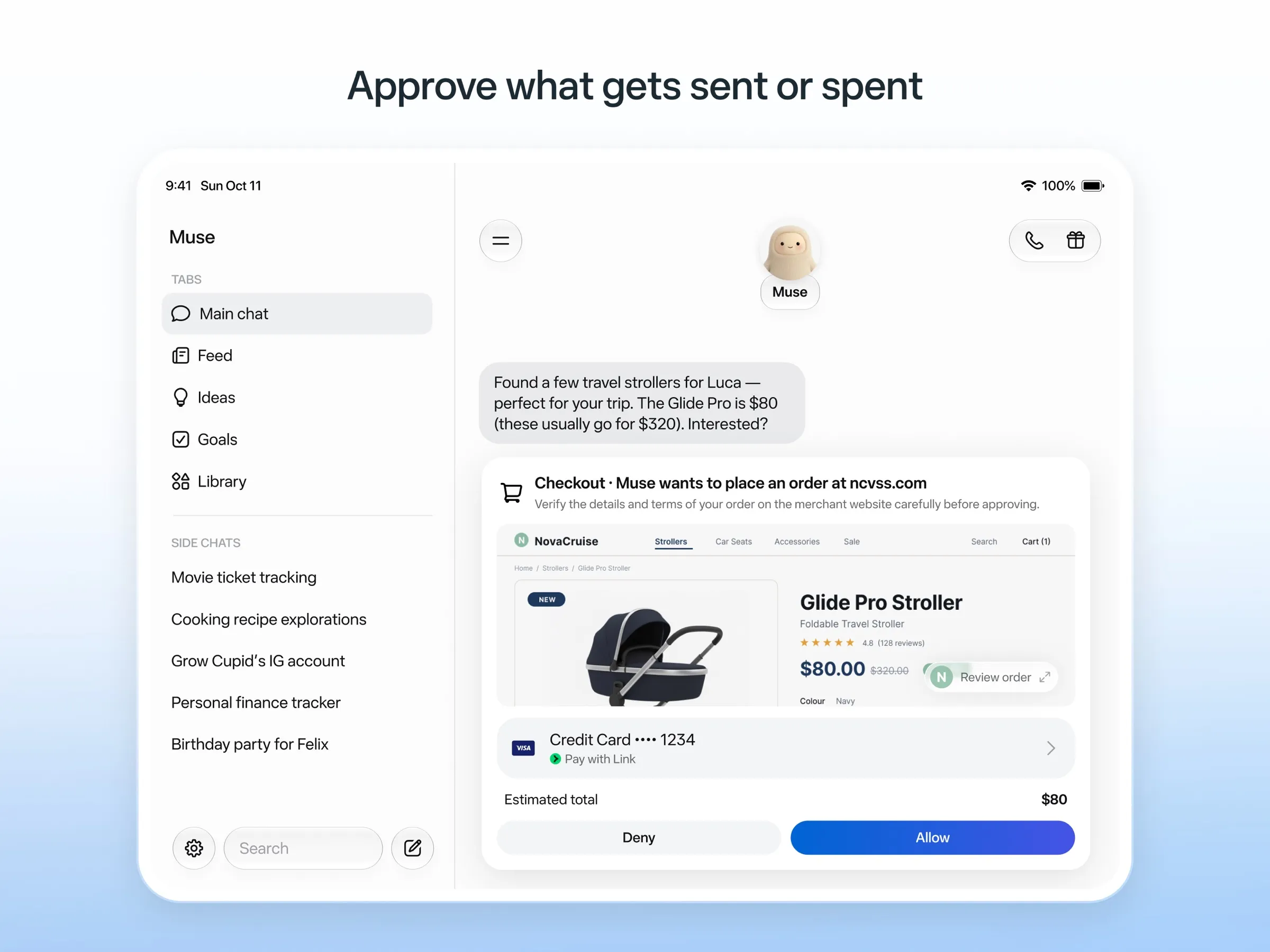
Muse 的安全設計更為詳盡。一個獨立的 Sentinel 代理會核准 Muse 送往網際網路的任何內容,Muse 在寄送電子郵件或購物前會先詢問,保留稽核紀錄,購物則透過 Link by Stripe 的一次性卡號進行,所以它永遠看不到你的真實卡片(Meta)。即便如此,早期使用者和媒體報導指出它越權行事,包括讀取了不該讀取的訊息(The Guardian)。
Grok Bot 會在敏感操作前請求核准,並使用它永遠無法以明文看到的已儲存登入資訊。它的弱點在於隔離:同一帳號下的所有 Bot 共用一台電腦、同一套檔案和登入資訊,文件說不要把不同的 Bot 當作安全邊界。使用者也回報 Amazon 會阻擋它購物(Teslarati)。
隱私
除非你選擇退出,Muse 會用你的互動來訓練 Meta 的模型,不過 Meta 表示不會把對話或電腦資料分享給其廣告系統。Grok Bot 會詢問是否允許用你的資料訓練,預設為關閉(常見問題)。兩者都無法自行架設。
結論
- 你想要一個處理生活雜務的助理,暫時不想付費: Muse。
- 你想在自己的帳號中持續完成工作,或者想要多個各司其職的代理: Grok Bot。
- 你不在美國、加拿大、日本、新加坡和墨西哥: 你目前還無法使用 Muse。
- 你已經在為 X Premium、SuperGrok 或 Cursor 付費: 先試試 Grok Bot,因為它已包含在內。
如果兩者都不適合,請參閱 Grok Bot 替代方案、Muse 替代方案或最佳 AI 助理。
價格
Grok Bot
Premium (The X Subscription)
US$30/月
- Includes Grok Bot
- 4x the usage of the $8 Plus plan, in a weekly pool shared with Grok and Cursor
- Bot's own cloud computer, sign-in to your tools, scheduled routines
Super (The X Subscription)
US$100/月
- 15x Plus usage
- Priority access at peak times
Ultra (The X Subscription)
US$200/月
- 50x Plus usage
- Earliest access to new products and models
Teams
US$30/月
- Price per user, from $30
- Shared Team Bots, including in Slack
- Admin, access, network and audit controls for Grok Bot
Enterprise
客製報價
- Custom pricing through sales
Muse
Free
免費
- Runs on Muse Spark
- Free up to a usage limit that refreshes
- Meta does not publish the size of the free allowance
- Payment card required to sign up
Power
US$20/月
- 500M Muse tokens per week
- Muse Wonder model
Maximum
US$100/月
- 3B Muse tokens per week
- Muse Wonder model
Grok Bot
優點
- Bots work on their own cloud computer, so tasks keep running when your laptop or phone is closed
- Can operate websites and apps that have no API, using saved logins it never sees in plain text
- Several Bots can run in parallel, message each other and share one workspace
- Routines can run on a schedule or after an event, and a Bot can learn a task from a recorded demonstration of up to 10 minutes
- Can place phone calls to US businesses for you and send a summary afterwards
- Native apps for macOS, Windows, Linux, iOS and Android, plus Slack
缺點
- No free plan and no standalone price: the cheapest way in is the $30/month Premium plan
- Usage comes from a weekly pool shared with Grok and Cursor, and SpaceXSI does not publish how much work that pool covers
- No model picker: Grok Bot chooses the model for each task and does not show which one it used
- All Bots on an account share one computer, files and logins; the docs say not to use separate Bots as a security boundary
- Users report Amazon blocks it from shopping as an unauthorized AI agent; Amazon hasn't commented
- Still labelled beta, with no browser version
Muse
優點
- Free tier, and no technical setup: you message it like a person in the app or on the web
- Runs on its own cloud computer and keeps working after you close the app
- Asks before sending email or buying, and shows an audit trail of what it did and plans to do
- Purchases go through a one-time card number with Link's purchase protections, so the agent never sees your real card
- Connects to email, calendar and Instagram, and can use a browser for sites without an API
缺點
- Only in the US, Canada, Japan, Singapore and Mexico so far, and Meta says Muse is still in limited testing
- Requires a payment card even for the free tier, and the stronger Muse Wonder model is for paid plans only
- Your interactions train Meta's AI models unless you opt out
- Free usage limit is not published, so it is hard to know when you will hit it
- Early users and press reported it overstepping permissions, such as reading messages it was not meant to
- Requires a Meta account and asks for broad access to email, calendars and payments
功能
| Grok Bot | Muse | |
|---|---|---|
| 網路搜尋 | 是 | 是 |
| 圖像生成 | 是 | 是 |
| 語音模式 | 是 | 是 |
| 檔案上傳 | 是 | 是 |
| 記憶 | 是 | 是 |
| 代你執行操作 | 是 | 是 |
| 應用程式整合 | 是 | 是 |
| 自主運作 | 是 | 是 |
| 主動傳訊息給你 | 是 | 是 |
| 可執行多個機器人 | 是 | 未知 |
來源
Grok Bot
- Grok Bot product page and FAQ2026年11月8日 查核
- SpaceXSI pricing: The X Subscription plans2026年11月8日 查核
- Introducing Grok Bot (launch post, Aug 11, 2026)2026年11月8日 查核
- Grok Bot FAQ: plans, platforms, memory, privacy and limits2026年11月8日 查核
- Grok Bot docs: Create and manage Bots2026年11月8日 查核
- Grok Bot changelog (v0.78.1, Oct 27, 2026)2026年11月8日 查核
- Cursor help: Grok Bot plans and usage2026年11月8日 查核
- Teslarati: Grok Bot can now call US businesses (Nov 2026)2026年11月8日 查核
- Teslarati: Amazon shuts out Grok Bot (Oct 15, 2026)2026年11月8日 查核
- Grok Bot docs: Overview (proactive teammate, morning briefing)2026年11月8日 查核
- Grok Bot docs: Chat and collaboration (Slack DMs, X Chat rolling out)2026年11月8日 查核
- Grok Bot docs: Get started (desktop and mobile apps)2026年11月8日 查核
- Grok Bot docs: Skills, routines and automations2026年11月8日 查核
- SpaceXSI: Team Bots in public beta (Sep 28, 2026)2026年11月8日 查核
- Wikipedia: SpaceXAI (xAI renamed SpaceXAI, then SpaceXSI)2026年11月8日 查核
- Cursor: Data Use & Privacy Overview (Privacy Mode and training)2026年11月8日 查核
Muse
- Meta: Introducing Muse, the world's first personal AI agent built for everyone2026年11月8日 查核
- Muse homepage2026年11月8日 查核
- Meta Help Center: About Muse subscriptions2026年11月8日 查核
- Meta Help Center: Meta AI, Muse and Vibes are separate apps2026年11月8日 查核
- TechCrunch: Meta debuts its Muse AI agent. Will consumers trust it?2026年11月8日 查核
- 9to5Mac: Muse personal agent gets apps for iPhone and Mac2026年11月8日 查核
- The Guardian TechScape: early Muse users report the agent overstepping permissions2026年11月8日 查核
- iPhone in Canada: Meta's Muse AI agent is now available in Canada2026年11月8日 查核
- Superpower Daily: Meta launches Muse in Japan (Oct 23, 2026)2026年11月8日 查核
- Meta: Muse is now available in Singapore (Oct 27, 2026)2026年11月8日 查核
- Mexico News Daily: Meta launches its Muse AI agent in Mexico (Nov 6, 2026)2026年11月8日 查核
- Meta Q3 2026 earnings call transcript: Muse Wonder in the paid tier, free tier on Muse Spark2026年11月8日 查核
- How to manage reminders and scheduled tasks with Muse2026年11月8日 查核
- WhatsApp Help Center: About chatting with your Muse agent through WhatsApp2026年11月8日 查核
- TechCrunch: Meta's Muse hits Mac2026年11月8日 查核
- Meta AI: Muse features and FAQ (browses the web, generates images)2026年11月8日 查核
- Meta Help Center: How your Muse agent browses the web2026年11月8日 查核
- Meta Help Center: How to use Muse with artifacts (uploads, image generation)2026年11月8日 查核
- Meta Help Center: How to get started with Muse2026年11月8日 查核