

Grok Bot vs Muse: which AI agent should you use?
Grok Bot runs several work-focused Bots from $30 a month; Meta's Muse is a free-to-start agent for everyday errands. How they differ on access, safety, privacy and cost.
At a glance
Pick Muse if you want a free, no-setup agent for everyday errands such as shopping, bills and family calendars, and you live in one of the five countries it covers. Pick Grok Bot if you want several agents doing recurring work, such as inbox triage, research and browser routines, and you’ll pay $30 a month for it.
Both launched within a month of each other in 2026, both work from their own cloud computer, and both ask before sensitive actions. They’re aimed at different people.

What they’re built for
Grok Bot leans toward work. You create named Bots, give each a job, and they run routines on a schedule or after an event, sign in to your tools, and message each other (Grok Bot). A Bot can learn a task from a recorded demonstration of up to 10 minutes, and it can place phone calls to US businesses for you (Teslarati). Teams can share Bots in Slack.
Muse leans toward home life. Meta’s own examples are selling a car, lowering a bill, booking travel and turning a recipe into a grocery list (Meta). You message it like a person in the Muse app, on the web or in WhatsApp, where access is still in limited testing in some countries (WhatsApp).
On our checklist, Grok Bot does all five things and Muse three. Muse misses the chat-app point because WhatsApp is still in testing, and Meta doesn’t say whether you can run more than one Muse.
Access and cost
| Grok Bot | Muse | |
|---|---|---|
| Free plan | No | Yes, up to an unpublished limit; card required |
| Cheapest paid | $30 a month (X Premium) | $20 a month (Power) |
| Apps | macOS, Windows, Linux, iOS, Android, Slack | Web, iOS, Android, macOS |
| Usage limit published? | No, a weekly pool shared with Grok and Cursor | Paid plans in tokens per week; free limit not published |
Grok Bot has no standalone price: it comes with The X Subscription from Premium up, and with some legacy Cursor and SuperGrok plans (pricing). Muse is free to start, with Power at $20 and Maximum at $100 for more weekly usage and the stronger Muse Wonder model (Meta help).
Safety
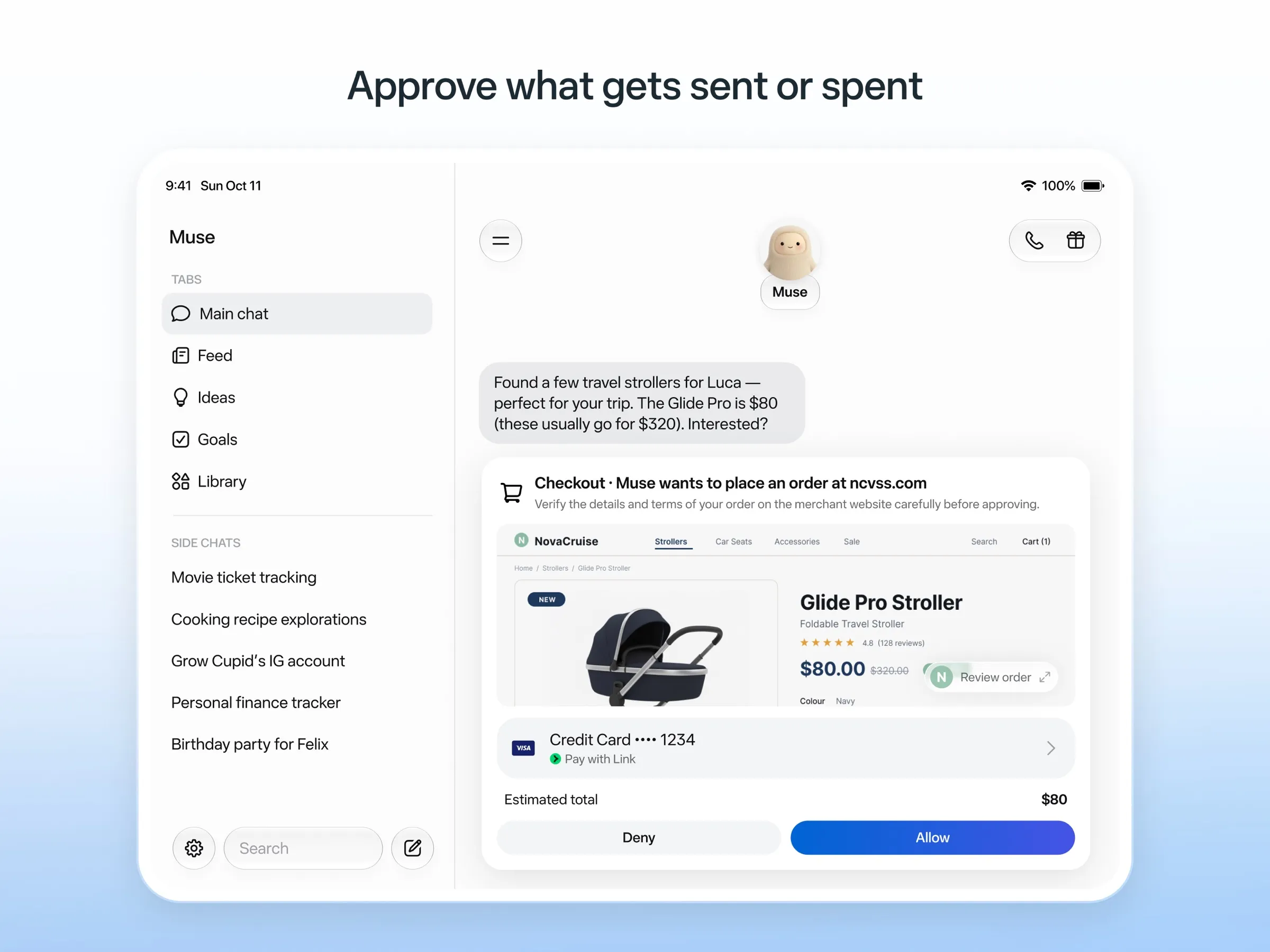
Muse has the more detailed safety design. A separate Sentinel agent approves anything Muse sends to the internet, Muse asks before sending email or buying, it keeps an audit trail, and purchases go through one-time card numbers from Link by Stripe, so it never sees your real card (Meta). Even so, early users and press reported it overstepping permissions, including reading messages it wasn’t meant to (The Guardian).
Grok Bot asks for approval before sensitive actions and uses saved logins it never sees in plain text. Its weak point is containment: all Bots on an account share one computer, files and logins, and the docs say not to use separate Bots as a security boundary. Users also report Amazon blocks it from shopping (Teslarati).
Privacy
Muse trains Meta’s models on your interactions unless you opt out, though Meta says it doesn’t share conversations or computer data with its ad systems. Grok Bot asks whether to allow training on your data, and it’s off by default (FAQ). Neither can be self-hosted.
The verdict
- You want an assistant for life admin and don’t want to pay yet: Muse.
- You want ongoing work done in your accounts, or several agents with different jobs: Grok Bot.
- You’re outside the US, Canada, Japan, Singapore and Mexico: Muse isn’t available to you yet.
- You already pay for X Premium, SuperGrok or Cursor: try Grok Bot first, since it’s included.
If neither fits, see Grok Bot alternatives, Muse alternatives or the best AI assistants.
Pricing
Grok Bot
Premium (The X Subscription)
$30/mo
- Includes Grok Bot
- 4x the usage of the $8 Plus plan, in a weekly pool shared with Grok and Cursor
- Bot's own cloud computer, sign-in to your tools, scheduled routines
Super (The X Subscription)
$100/mo
- 15x Plus usage
- Priority access at peak times
Ultra (The X Subscription)
$200/mo
- 50x Plus usage
- Earliest access to new products and models
Teams
$30/mo
- Price per user, from $30
- Shared Team Bots, including in Slack
- Admin, access, network and audit controls for Grok Bot
Enterprise
Custom
- Custom pricing through sales
Muse
Free
Free
- Runs on Muse Spark
- Free up to a usage limit that refreshes
- Meta does not publish the size of the free allowance
- Payment card required to sign up
Power
$20/mo
- 500M Muse tokens per week
- Muse Wonder model
Maximum
$100/mo
- 3B Muse tokens per week
- Muse Wonder model
Grok Bot
Strengths
- Bots work on their own cloud computer, so tasks keep running when your laptop or phone is closed
- Can operate websites and apps that have no API, using saved logins it never sees in plain text
- Several Bots can run in parallel, message each other and share one workspace
- Routines can run on a schedule or after an event, and a Bot can learn a task from a recorded demonstration of up to 10 minutes
- Can place phone calls to US businesses for you and send a summary afterwards
- Native apps for macOS, Windows, Linux, iOS and Android, plus Slack
Weaknesses
- No free plan and no standalone price: the cheapest way in is the $30/month Premium plan
- Usage comes from a weekly pool shared with Grok and Cursor, and SpaceXSI does not publish how much work that pool covers
- No model picker: Grok Bot chooses the model for each task and does not show which one it used
- All Bots on an account share one computer, files and logins; the docs say not to use separate Bots as a security boundary
- Users report Amazon blocks it from shopping as an unauthorized AI agent; Amazon hasn't commented
- Still labelled beta, with no browser version
Muse
Strengths
- Free tier, and no technical setup: you message it like a person in the app or on the web
- Runs on its own cloud computer and keeps working after you close the app
- Asks before sending email or buying, and shows an audit trail of what it did and plans to do
- Purchases go through a one-time card number with Link's purchase protections, so the agent never sees your real card
- Connects to email, calendar and Instagram, and can use a browser for sites without an API
Weaknesses
- Only in the US, Canada, Japan, Singapore and Mexico so far, and Meta says Muse is still in limited testing
- Requires a payment card even for the free tier, and the stronger Muse Wonder model is for paid plans only
- Your interactions train Meta's AI models unless you opt out
- Free usage limit is not published, so it is hard to know when you will hit it
- Early users and press reported it overstepping permissions, such as reading messages it was not meant to
- Requires a Meta account and asks for broad access to email, calendars and payments
Features
| Grok Bot | Muse | |
|---|---|---|
| Web search | Yes | Yes |
| Image generation | Yes | Yes |
| Voice mode | Yes | Yes |
| File uploads | Yes | Yes |
| Memory | Yes | Yes |
| Takes actions for you | Yes | Yes |
| App integrations | Yes | Yes |
| Works on its own | Yes | Yes |
| Messages you first | Yes | Yes |
| Runs several bots | Yes | Unknown |
Sources
Grok Bot
- Grok Bot product page and FAQChecked Nov 8, 2026
- SpaceXSI pricing: The X Subscription plansChecked Nov 8, 2026
- Introducing Grok Bot (launch post, Aug 11, 2026)Checked Nov 8, 2026
- Grok Bot FAQ: plans, platforms, memory, privacy and limitsChecked Nov 8, 2026
- Grok Bot docs: Create and manage BotsChecked Nov 8, 2026
- Grok Bot changelog (v0.78.1, Oct 27, 2026)Checked Nov 8, 2026
- Cursor help: Grok Bot plans and usageChecked Nov 8, 2026
- Teslarati: Grok Bot can now call US businesses (Nov 2026)Checked Nov 8, 2026
- Teslarati: Amazon shuts out Grok Bot (Oct 15, 2026)Checked Nov 8, 2026
- Grok Bot docs: Overview (proactive teammate, morning briefing)Checked Nov 8, 2026
- Grok Bot docs: Chat and collaboration (Slack DMs, X Chat rolling out)Checked Nov 8, 2026
- Grok Bot docs: Get started (desktop and mobile apps)Checked Nov 8, 2026
- Grok Bot docs: Skills, routines and automationsChecked Nov 8, 2026
- SpaceXSI: Team Bots in public beta (Sep 28, 2026)Checked Nov 8, 2026
- Wikipedia: SpaceXAI (xAI renamed SpaceXAI, then SpaceXSI)Checked Nov 8, 2026
- Cursor: Data Use & Privacy Overview (Privacy Mode and training)Checked Nov 8, 2026
Muse
- Meta: Introducing Muse, the world's first personal AI agent built for everyoneChecked Nov 8, 2026
- Muse homepageChecked Nov 8, 2026
- Meta Help Center: About Muse subscriptionsChecked Nov 8, 2026
- Meta Help Center: Meta AI, Muse and Vibes are separate appsChecked Nov 8, 2026
- TechCrunch: Meta debuts its Muse AI agent. Will consumers trust it?Checked Nov 8, 2026
- 9to5Mac: Muse personal agent gets apps for iPhone and MacChecked Nov 8, 2026
- The Guardian TechScape: early Muse users report the agent overstepping permissionsChecked Nov 8, 2026
- iPhone in Canada: Meta's Muse AI agent is now available in CanadaChecked Nov 8, 2026
- Superpower Daily: Meta launches Muse in Japan (Oct 23, 2026)Checked Nov 8, 2026
- Meta: Muse is now available in Singapore (Oct 27, 2026)Checked Nov 8, 2026
- Mexico News Daily: Meta launches its Muse AI agent in Mexico (Nov 6, 2026)Checked Nov 8, 2026
- Meta Q3 2026 earnings call transcript: Muse Wonder in the paid tier, free tier on Muse SparkChecked Nov 8, 2026
- How to manage reminders and scheduled tasks with MuseChecked Nov 8, 2026
- WhatsApp Help Center: About chatting with your Muse agent through WhatsAppChecked Nov 8, 2026
- TechCrunch: Meta's Muse hits MacChecked Nov 8, 2026
- Meta AI: Muse features and FAQ (browses the web, generates images)Checked Nov 8, 2026
- Meta Help Center: How your Muse agent browses the webChecked Nov 8, 2026
- Meta Help Center: How to use Muse with artifacts (uploads, image generation)Checked Nov 8, 2026
- Meta Help Center: How to get started with MuseChecked Nov 8, 2026