
Grok Bot review: an agent that works in your accounts, if you can afford the limits
Grok Bot runs named AI agents on a cloud computer that sign in to your apps, shop and now make phone calls. Who it suits, what it costs and where it falls short.
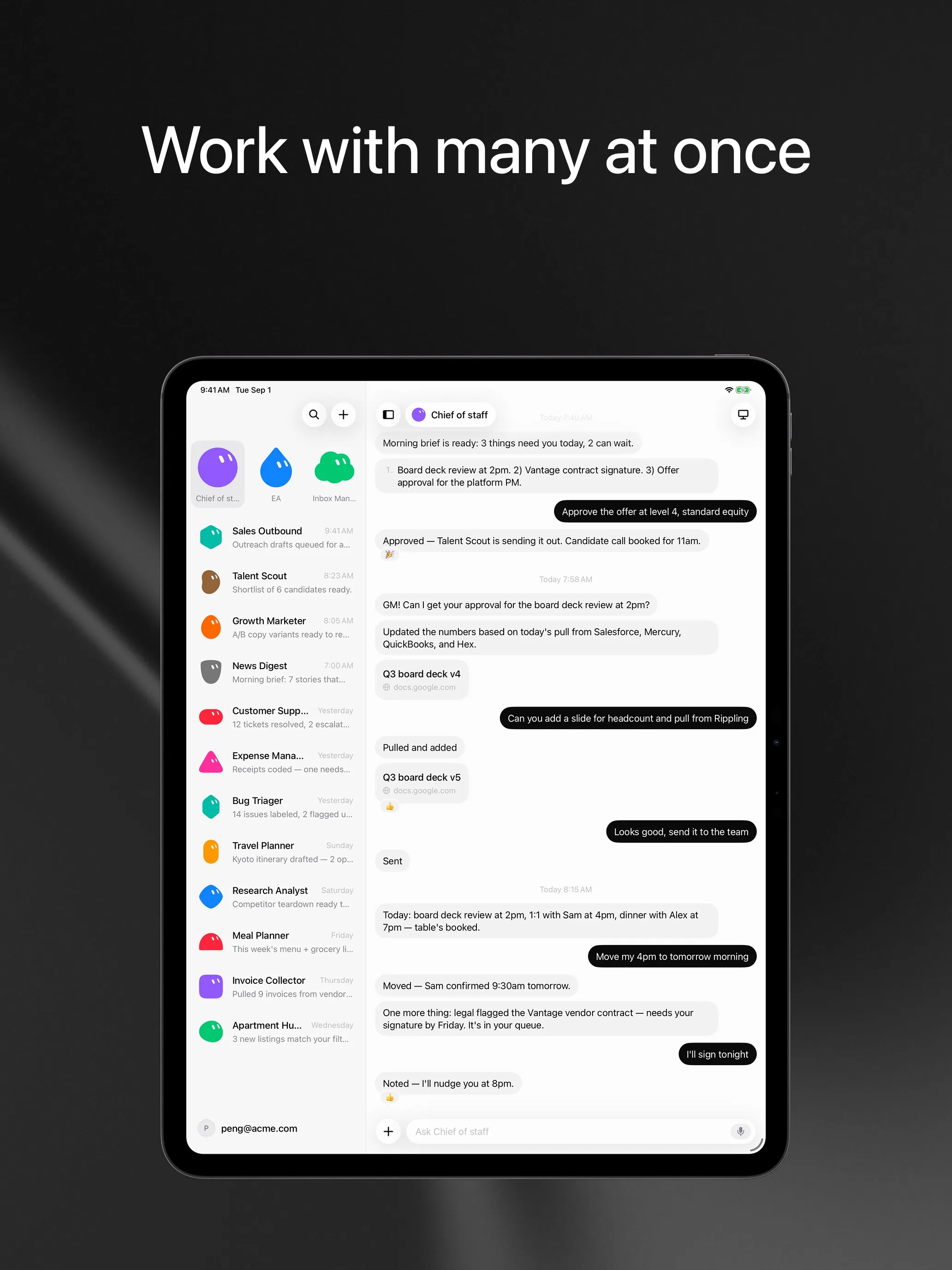
Visit Grok BotGrok Bot is SpaceXSI’s (formerly xAI) app for always-on AI agents. You create named Bots, give each one a job, and they work on a shared cloud computer: they sign in to your tools, run routines on a schedule, and check with you before anything sensitive. It’s worth it if you already pay for the $30 Premium tier of The X Subscription and have recurring browser or inbox chores to hand off. It’s a harder sell if you would be paying $30 a month just for it, because nobody outside SpaceXSI knows how much work the weekly usage pool actually covers, and that pool shrank in November.
Grok Bot is not the Grok chatbot, and it’s not the @grok account that replies to posts on X. For a plain introduction to all three, read What is Grok Bot?.

Who Grok Bot is for
The people who get the most from it fall into three groups:
- Existing subscribers. Grok Bot comes bundled with Premium, Super and Ultra on The X Subscription, and with older SuperGrok, X Premium+ and paid Cursor plans (Cursor help). If you already pay for one of those, trying it costs nothing extra.
- People with repetitive web work. Outbound emails, expense reports, inbox triage, comparing prices across shops. These are tasks that live in a browser and follow the same steps every week.
- Small teams in Slack. You can already DM a Bot in Slack. The Teams plan adds shared Team Bots and admin controls, so a Bot can sit in a channel and take requests from several people, though Team Bots are still a public beta.
It suits people who want to chat with an AI less well. For questions, writing and quick research, the Grok chatbot or any plain chat app is cheaper and faster. If you want an assistant but not this one, see our Grok Bot alternatives.
What’s new since launch
Grok Bot launched in beta on August 11, 2026 for SuperGrok and Cursor subscribers on macOS and iOS. It has changed a lot in three months:
- Every desktop and phone. Windows, Linux and Android followed, and the FAQ now lists macOS, Windows, Linux, iPhone, iPad and Android. There is still no browser version.
- In Tesla cars. Grok Bot has been in Tesla vehicles since September 22, according to Teslarati.
- One subscription. On October 12, SpaceXSI folded Grok, Grok Bot, Cursor and X Premium into The X Subscription. Grok Bot starts at Premium; the $8 Plus plan doesn’t include it (pricing).
- Tag
@boton X. You can hand a post to your Bot by tagging@bot, for example to summarize a thread (FAQ). Chatting with your Bots in X Chat, though, is still rolling out gradually, so for now the apps and Slack are where you talk to them. - Phone calls. In early November, Grok Bot started calling US businesses for users. Creator Peter Yang posted a call in which his Bot spent about 25 minutes with Comcast and waited for his approval before accepting a cheaper plan (Teslarati). Calls must say they come from a virtual assistant, and only US numbers work for now.
- Tighter limits. Over Halloween weekend, users found their weekly usage maxed out. Elon Musk confirmed it was deliberate: “The cost of serving Grok Bot was unsustainably high relative to revenue” (TechCrunch). SpaceXSI has not said what the new limits are.
Real use cases
The launch post and changelog point at the jobs SpaceXSI built it for: sales outreach, recruiting pipelines, inbox and expense work, and, more recently, consumer tasks such as finding unused subscriptions and shopping. Musk has promoted it for buying gifts (TechCrunch).
Four features make these work better than in a chat assistant:
- Routines. A Bot can run a task on a schedule or after an event, so a weekly report or a daily inbox sweep happens without you asking (docs).
- It speaks first. SpaceXSI pitches a Bot as a proactive teammate that can send you a morning briefing rather than wait for a prompt (overview).
- Teach a task. You can record a demonstration of up to 10 minutes and the Bot learns the steps. That helps with internal tools that no AI has seen before.
- Several Bots at once. Bots can run in parallel and message each other, so one can research while another drafts.
One practical limit: some sites block agents. Since at least October 10, Amazon has refused orders from Grok Bot, telling users that “continued access by an unauthorized AI agent violates Amazon’s Conditions of Use” (Teslarati). Expect the same from other large retailers.
How Grok Bot compares
vs Muse. Meta’s agent is the closest consumer rival. Both run on a cloud computer and ask before purchases. Muse has a free tier and a $20 Power plan and is built for errands, but you mostly reach it in its own app or on the web: WhatsApp chat is only in limited testing. Grok Bot has no free plan, but it has desktop apps for every OS, multiple named Bots, Slack and team controls. For personal errands, try Muse first. For work, Grok Bot is more capable.
vs OpenClaw. OpenClaw is free, open source and runs on your own machine with the model you choose. It also asks a lot more of you: setup, security settings, and an API bill that can climb fast. Grok Bot is hosted and picks the model for you, so it works the day you install it. Choose OpenClaw if you want control and privacy and are comfortable on the command line.
vs Manus. Manus is built around finished deliverables, such as a research report, a website or a slide deck, and bills in credits. Grok Bot is built around ongoing roles inside your accounts. If your work is a series of projects, Manus fits. If it’s a list of chores that never ends, Grok Bot fits.
vs Instinct. Instinct is a single assistant you text or call, and it’s still invite-only. Grok Bot is a full app with many Bots and team features, and anyone with Premium can use it.
vs dots. OpenAI’s agent is the nearest match in shape: a cloud computer, proactive check-ins, and Slack. But each user gets one primary dot, and it lives inside ChatGPT, included only from the $100 Pro plan or Business Premium. Grok Bot is cheaper to start and lets you run several Bots side by side. Pick dots if your work already runs through ChatGPT.
vs Perplexity Teammates. Teammates also give each agent its own computer and let several work together, and they watch Slack, GitHub and Linear. They are a web-only research preview for $200 Perplexity Max subscribers. Grok Bot is the more finished product today, with apps on every platform.
Pricing advice
Premium at $30 a month is the cheapest way in, and it also includes Grok chat, Cursor and X Premium. If you would use two of those, the bundle is good value. If you only want the agent, $30 buys an allowance that SpaceXSI doesn’t publish, shared with the other products, and cut once already.
Some practical points from the FAQ and Cursor’s help page:
- Start on Premium and watch the meter for a week before moving to Super ($100) or Ultra ($200).
- Usage past the pool comes from prepaid credit. Spending caps don’t stop a Bot mid-run, and used credit isn’t refunded. Set routines carefully before you top up.
- Linking a Grok account to Cursor can’t be undone, and plans don’t stack. If you have both, read Cursor’s page before connecting them.
- Older articles are wrong about separate limits. At launch, Grok Bot had its own usage. Since The X Subscription, it shares the pool with Grok and Cursor.
Privacy and safety
Grok Bot signs in to your accounts with saved logins that it doesn’t see in plain text, and asks for approval before sensitive actions. That’s the right design, but keep three things in mind:
- All Bots on an account share one computer, files and logins. The docs say not to treat separate Bots as a security boundary. Don’t give a “research” Bot access you wouldn’t give your “finance” Bot.
- Training is off unless you allow it. Grok Bot asks whether it may train on your data, and the default is no. The setting follows your Cursor account privacy settings. Cursor’s Legacy Privacy Mode isn’t supported, because Grok Bot stores data in the cloud.
- Promises on X aren’t policy. Musk posted that SpaceX would “make you whole” if Grok Bot made a purchase mistake or leaked a card, but the consumer terms still make users responsible for their agents’ actions and limit liability (Teslarati). Use approvals for any purchase.
There’s also no model picker. Grok Bot chooses the model for each task and doesn’t tell you which one it used, so you can’t steer cost or quality yourself.
Verdict
Grok Bot is one of the most capable hosted agents you can buy right now: it runs on every desktop and phone, keeps working in the cloud, learns tasks from a recording, and can now pick up the phone. For existing SuperGrok, X Premium+ or Cursor subscribers, it’s an easy yes to try, and it does everything on our checklist.
For everyone else, the weak point is the meter, not the agent. You pay at least $30 a month for an allowance nobody outside SpaceXSI can measure, shared with chat and coding, and already tightened once because it cost too much to serve. Try Muse free first for personal errands, look at OpenClaw if you want control, and see our Grok Bot alternatives for the full list.
Pricing
Premium (The X Subscription)
$30/mo
- Includes Grok Bot
- 4x the usage of the $8 Plus plan, in a weekly pool shared with Grok and Cursor
- Bot's own cloud computer, sign-in to your tools, scheduled routines
Super (The X Subscription)
$100/mo
- 15x Plus usage
- Priority access at peak times
Ultra (The X Subscription)
$200/mo
- 50x Plus usage
- Earliest access to new products and models
Teams
$30/mo
- Price per user, from $30
- Shared Team Bots, including in Slack
- Admin, access, network and audit controls for Grok Bot
Enterprise
Custom
- Custom pricing through sales
Features
| Web search | Yes |
|---|---|
| Image generation | Yes |
| Voice mode | Yes |
| File uploads | Yes |
| Memory | Yes |
| Takes actions for you | Yes |
| App integrations | Yes |
| Works on its own | Yes |
| Messages you first | Yes |
| Runs several bots | Yes |
Strengths
- Bots work on their own cloud computer, so tasks keep running when your laptop or phone is closed
- Can operate websites and apps that have no API, using saved logins it never sees in plain text
- Several Bots can run in parallel, message each other and share one workspace
- Routines can run on a schedule or after an event, and a Bot can learn a task from a recorded demonstration of up to 10 minutes
- Can place phone calls to US businesses for you and send a summary afterwards
- Native apps for macOS, Windows, Linux, iOS and Android, plus Slack
Weaknesses
- No free plan and no standalone price: the cheapest way in is the $30/month Premium plan
- Usage comes from a weekly pool shared with Grok and Cursor, and SpaceXSI does not publish how much work that pool covers
- No model picker: Grok Bot chooses the model for each task and does not show which one it used
- All Bots on an account share one computer, files and logins; the docs say not to use separate Bots as a security boundary
- Users report Amazon blocks it from shopping as an unauthorized AI agent; Amazon hasn't commented
- Still labelled beta, with no browser version
Best for
- People who want to hand off recurring browser and inbox work to an agent
- Existing SuperGrok, X Premium or Cursor subscribers
- Small teams that want shared agents in Slack
Sources
- Grok Bot product page and FAQChecked Nov 8, 2026
- SpaceXSI pricing: The X Subscription plansChecked Nov 8, 2026
- Introducing Grok Bot (launch post, Aug 11, 2026)Checked Nov 8, 2026
- Grok Bot FAQ: plans, platforms, memory, privacy and limitsChecked Nov 8, 2026
- Grok Bot docs: Create and manage BotsChecked Nov 8, 2026
- Grok Bot changelog (v0.78.1, Oct 27, 2026)Checked Nov 8, 2026
- Cursor help: Grok Bot plans and usageChecked Nov 8, 2026
- Teslarati: Grok Bot can now call US businesses (Nov 2026)Checked Nov 8, 2026
- Teslarati: Amazon shuts out Grok Bot (Oct 15, 2026)Checked Nov 8, 2026
- Grok Bot docs: Overview (proactive teammate, morning briefing)Checked Nov 8, 2026
- Grok Bot docs: Chat and collaboration (Slack DMs, X Chat rolling out)Checked Nov 8, 2026
- Grok Bot docs: Get started (desktop and mobile apps)Checked Nov 8, 2026
- Grok Bot docs: Skills, routines and automationsChecked Nov 8, 2026
- SpaceXSI: Team Bots in public beta (Sep 28, 2026)Checked Nov 8, 2026
- Wikipedia: SpaceXAI (xAI renamed SpaceXAI, then SpaceXSI)Checked Nov 8, 2026
- Cursor: Data Use & Privacy Overview (Privacy Mode and training)Checked Nov 8, 2026