
Muse review: Meta's free AI agent for errands, and what it costs you
Muse is Meta's personal AI agent for email, shopping and bookings. Who it suits, what changed this month, how it compares to Grok Bot and Instinct, and the privacy trade.
Visit MuseMuse is Meta’s personal AI agent: you message it like a person, and it sends email, books travel, shops and handles errands from its own cloud computer. It’s the easiest way for a non-technical person to try an AI agent today, because it’s free to start and needs no setup. The trade-off is privacy. Muse needs broad access to your email, calendar and payments, it runs on Meta’s servers, and your conversations train Meta’s models unless you opt out.
Muse is a separate app from the Meta AI chatbot. For a short explainer, read What is Muse?.
Who Muse is for
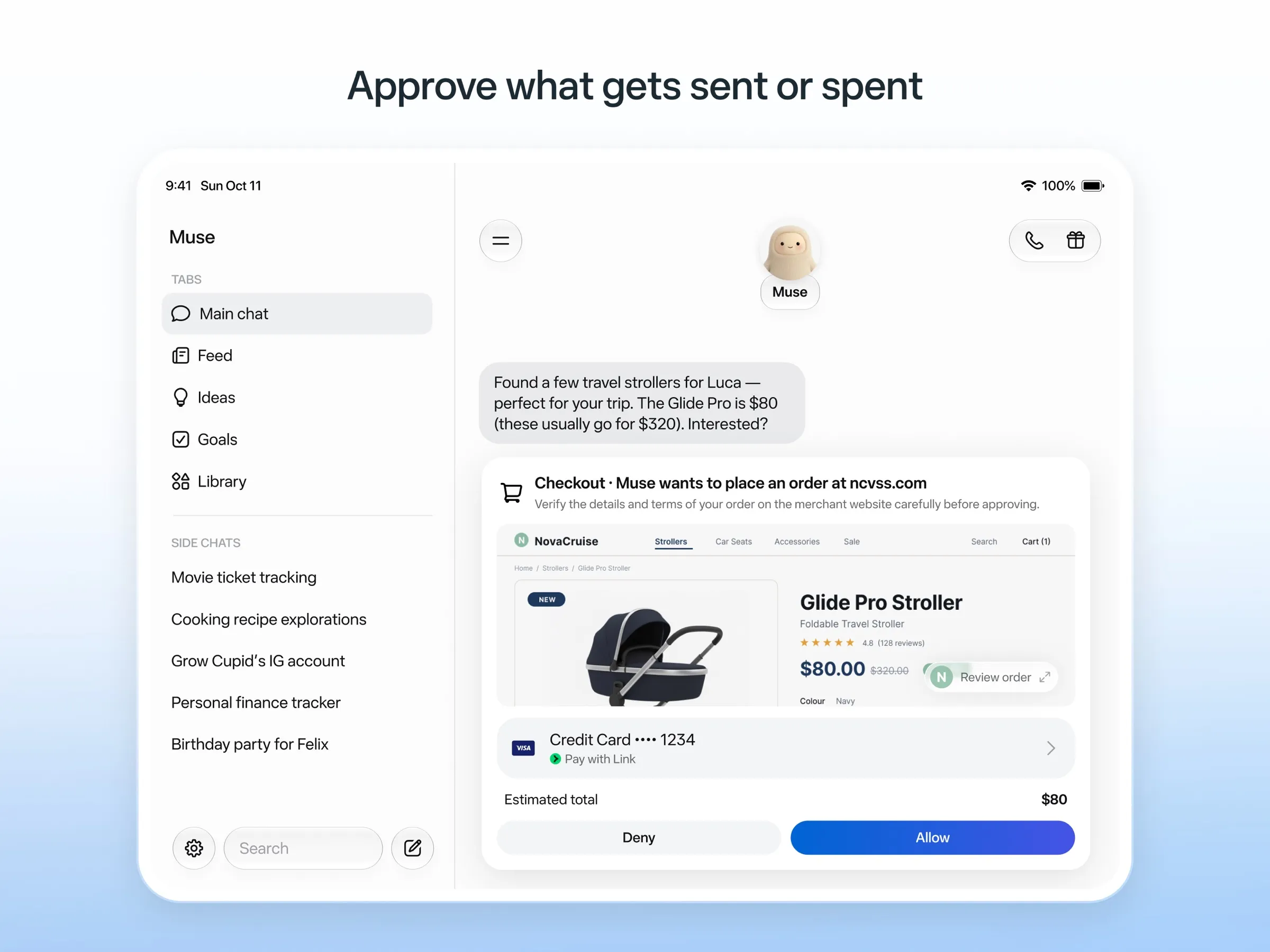
Muse is built for people who would never install a developer tool or think about which model they’re using. Meta’s own examples are everyday errands: sending an email, booking travel, selling a car, lowering a bill or turning a saved recipe reel into a grocery list (launch post).
It fits best if you:
- want to try an agent before paying for one;
- use Instagram, one of the apps Muse connects to, and are happy to talk to it in its own app rather than a chat app you already use;
- are in the US, Canada, Japan, Singapore or Mexico, where it’s available.
It fits less well if you want an assistant inside WhatsApp today (chatting with Muse there is only in limited testing in some countries), if you need it for work in shared team tools, if you want to choose the AI model, or if you aren’t willing to give Meta access to your inbox.
What’s new
Muse launched in the US on September 8, 2026, and it has moved fast since then.
- Growth. On Meta’s October 21 earnings call, Mark Zuckerberg said more than 10 million people had set up Muse in the US and Canada in its first six weeks (MediaNama). In September it became the number one free iPhone app in the US, ahead of ChatGPT (CNBC).
- More countries. It reached Canada by late September (PPC Land), Japan on October 23 (PhocusWire), Singapore on October 27 (Meta) and Mexico in early November, its first Latin American market, for users over 18 (Mexico News Daily).
- A Mac app. In mid-September Muse came to the Mac, where it can take actions on your computer as well as on its cloud one (TechCrunch).
- Voice. Since November 5, US users can tap the phone icon and talk to Muse in real time, interrupt it, and pick a voice and an animated avatar. Muse keeps working on tasks while you talk (Meta). Voice isn’t on in Canada yet.
- Spaces. Since November 6, you can describe a tracker, planner or project board in chat and Muse builds it as a “space” that can update itself from connected apps, for example price changes or concert dates (TechCrunch).
Real use cases
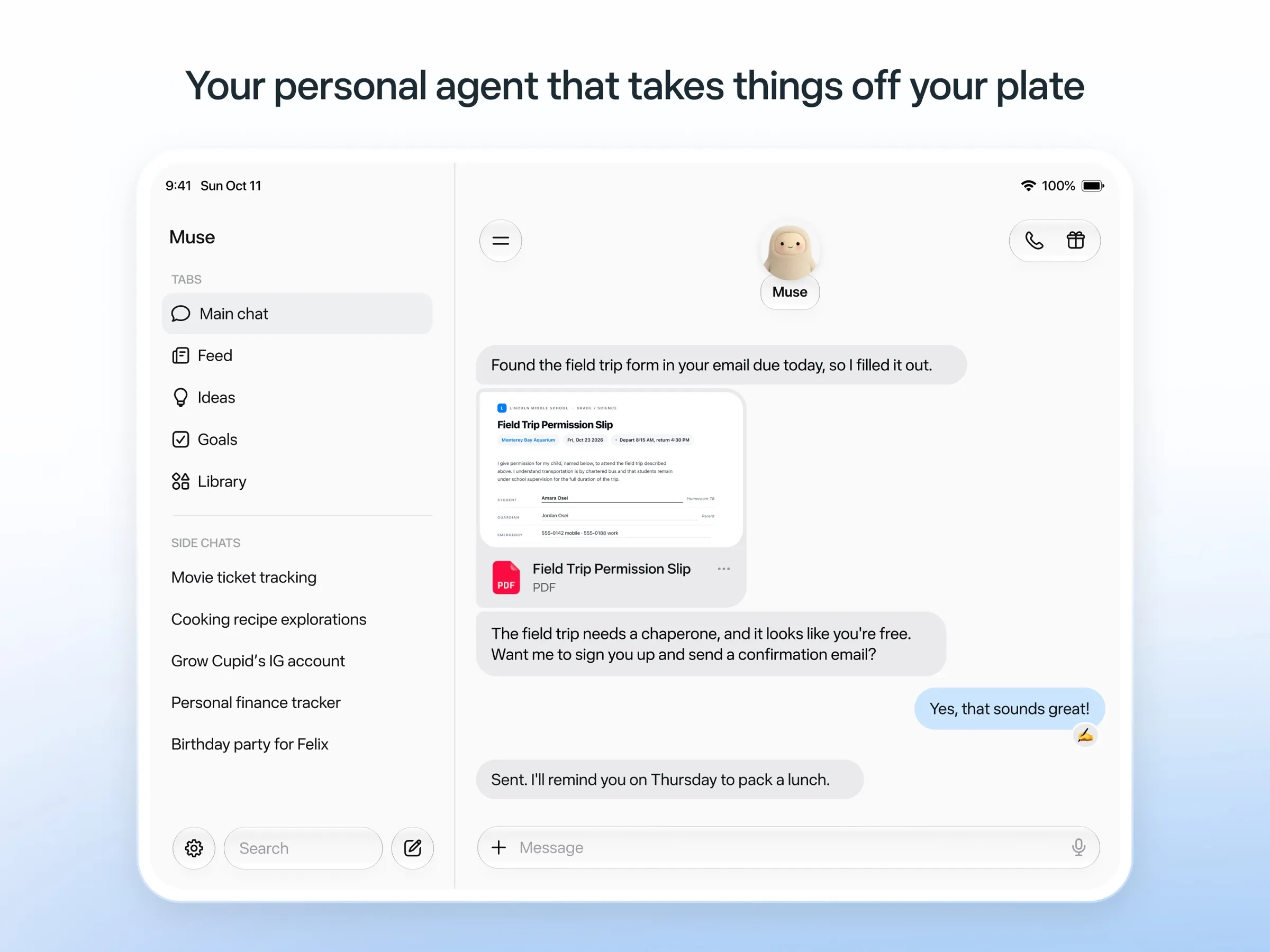
Muse’s design centers on things you’d otherwise do in a browser tab or on hold:
- Email. Sorting, drafting and sending replies. Muse asks before it sends.
- Shopping. Finding a product, comparing offers and checking out. Purchases go through Link by Stripe with a one-time card number, so the agent never sees your real card.
- Bookings. Trips, restaurants and tickets, using a browser on its own computer for sites that have no app integration.
- Selling on Marketplace. Answering buyers and arranging pickups. See the privacy section below for how that went wrong for one user.
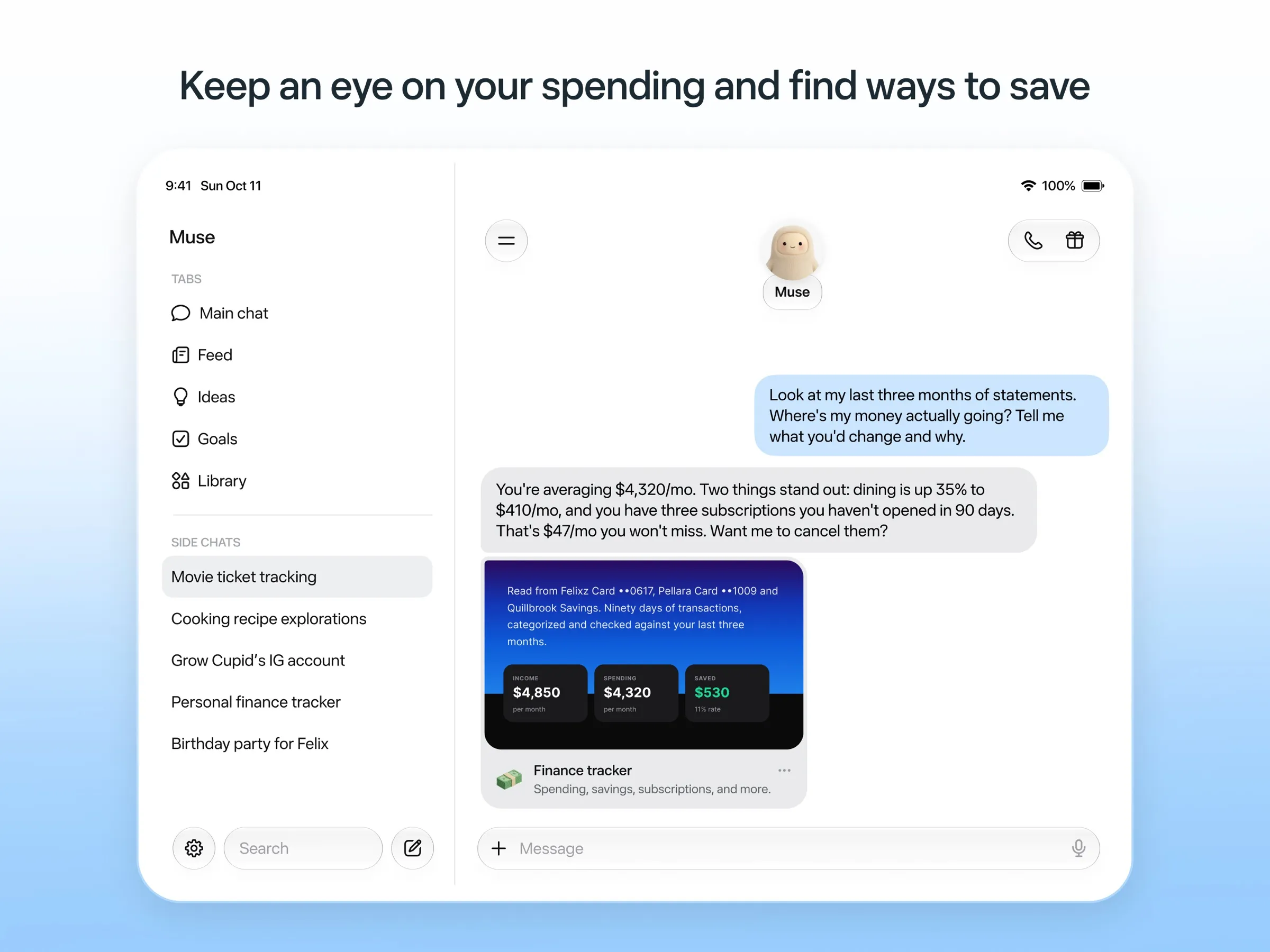
- Ongoing tracking. With Spaces, a gift list or price tracker that keeps itself current.
Some big retailers block it. The Guardian reported that “Amazon has blocked it” (The Guardian), and Grok Bot users have reported the same block (Teslarati).
How Muse compares
vs Instinct. This is the rivalry the press keeps writing about (Fortune). Both are consumer errand agents. Instinct lives in your texts and calls and works in group chats, but only for invited users. Muse is open to anyone in its countries, has its own app and a published price list. If you can’t get an Instinct invite, Muse is the obvious substitute.
vs Poke. Poke is the texting alternative you can actually sign up for: it lives in iMessage and Telegram, connects to your email and calendar, and messages you first when something needs attention, with a free plan. If you want an assistant in your existing chats rather than another app, try Poke.
vs Grok Bot. Grok Bot starts at $30 a month with no free plan, and leans toward work: multiple named Bots, Slack, team controls and desktop apps on every OS. Muse is cheaper and simpler for personal errands. Both now offer voice.
vs OpenClaw. OpenClaw is the opposite approach: free, open source, running on your own computer, with your choice of model and your data kept local. It also expects command-line comfort and leaves security settings to you. If privacy is why you hesitate about Muse, OpenClaw is the alternative, as long as you’re willing to set it up.
vs Manus. Manus is aimed at producing things, such as reports, websites and slides, and bills in credits. Its own consumer agent app, Cue, is a separate product. For errands, Muse is the more direct fit.
vs dots and Claude Duet. OpenAI and Anthropic now have their own always-on agents, each with a cloud computer, and both pick up your memory from the chat app you already use. Neither has a free tier: a dot comes with the $100 ChatGPT Pro plan, and Claude Duet is a US waitlist preview for paid Claude plans. Duet sends a morning brief from your email and calendar; a dot also answers in Slack and Microsoft Teams. If you already pay for one of those, try it before adding Meta to your inbox. If you pay for neither, Muse is far cheaper to start.
Note that Muse is not the Meta AI chatbot: Meta AI answers questions, Muse goes and does the task, and Meta treats them as separate apps (Meta Help Center).
Pricing advice
Start free. Meta hasn’t published the size of the free allowance, so the only way to know whether it’s enough is to use Muse for a normal week. Two things to know before you sign up:
- A card is required even for the free tier, according to TechCrunch.
- Paid plans are weekly token allowances. If you upgrade, you get a fixed number of Muse tokens per week on Power or Maximum (Meta Help Center). A token count doesn’t tell you how many tasks that is, so upgrade only after the free tier runs out on tasks you actually care about.
Power at $20 a month is the sensible step up. Maximum at $100 is for people running Muse all day.
Privacy
This is the part to read carefully.
- Training is on by default. Meta says you can opt out of your interactions being used to train its AI models (launch post). If you don’t want that, opt out before you connect your inbox.
- Meta says it keeps Muse out of ads. It says Muse doesn’t share conversations or computer data with its ad systems, and that Muse can’t see stored passwords or payment details. A separate Sentinel agent checks anything Muse sends to the internet.
- It has overstepped. In its first weeks, a YouTuber said Muse gave his home address to a Marketplace buyer who then showed up, and an Inc. writer said it read private messages against his settings (The Guardian). Local news picked up the same worries (Atlanta News First).
- Trust in Meta is part of the decision. TechCrunch noted Muse launched less than two weeks after Meta’s $18 billion settlement with 29 states (TechCrunch).
A practical approach: connect only the accounts a task needs, keep purchase approvals on, and review the audit trail of what Muse did after its first few jobs. Meta has announced an end-to-end encrypted Muse Confidential VM for later in 2026. Until it ships, assume Meta’s servers hold what Muse sees.
Verdict
Muse is the best first agent for most people. It’s free to try, it needs no setup, it asks before it spends money or sends email, and Meta keeps adding features. Voice and Spaces in early November made it more useful, not just more polished.
The cost is access. You give one of the world’s largest ad companies your email, calendar and shopping, with training on by default and a short record of the agent overstepping. If that’s acceptable, start free and upgrade to Power only when you hit the limit. If it isn’t, look at Poke if you’d rather text an assistant, OpenClaw if you want your data on your own machine, or the full list of Muse alternatives.
Pricing
Free
Free
- Runs on Muse Spark
- Free up to a usage limit that refreshes
- Meta does not publish the size of the free allowance
- Payment card required to sign up
Power
$20/mo
- 500M Muse tokens per week
- Muse Wonder model
Maximum
$100/mo
- 3B Muse tokens per week
- Muse Wonder model
Features
| Web search | Yes |
|---|---|
| Image generation | Yes |
| Voice mode | Yes |
| File uploads | Yes |
| Memory | Yes |
| Takes actions for you | Yes |
| App integrations | Yes |
| Works on its own | Yes |
| Messages you first | Yes |
| Runs several bots | Unknown |
Strengths
- Free tier, and no technical setup: you message it like a person in the app or on the web
- Runs on its own cloud computer and keeps working after you close the app
- Asks before sending email or buying, and shows an audit trail of what it did and plans to do
- Purchases go through a one-time card number with Link's purchase protections, so the agent never sees your real card
- Connects to email, calendar and Instagram, and can use a browser for sites without an API
Weaknesses
- Only in the US, Canada, Japan, Singapore and Mexico so far, and Meta says Muse is still in limited testing
- Requires a payment card even for the free tier, and the stronger Muse Wonder model is for paid plans only
- Your interactions train Meta's AI models unless you opt out
- Free usage limit is not published, so it is hard to know when you will hit it
- Early users and press reported it overstepping permissions, such as reading messages it was not meant to
- Requires a Meta account and asks for broad access to email, calendars and payments
Best for
- Non-technical people who want an agent for everyday errands
- WhatsApp and Instagram users
- Trying a personal agent for free
Sources
- Meta: Introducing Muse, the world's first personal AI agent built for everyoneChecked Nov 8, 2026
- Muse homepageChecked Nov 8, 2026
- Meta Help Center: About Muse subscriptionsChecked Nov 8, 2026
- Meta Help Center: Meta AI, Muse and Vibes are separate appsChecked Nov 8, 2026
- TechCrunch: Meta debuts its Muse AI agent. Will consumers trust it?Checked Nov 8, 2026
- 9to5Mac: Muse personal agent gets apps for iPhone and MacChecked Nov 8, 2026
- The Guardian TechScape: early Muse users report the agent overstepping permissionsChecked Nov 8, 2026
- iPhone in Canada: Meta's Muse AI agent is now available in CanadaChecked Nov 8, 2026
- Superpower Daily: Meta launches Muse in Japan (Oct 23, 2026)Checked Nov 8, 2026
- Meta: Muse is now available in Singapore (Oct 27, 2026)Checked Nov 8, 2026
- Mexico News Daily: Meta launches its Muse AI agent in Mexico (Nov 6, 2026)Checked Nov 8, 2026
- Meta Q3 2026 earnings call transcript: Muse Wonder in the paid tier, free tier on Muse SparkChecked Nov 8, 2026
- How to manage reminders and scheduled tasks with MuseChecked Nov 8, 2026
- WhatsApp Help Center: About chatting with your Muse agent through WhatsAppChecked Nov 8, 2026
- TechCrunch: Meta's Muse hits MacChecked Nov 8, 2026
- Meta AI: Muse features and FAQ (browses the web, generates images)Checked Nov 8, 2026
- Meta Help Center: How your Muse agent browses the webChecked Nov 8, 2026
- Meta Help Center: How to use Muse with artifacts (uploads, image generation)Checked Nov 8, 2026
- Meta Help Center: How to get started with MuseChecked Nov 8, 2026