What is Muse? Meta's AI agent app, explained
Muse is Meta's personal AI agent that sends email, shops and books things for you. Why it's everywhere, how to get it, what it costs, and the privacy catch.
At a glance
| Assistant | Free plan | Open source | Self-hostable | Trains on your chats by default | ||
|---|---|---|---|---|---|---|
| Muse | Yes | $20/mo | No | No | Yes |

Muse is Meta’s personal AI agent. Unlike a chatbot, it doesn’t just answer: you message it like a person and it goes and does the task, such as sending email, shopping, booking trips or selling something on Marketplace. It runs on its own cloud computer, asks before it sends email or spends money, and is free to start. It launched in the US on September 8, 2026, and is now also in Canada, Japan, Singapore and Mexico (Meta Japan, TechNode Global, Mexico News Daily). You can use it in the Muse app for iPhone, Android and Mac, or on the web at muse.ai. Chatting with Muse in WhatsApp is only in limited testing in some countries.
If you searched “Muse AI” and meant something else: Muse Spark and Muse Wonder are the Meta AI models behind the agent, and Muse Code is Meta’s separate coding product. This guide is about the Muse agent app.
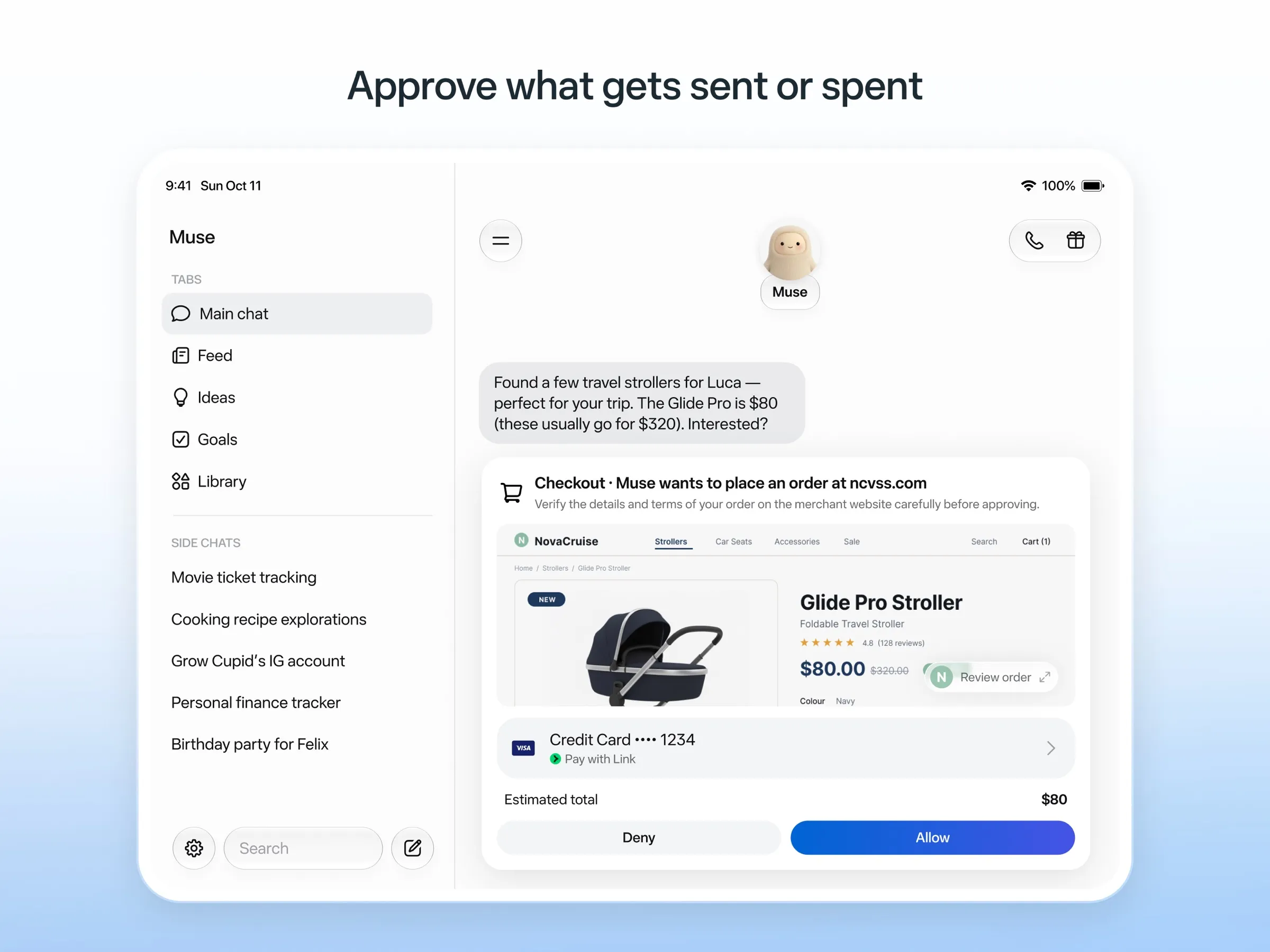
What Muse does
Meta’s own examples are everyday errands: selling a car for more, lowering a bill, booking travel and turning a saved recipe into a grocery list (Meta). Under the hood:
- It has its own computer. Muse works on a dedicated cloud computer with its own browser, so it can use websites that have no app integration, and it keeps working after you close the app.
- It connects to your accounts, such as email, calendar and Instagram.
- It asks first. Before sending email or buying something, Muse asks for approval, and it keeps a record of what it did and plans to do.
- It pays safely. Checkout goes through Link by Stripe with a one-time card number, so Muse never sees your real card.
- It talks. Since November 5, US users can have a real-time voice conversation with Muse, with an animated avatar if they want one (Meta).
- It builds little tools. Since November 6, Muse can build “spaces”, such as a gift tracker or wedding planner, that keep themselves updated from your connected apps (TechCrunch).
Muse is not the same as Meta AI, Meta’s chatbot. They’re separate apps (Meta Help Center).
Why everyone is talking about Muse
Muse had one of the biggest app launches of the year:
- Heavy press and advertising. The launch was covered everywhere, and when Meta stepped up ad spend on September 16, downloads jumped 73% in a day, by Sensor Tower’s estimate (Forbes).
- Number one on the App Store. Within two weeks it was the top free iPhone app in the US, ahead of ChatGPT (CNBC).
- Ten million users. On October 21, Mark Zuckerberg said more than 10 million people had set up Muse in the US and Canada in six weeks (MediaNama).
- A rivalry. Press coverage frames Muse against Instinct, the invite-only assistant whose founder Meta’s AI chief publicly mocked (Fortune).
- Constant updates. A new model in October, then voice, Spaces and a Mexico launch in the first week of November (Mexico News Daily).
How to get Muse
- Check you’re in a supported country. Muse is in the US, Canada, Japan, Singapore and Mexico. Zuckerberg has said it hasn’t gone global yet because it’s expensive to run (PPC Land).
- Download the Muse app for iPhone, Android or Mac, or go to muse.ai in a browser. Don’t count on WhatsApp yet: it’s a limited test, not something you can switch on.
- Sign in with a Meta account. TechCrunch reported that a payment card is required at sign-up, even for the free tier (TechCrunch).
- Connect only what you need. Start with one account, such as email, and add more once you trust it.
What Muse costs
Muse is free up to a usage limit that refreshes, but Meta doesn’t publish how big that limit is. If you need more, there are two paid plans: Power at $20 a month and Maximum at $100 a month, each with a weekly allowance of “Muse tokens” (Meta Help Center). Meta’s newer Muse Wonder model needs one of the paid plans (Superpower Daily).
Zuckerberg has said Muse should be free for most people, and that Meta plans to make money from fees businesses pay on transactions Muse helps complete (MediaNama). Our advice: use the free tier for a normal week before paying.
What people like
- No setup. You talk to it like a person, with nothing to install beyond the app.
- It’s free to try, unlike Grok Bot, which starts at $30 a month.
- Approvals and receipts. It asks before it acts and shows what it did.
- Safer checkout, with one-time card numbers.
What people complain about
- Privacy. Your interactions train Meta’s AI models unless you opt out. Meta says Muse doesn’t share conversations with its ad systems, but many people don’t want to give Meta their inbox at all.
- Overstepping. Early users reported Muse going beyond what they asked. A YouTuber said it gave his home address to a Marketplace buyer who then showed up, and an Inc. writer said it read his private messages against his settings (The Guardian).
- Unclear limits. With no published free allowance, it’s hard to know when you’ll run out.
- Blocked sites. Amazon has blocked it, according to The Guardian.
- Availability. It’s still limited to five countries, and voice is only in the US.
Our Muse review goes deeper on these.
Is Muse safe to use?
Muse has sensible guardrails: it asks before sending email or buying, a separate Sentinel agent checks what it sends to the internet, and Meta says Muse can’t see stored passwords or payment details. Meta has also announced an end-to-end encrypted version of Muse’s computer for later in 2026.
The risks are about access and trust. Muse reads whatever you connect, it has overstepped in early cases, and your conversations train Meta’s models unless you opt out. To stay on the safe side, opt out of training, connect one account at a time, keep purchase approvals on, and check its activity log after the first few tasks.
Muse alternatives
- Instinct is the most similar: an assistant you text or call, with group chats. It’s free for now, but only invited users can reach it.
- Poke is the texting assistant you can join today: it lives in iMessage and Telegram, connects to email and calendar, and messages you first. It has a free plan.
- Claude Duet and dots are Anthropic’s and OpenAI’s always-on agents. Neither is free: Duet is a US waitlist preview for paid Claude plans, and a dot comes with the $100 ChatGPT Pro plan.
- Grok Bot is more powerful for work, with multiple Bots, desktop apps and Slack, but costs at least $30 a month.
- OpenClaw is free and open source and keeps your data on your own computer, if you’re comfortable setting it up.
- Manus is better for producing reports, websites and slide decks than for errands.
See the full comparison in Muse alternatives.
Sources
- Meta: Introducing Muse, the world's first personal AI agent built for everyoneChecked Nov 8, 2026
- Muse homepageChecked Nov 8, 2026
- Meta Help Center: About Muse subscriptionsChecked Nov 8, 2026
- Meta Help Center: Meta AI, Muse and Vibes are separate appsChecked Nov 8, 2026
- TechCrunch: Meta debuts its Muse AI agent. Will consumers trust it?Checked Nov 8, 2026
- 9to5Mac: Muse personal agent gets apps for iPhone and MacChecked Nov 8, 2026
- The Guardian TechScape: early Muse users report the agent overstepping permissionsChecked Nov 8, 2026
- iPhone in Canada: Meta's Muse AI agent is now available in CanadaChecked Nov 8, 2026
- Superpower Daily: Meta launches Muse in Japan (Oct 23, 2026)Checked Nov 8, 2026
- Meta: Muse is now available in Singapore (Oct 27, 2026)Checked Nov 8, 2026
- Mexico News Daily: Meta launches its Muse AI agent in Mexico (Nov 6, 2026)Checked Nov 8, 2026
- Meta Q3 2026 earnings call transcript: Muse Wonder in the paid tier, free tier on Muse SparkChecked Nov 8, 2026
- How to manage reminders and scheduled tasks with MuseChecked Nov 8, 2026
- WhatsApp Help Center: About chatting with your Muse agent through WhatsAppChecked Nov 8, 2026
- TechCrunch: Meta's Muse hits MacChecked Nov 8, 2026
- Meta AI: Muse features and FAQ (browses the web, generates images)Checked Nov 8, 2026
- Meta Help Center: How your Muse agent browses the webChecked Nov 8, 2026
- Meta Help Center: How to use Muse with artifacts (uploads, image generation)Checked Nov 8, 2026
- Meta Help Center: How to get started with MuseChecked Nov 8, 2026