
Perplexity Teammates review: several AI agents for ongoing work, on Max
Perplexity Teammates are persistent agents that watch Slack, GitHub and Linear and hand work to each other. Who they suit, the Max-only limits, and how they compare.
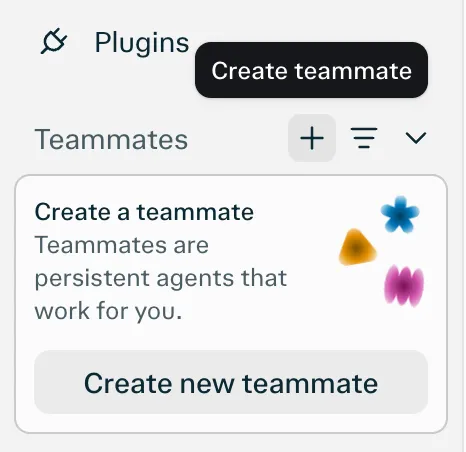
Visit Perplexity TeammatesPerplexity Teammates are persistent agents that own a piece of ongoing work. Each one has a name, a role, a model, its own isolated computer with a browser, and memory that carries across runs. A teammate splits a goal into tasks it runs in parallel, watches tools like Slack, GitHub and Linear, acts when something changes, and contacts you when it needs input (Perplexity).
The difference from most assistants here is that you can have several, and they work together. The catch is access: Teammates are a web-only research preview for individual Perplexity Max subscribers, at $200 a month, announced on November 4, 2026.
Who Perplexity Teammates are for
Perplexity’s examples are business functions, not personal errands: a marketing teammate that watches campaign results and rival promotions and drafts fixes when results slip; a sales teammate that spots a customer who stopped buying, reviews their history and drafts an offer; a support teammate that summarizes yesterday’s complaints; an operations teammate that chases missing paperwork when a deadline is 72 hours away (Perplexity).
It fits best if you:
- run a small business or a team and want separate agents for separate jobs;
- work in Slack, GitHub and Linear, where you can tag teammates as apps;
- already pay for Perplexity Max, or would for this.
It fits poorly if you want a phone-first assistant (there’s no app yet), a cheap entry point, or predictable costs.
What it actually does day to day
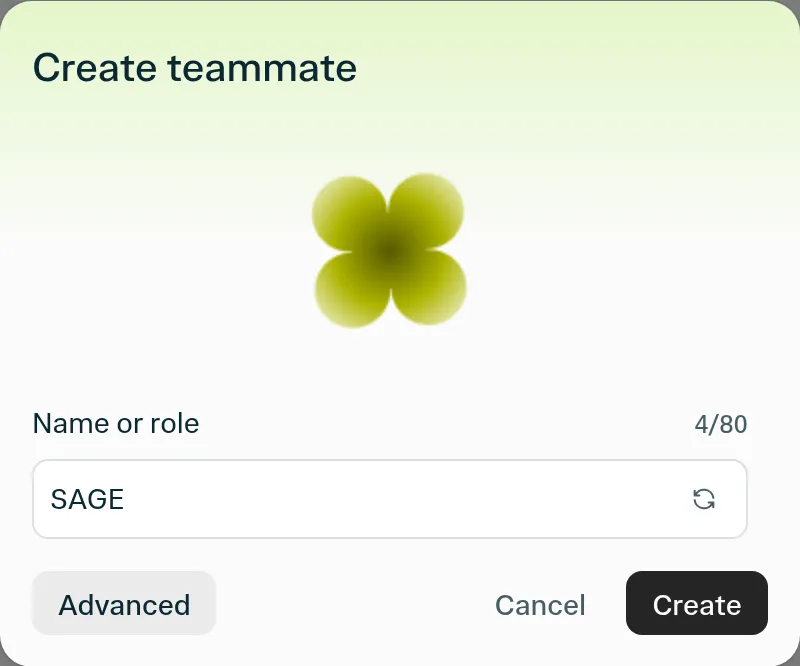
You create a teammate from the sidebar, name it, connect plugins such as Slack, GitHub or Gmail, describe the work, and assign it a Project and a first task (Perplexity). From there:
- It watches and reacts. A teammate can monitor connected tools and respond to events, such as replying to pull request review comments (Help Center). Added to a Slack channel, it takes requests from colleagues and posts status updates.
- Teammates share a Project. Teammates in the same Project share context, files and instructions, keep their own roles, and can message each other when new information arrives. Perplexity’s example: one teammate finds website bugs and passes them to another that prepares fixes.
- You choose the model. New teammates default to Claude Opus 5.5, and you can switch per teammate. Perplexity suggests a stronger model for planning and hard decisions and a cheaper, faster one for routine work (Help Center).
- You can take over. Each teammate has its own desktop, and you can take control and steer it, or redirect it mid-task.
- It learns from feedback. Told that an agency needs two weeks’ notice, it builds that lead time into future schedules (Perplexity).
Limits
- Max only. The preview is for individual Max subscriptions, not Pro; Enterprise Pro and Enterprise Max aren’t included by default (Help Center). Max is $200 a month or $2,000 a year, with annual billing only on the web (Max Help Center).
- Credits, not a flat fee. Teammates draw on Max’s monthly credit allocation. Parallel agents, large files or codebases, and frequent automations use more. The Usage page shows consumption and handles extra purchases and auto-refill. Perplexity publishes no credit cost per task, so watch the Usage page closely in the first weeks.
- No published cap. You can create several teammates, but there’s no stated maximum; credits are the practical limit.
- Web only. iOS is promised “soon”; there’s no Android or desktop app mentioned.
- Research preview. Perplexity says behavior may change and that it will expand access and features in the coming weeks.
Privacy
The isolation model is sound. Each teammate runs on its own computer, and its browsing sessions and cookies are limited to that teammate. Saved credentials are encrypted and entered securely, and teammates can’t view them. Teammates use your installed plugins and skills with the permissions you already have, and when you connect GitHub you choose which repositories each one can see (Help Center). A teammate’s chat is visible to its owner; shared chats are read-only for others.
Teammates needs a Max plan, and Perplexity turns on AI data retention by default for Free, Pro and Max accounts, so your data may be used to train AI models unless you switch it off in Settings (Perplexity). Opting out only covers data collected afterwards, so do it before connecting a work inbox or repository.
How Perplexity Teammates compare
vs dots. OpenAI gives you one dot, with “teams of Dots” only planned. Teammates already does multiple agents with handoffs and per-agent models. dots wins on reach: Slack and Teams as channels, mobile apps, calls, and a lower starting price at $100.
vs Claude Duet. Duet is one careful agent on one model, US waitlist only, but it starts on a $20 Claude plan and briefs you on its own every morning. Teammates is the more powerful setup; Duet is the easier one to live with.
vs Grok Bot. The closest match in shape: several named agents on a cloud computer, Slack Team Bots in beta. Grok Bot starts at $30 a month and has desktop and mobile apps, which makes it the cheaper way to run a small team of agents.
vs Manus. Manus also bills in credits and runs on its own cloud computers, but it’s built around producing deliverables (reports, sites, slides) and has a free plan to try it.
vs Lindy. Lindy covers the same small-team ground for inbox, meetings and Slack, at $49.99 per user with a free plan and a stated no-training policy.
vs Rakazo, OpenClaw and Hermes Agent. If what draws you to Teammates is several agents with your choice of model, these do that open source and self-hosted, with no credit meter beyond your model bill. Rakazo bots also get their own computers and can delegate to each other. (Disclosure: Rakazo is made by the company behind this site, and is ranked on the same terms.)
Verdict
Perplexity Teammates is the most ambitious multi-agent product from a big AI company right now: several agents, separate computers, shared Projects, handoffs and model choice. For a Max subscriber running real ongoing work in Slack, GitHub and Linear, it’s worth setting up one teammate on one well-defined job and watching the credit usage before adding more.
For everyone else, $200 a month plus credits for a web-only preview is a lot. Grok Bot gets you multiple agents for less, dots is more polished for a single agent, and the best AI agents ranking covers the rest.
Pricing
Perplexity Max
$200/mo
- Required for the Teammates preview; Pro is not included
- $2,000 a year on annual billing (web only)
- Monthly credit allocation, with extra credits or auto-refill available
Features
| Web search | Yes |
|---|---|
| Image generation | Yes |
| Voice mode | Unknown |
| File uploads | Yes |
| Memory | Yes |
| Takes actions for you | Yes |
| App integrations | Yes |
| Works on its own | Yes |
| Messages you first | Yes |
| Runs several bots | Yes |
Strengths
- Run several teammates, each on its own isolated computer and browser with separate sessions
- Watches Slack, GitHub, Linear and other connected tools, acts on changes and reaches out when it needs you
- Pick the model per teammate or task, with Claude Opus 5.5 as the default
- Splits a goal into parallel agent tasks, and teammates in a Project share context and hand work to each other
- You can take over a teammate's desktop and steer it, and it can't view your saved credentials
Weaknesses
- Only on Perplexity Max at $200 a month; Pro and Enterprise plans are excluded by default
- Research preview whose behavior may change
- Web only for now; the iOS app is only promised soon
- Usage draws on credits, and parallel agents, large files and frequent automations use more
- No published cap on teammates and no published credit cost per task
Best for
- Perplexity Max subscribers with long-running projects
- Teams that work in Slack, GitHub and Linear
- People who want several specialized agents
Sources
- Perplexity blog: Teammates are agents for complex, ongoing work (November 4, 2026)Checked Nov 8, 2026
- Perplexity Help Center: Perplexity TeammatesChecked Nov 8, 2026
- Perplexity Help Center: Perplexity Max ($200 a month)Checked Nov 8, 2026
- Perplexity Help Center: Data Collection at PerplexityChecked Nov 8, 2026
- Perplexity Help Center: Generating Images with PerplexityChecked Nov 8, 2026