Instinct के विकल्प जिन्हें आप बिना इनवाइट के इस्तेमाल कर सकते हैं
Instinct का इनवाइट नहीं है, या इसकी शर्तें ठीक नहीं लगतीं? Poke सबसे करीबी टेक्स्ट वाला असिस्टेंट है, Lindy काम के लिए सबसे मज़बूत, Muse कामकाज के लिए सबसे करीबी।
एक नज़र में






आज साइन अप किया जा सकने वाला Instinct का सबसे करीबी विकल्प Poke है: कोई ऐप नहीं, आप इसे iMessage या Telegram में मैसेज करते हैं, और इसमें बिना कार्ड वाला मुफ़्त प्लान है। अगर आप काम के लिए ऐसा टेक्स्ट वाला असिस्टेंट चाहते हैं जो आपके डेटा पर ट्रेनिंग न करे, तो Lindy इस्तेमाल करें। अगर आप Instinct से बुकिंग और खरीदारी जैसे काम चाहते थे, तो Muse इस्तेमाल करें।
लोग Instinct के विकल्प क्यों ढूँढते हैं
Instinct का आइडिया सरल और आकर्षक है: कोई नया ऐप नहीं, बस इसे मैसेज या कॉल करें, और यह ट्रेन बुक करने, किराने का सामान ऑर्डर करने या फूल भेजने के लिए फ़ोन और कंप्यूटर इस्तेमाल करता है। इसने $10B के वैल्यूएशन पर $1B जुटाए। फिर भी यह जो कुछ भी देता है वह सबके लिए उपलब्ध नहीं है। विकल्प ढूँढने वाले ज़्यादातर लोग इनमें से किसी समूह में आते हैं:
- उन्हें एंट्री नहीं मिलती। Instinct सिर्फ़ इनवाइट से मिलता है, कोई सार्वजनिक साइन-अप नहीं और कोई प्रकाशित कीमत नहीं। दोबारा बेचे जाने वाले इनवाइट के लिए भुगतान न करें।
- उन्होंने शर्तें पढ़ीं। सेवा की शर्तें Instinct को आपकी सामग्री पर ट्रेनिंग करने देती हैं जब तक आप ऑप्ट आउट न करें (और ऑप्ट-आउट सिर्फ़ आगे के लिए लागू होता है), इसे समझौते और लेन-देन करने के लिए आपका एजेंट नियुक्त करती हैं, और क्लास एक्शन छूट के साथ बाध्यकारी मध्यस्थता की माँग करती हैं।
- इसने बिना पूछे काम किया। टेस्टर्स ने बताया कि इसने बिना पूछे एक ईमेल भेज दिया और Google एक्सेस रद्द होने के बाद भी इनबॉक्स डेटा रखा।
- मॉडल चुनने का विकल्प नहीं। कंपनी यह नहीं बताती कि वह कौन-से मॉडल इस्तेमाल करती है।
हमने इन्हें कैसे रैंक किया
Instinct की पहचान यह है कि आप इस तक उस मैसेजिंग ऐप से पहुँचते हैं जिसे आप पहले से इस्तेमाल करते हैं, बिना कुछ सेट किए। इसलिए हमने पहले इसी आधार पर रैंक किया: आज खुला साइन-अप, iMessage, WhatsApp, Telegram या Slack से पहुँच, और चलाने के लिए कोई सर्वर नहीं। फिर हमारी रेटिंग (ऊपर टेबल में) और कीमत से। Claude Duet जैसे वेटलिस्ट वाले प्रोडक्ट बाहर रखे गए हैं, क्योंकि वे “एंट्री नहीं मिलती” वाली समस्या हल नहीं करते।
1. Poke: सबसे करीबी “बस मैसेज करें” वाला असिस्टेंट
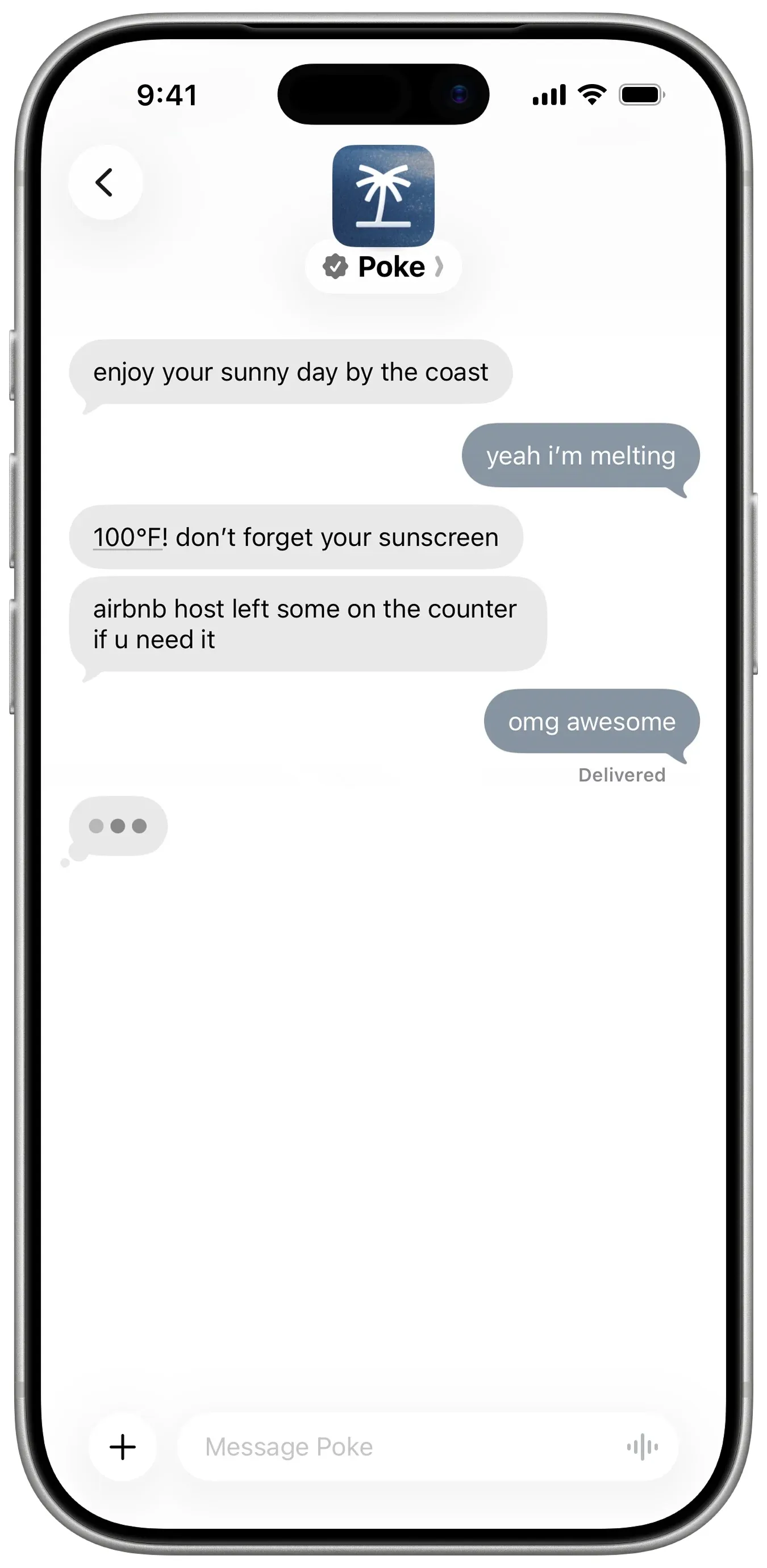
Poke बिना इनवाइट के वही अनुभव है। आप अपने फ़ोन नंबर से साइन अप करते हैं और इसे iMessage, SMS या Telegram पर मैसेज करते हैं। यह Gmail, Outlook, Google Calendar और कई अन्य ऐप्स से जुड़ता है, recipes नाम के ऑटोमेशन चलाता है, और जब किसी चीज़ पर ध्यान देना हो तो पहले खुद मैसेज करता है। मुफ़्त प्लान के लिए कार्ड नहीं चाहिए, और Pro $19 प्रति माह है।
आप क्या छोड़ते हैं: असली दुनिया के काम और प्राइवेसी। Poke आपके इनबॉक्स, कैलेंडर और ऐप्स पर केंद्रित है; फ़ोन कॉल और रिज़र्वेशन Poke Human से आते हैं, यानी लोग जो $199 वाले Ultra प्लान पर काम सँभालते हैं। Instinct की तरह, यह आपके डेटा पर ट्रेनिंग करता है जब तक आप Maximum Privacy न चुनें, यह नहीं बताता कि कौन-से मॉडल इस्तेमाल करता है, और अब यह Cognition का है, इसलिए इसकी दिशा बदल सकती है।
2. Lindy: काम के लिए टेक्स्टिंग असिस्टेंट, बिना ट्रेनिंग
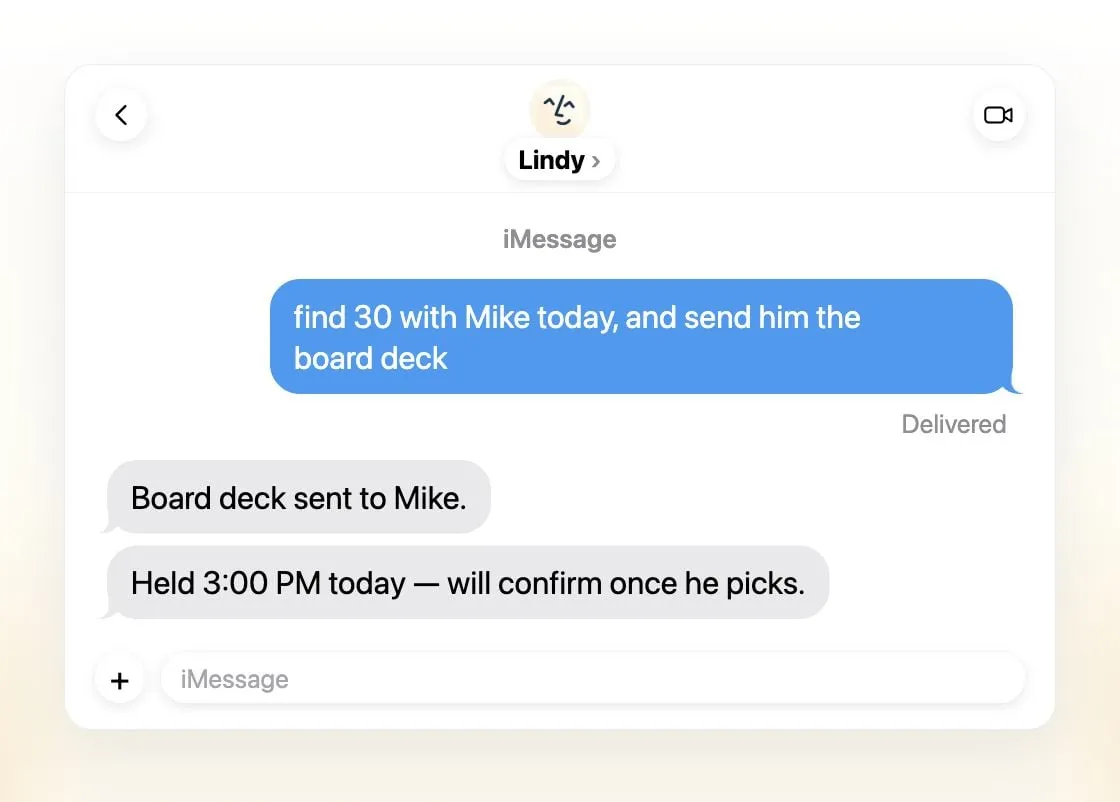
Lindy लगभग हर उस जगह उपलब्ध है जहाँ Instinct है, और उससे ज़्यादा: iMessage या SMS, Slack, अपना फ़ोन नंबर, ईमेल, Gmail एक्सटेंशन और वेब। यह ईमेल छाँटता है, जवाब का ड्राफ़्ट बनाता है, मीटिंग शेड्यूल करता है, कॉल रिकॉर्ड करता है और उनकी तैयारी कराता है, रोज़ ब्रीफ़िंग भेजता है, और बाहरी असर वाले किसी भी काम से पहले अनुमति माँगता है, ठीक वही सुरक्षा जो Instinct के टेस्टर्स चाहते थे। Lindy कहता है कि वह कभी आपके डेटा से मॉडल ट्रेन नहीं करता, और आप हर काम के लिए मॉडल चुनते हैं।
आप क्या छोड़ते हैं: कीमत और निजी काम। पेड सीट $49.99 प्रति उपयोगकर्ता प्रति माह से शुरू होती हैं, मुफ़्त क्रेडिट 7 दिन बाद खत्म हो जाते हैं, और Lindy काम के लिए बना है, किराने के लिए नहीं।
3. Muse: सबसे करीबी कामकाज वाला एजेंट
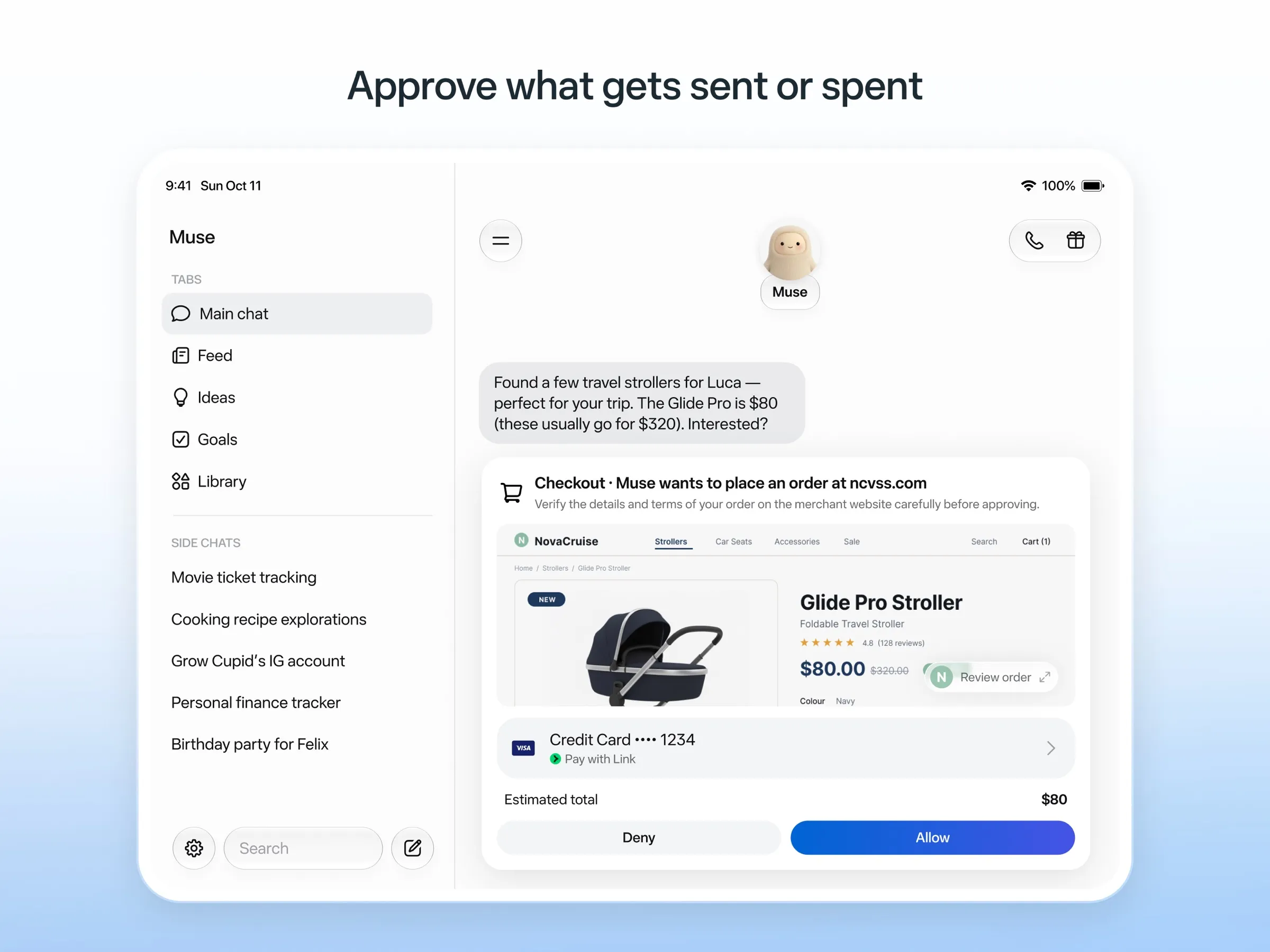
Meta का पर्सनल एजेंट Muse, कामकाज के मामले में Instinct का सबसे सीधा प्रतिद्वंद्वी है। यह ईमेल भेजने, यात्रा बुक करने और खरीदारी करने के लिए अपने क्लाउड कंप्यूटर पर काम करता है, ईमेल भेजने या खरीदारी से पहले पूछता है, अपने किए कामों का ऑडिट ट्रेल रखता है, और एक बार इस्तेमाल होने वाले कार्ड नंबरों से भुगतान करता है ताकि यह कभी आपका असली कार्ड न देखे। इसमें मुफ़्त टियर है और iOS, Android, Mac और वेब के लिए ऐप हैं।
आप क्या छोड़ते हैं: टेक्स्टिंग। Muse तीसरे स्थान पर है क्योंकि आप इसे इसके अपने ऐप में इस्तेमाल करते हैं; WhatsApp में इससे चैट करना कुछ देशों में सिर्फ़ सीमित टेस्टिंग में है। यह सिर्फ़ अमेरिका, कनाडा, जापान, सिंगापुर और मेक्सिको में है, मुफ़्त टियर के लिए भी पेमेंट कार्ड माँगता है, और आपके इंटरैक्शन Meta के मॉडल ट्रेन करते हैं जब तक आप ऑप्ट आउट न करें। Muse की अपनी अनुमति वाली चूकें भी रही हैं, जिनमें एक उपयोगकर्ता के घर का पता Marketplace के खरीदार के साथ साझा करना शामिल है।
4. Grok Bot: सबसे सक्षम, और यह फ़ोन कॉल करता है
Grok Bot एक स्थायी क्लाउड कंप्यूटर पर नाम वाले Bots चलाता है जो आपके ऐप्स में साइन इन करते हैं, शेड्यूल किए गए रूटीन चलाते हैं और संवेदनशील कामों से पहले अनुमति माँगते हैं। यह रिकॉर्ड किए गए डेमो से कोई काम सीख सकता है और आपकी ओर से अमेरिकी व्यवसायों को फ़ोन कर सकता है, जो यहाँ Instinct की कॉल के सबसे करीब है। यह हमारी चेकलिस्ट की हर चीज़ करता है।
आप क्या छोड़ते हैं: सरलता। यह दूसरों से नीचे है क्योंकि आप इसे टेक्स्ट थ्रेड के बजाय इसके ऐप्स से इस्तेमाल करते हैं (इसका चैट-ऐप चैनल Slack है), यह बिना मुफ़्त प्लान के $30 प्रति माह से शुरू होता है, हैलोवीन वीकेंड पर उपयोगकर्ता साप्ताहिक उपयोग सीमा तक जल्दी पहुँच गए, और आप मॉडल नहीं चुन सकते।

5. OpenClaw: निजी, खुद-करें वाला रास्ता
OpenClaw आपको Instinct का “बस मैसेज करें” वाला अनुभव आपकी अपनी शर्तों पर देता है। यह मुफ़्त और ओपन सोर्स है, आपके कंप्यूटर पर चलता है, और iMessage, WhatsApp, Telegram और 26 अन्य चैट चैनलों से आदेश लेता है। आप मॉडल चुनते हैं, लोकल मॉडल समेत, और आपकी मेमोरी और क्रेडेंशियल आपके हार्डवेयर पर रहते हैं। OpenClaw खुद कोई मॉडल ट्रेन नहीं करता।
आप क्या छोड़ते हैं: आसानी और डिफ़ॉल्ट सुरक्षा। यह आखिरी स्थान पर है क्योंकि इसके लिए आपकी अपनी मशीन और कमांड लाइन चाहिए, सैंडबॉक्सिंग डिफ़ॉल्ट रूप से बंद है, और महंगे मॉडलों के साथ मॉडल के बिल बढ़ सकते हैं। मेंटेनर चेतावनी देते हैं कि यह गैर-तकनीकी उपयोगकर्ताओं के लिए जोखिम भरा है।

आपको कौन-सा चुनना चाहिए?
- आप आज ही Instinct जैसा मैसेज वाला अनुभव मुफ़्त चाहते हैं: Poke.
- आप काम के लिए ऐसा टेक्स्टिंग असिस्टेंट चाहते हैं जो आपके डेटा पर ट्रेनिंग न करे: Lindy.
- आप बुकिंग और खरीदारी जैसे काम चाहते हैं: Muse.
- आप फ़ोन कॉल समेत सबसे सक्षम एजेंट चाहते हैं और भुगतान करेंगे: Grok Bot.
- आप अपने डेटा पर नियंत्रण चाहते हैं और सेटअप सँभाल सकते हैं: OpenClaw.
अगर आपको Instinct का इनवाइट मिल जाए, तो अपना ईमेल जोड़ने से पहले app.instinct.com/settings पर ट्रेनिंग बंद करें। यह भी देखें: Instinct क्या है।
विकल्प
$19/माह
A personal AI assistant you text in iMessage or Telegram that connects to your email, calendar and apps and messages you first when something needs attention.
Poke पर जाएँखूबियाँ
- Nothing to install: you sign up with a phone number and text it like a contact
- Messages you first, using your connected services and memory
- Free plan with no credit card, and email and calendar included
- Connects to Gmail, Outlook, Google Calendar, Notion, GitHub, Linear and many more apps, plus custom integrations through MCP
- Shareable automation recipes, and developers can build their own
कमियाँ
- Uses your data to train its AI models unless you choose Maximum Privacy
- WhatsApp support is limited to some markets
- Only one phone number per account
- Does not say which AI models it uses, and does not publish how many credits each plan includes
- Now owned by Cognition, so the product's direction may change
$49.99/माह
An AI assistant for work that runs your inbox, calendar and meetings, takes requests by iMessage, Slack, phone or browser, and sends you daily briefs.
Lindy पर जाएँखूबियाँ
- Texts you first: a personalized first message, alerts on time-sensitive email, and daily briefs
- Reachable almost anywhere: iMessage or SMS, Slack, its own phone number, Gmail via a Chrome extension, and the web
- 1,500+ integrations plus any hosted MCP server, and a browser for tools without one
- Asks for approval before anything with outside impact
- Says it never uses your data to train models, with SOC 2 Type II, GDPR and PIPEDA compliance
कमियाँ
- Expensive for individuals: paid seats start at $49.99 per user a month, and free credits last only 7 days
- Credit-based usage is hard to predict, from 2 credits for a simple ask to 2,500 for a big build
- One shared Lindy per team rather than separate assistants for different jobs
- No mobile app; on phones you use iMessage, SMS or calls
- Plan names differ between its pricing page and its docs, so it is hard to tell what each tier includes
$20/माह
Meta's personal AI agent that sends email, books travel and shops for you from its own cloud computer, in the Muse app or on the web.
Muse पर जाएँखूबियाँ
- Free tier, and no technical setup: you message it like a person in the app or on the web
- Runs on its own cloud computer and keeps working after you close the app
- Asks before sending email or buying, and shows an audit trail of what it did and plans to do
- Purchases go through a one-time card number with Link's purchase protections, so the agent never sees your real card
- Connects to email, calendar and Instagram, and can use a browser for sites without an API
कमियाँ
- Only in the US, Canada, Japan, Singapore and Mexico so far, and Meta says Muse is still in limited testing
- Requires a payment card even for the free tier, and the stronger Muse Wonder model is for paid plans only
- Your interactions train Meta's AI models unless you opt out
- Free usage limit is not published, so it is hard to know when you will hit it
- Early users and press reported it overstepping permissions, such as reading messages it was not meant to
- Requires a Meta account and asks for broad access to email, calendars and payments
$30/माह
Always-on AI agents from SpaceXSI that run on a shared cloud computer, sign in to your apps and finish multi-step work while you're away.
Grok Bot पर जाएँखूबियाँ
- Bots work on their own cloud computer, so tasks keep running when your laptop or phone is closed
- Can operate websites and apps that have no API, using saved logins it never sees in plain text
- Several Bots can run in parallel, message each other and share one workspace
- Routines can run on a schedule or after an event, and a Bot can learn a task from a recorded demonstration of up to 10 minutes
- Can place phone calls to US businesses for you and send a summary afterwards
- Native apps for macOS, Windows, Linux, iOS and Android, plus Slack
कमियाँ
- No free plan and no standalone price: the cheapest way in is the $30/month Premium plan
- Usage comes from a weekly pool shared with Grok and Cursor, and SpaceXSI does not publish how much work that pool covers
- No model picker: Grok Bot chooses the model for each task and does not show which one it used
- All Bots on an account share one computer, files and logins; the docs say not to use separate Bots as a security boundary
- Users report Amazon blocks it from shopping as an unauthorized AI agent; Amazon hasn't commented
- Still labelled beta, with no browser version
Free, MIT-licensed personal AI agent that runs on your own computer and takes orders from WhatsApp, Telegram, iMessage, Slack and 20+ other chat apps.
OpenClaw पर जाएँखूबियाँ
- Free and MIT licensed, with no paid tier
- Runs on your own hardware; state, memory and credentials stay local, and it sends nothing home except an optional daily version check
- Works in 29 chat channels, including WhatsApp, Telegram, iMessage, Slack, Discord and Microsoft Teams
- Model-agnostic: 64 model and media providers, plus local models
- Large ecosystem of skills and 142 official plugins, and very active development
कमियाँ
- Model costs are on you and can run high: testers and users have reported spending over $100 in a day with expensive models
- Sandboxing is off by default and the agent can run commands on the host unless you turn on approvals
- Setup and upkeep expect comfort with the command line; maintainers warn it is risky for non-technical users
- Broad access to email, messages and the system makes prompt injection and malicious third-party skills a real risk
फ़ीचर
| Instinct | Poke | Lindy | Muse | Grok Bot | OpenClaw | |
|---|---|---|---|---|---|---|
| वेब सर्च | हाँ | हाँ | हाँ | हाँ | हाँ | हाँ |
| इमेज बनाना | अज्ञात | अज्ञात | हाँ | हाँ | हाँ | हाँ |
| वॉइस मोड | हाँ | हाँ | हाँ | हाँ | हाँ | हाँ |
| फ़ाइल अपलोड | हाँ | हाँ | हाँ | हाँ | हाँ | हाँ |
| मेमोरी | हाँ | हाँ | हाँ | हाँ | हाँ | हाँ |
| आपके लिए काम करता है | हाँ | हाँ | हाँ | हाँ | हाँ | हाँ |
| ऐप इंटीग्रेशन | हाँ | हाँ | हाँ | हाँ | हाँ | हाँ |
| खुद से काम करता है | हाँ | हाँ | हाँ | हाँ | हाँ | हाँ |
| पहले ख़ुद मैसेज करता है | हाँ | हाँ | हाँ | हाँ | हाँ | हाँ |
| कई बॉट | अज्ञात | अज्ञात | नहीं | अज्ञात | हाँ | हाँ |
स्रोत
Instinct
- Instinct homepage8 नव॰ 2026 को जाँचा गया
- Instinct Terms of Service (last revised Aug 26, 2026)8 नव॰ 2026 को जाँचा गया
- TechCrunch: Instinct brings its AI agent to group chats8 नव॰ 2026 को जाँचा गया
- Fortune: Noah Shinn's viral AI assistant Instinct raises $1B Series C8 नव॰ 2026 को जाँचा गया
- Vellum: Instinct breakdown (competitor; summary of early tester reports)8 नव॰ 2026 को जाँचा गया
- Digit: Instinct clarifies WhatsApp outage (works through WhatsApp and iMessage)8 नव॰ 2026 को जाँचा गया
- RuntimeWire: Instinct brings its group AI agent to iMessage for all users (Oct 29, 2026)8 नव॰ 2026 को जाँचा गया
- Privacy Policy | Instinct8 नव॰ 2026 को जाँचा गया
- Built In: What Is Instinct AI? (Oct 21, 2026)8 नव॰ 2026 को जाँचा गया
Poke
- Poke homepage8 नव॰ 2026 को जाँचा गया
- Poke pricing8 नव॰ 2026 को जाँचा गया
- Poke FAQ8 नव॰ 2026 को जाँचा गया
- Poke privacy notice (last updated September 11, 2026)8 नव॰ 2026 को जाँचा गया
- Cognition: welcoming The Interaction Company to Cognition (July 23, 2026)8 नव॰ 2026 को जाँचा गया
- TechCrunch: Poke makes using AI agents as easy as sending a text8 नव॰ 2026 को जाँचा गया
- TechCrunch: Apple approves Poke as the first AI agent on its Messages for Business platform8 नव॰ 2026 को जाँचा गया
- Introducing Poke.com (launch announcement, September 8, 2025)8 नव॰ 2026 को जाँचा गया
- Poke docs: Welcome (built-in web search)8 नव॰ 2026 को जाँचा गया
- Poke release notes (web search, sharing images, attachments)8 नव॰ 2026 को जाँचा गया
Lindy
- Lindy homepage8 नव॰ 2026 को जाँचा गया
- Lindy pricing8 नव॰ 2026 को जाँचा गया
- Lindy docs: What is Lindy?8 नव॰ 2026 को जाँचा गया
- Lindy docs: iMessage & SMS8 नव॰ 2026 को जाँचा गया
- Lindy docs: Phone Calls8 नव॰ 2026 को जाँचा गया
- Lindy docs: Ad Hoc Tasks (research)8 नव॰ 2026 को जाँचा गया
- Lindy docs: Pricing and credits8 नव॰ 2026 को जाँचा गया
- Lindy Assistant: The AI that runs your work life8 नव॰ 2026 को जाँचा गया
- Lindy docs: Set up Lindy (web search, image generation)8 नव॰ 2026 को जाँचा गया
- Lindy docs: Files (drop files and folders in for Lindy to use)8 नव॰ 2026 को जाँचा गया
- Lindy changelog (Creatives: on-brand images, Sep 16, 2026)8 नव॰ 2026 को जाँचा गया
Muse
- Meta: Introducing Muse, the world's first personal AI agent built for everyone8 नव॰ 2026 को जाँचा गया
- Muse homepage8 नव॰ 2026 को जाँचा गया
- Meta Help Center: About Muse subscriptions8 नव॰ 2026 को जाँचा गया
- Meta Help Center: Meta AI, Muse and Vibes are separate apps8 नव॰ 2026 को जाँचा गया
- TechCrunch: Meta debuts its Muse AI agent. Will consumers trust it?8 नव॰ 2026 को जाँचा गया
- 9to5Mac: Muse personal agent gets apps for iPhone and Mac8 नव॰ 2026 को जाँचा गया
- The Guardian TechScape: early Muse users report the agent overstepping permissions8 नव॰ 2026 को जाँचा गया
- iPhone in Canada: Meta's Muse AI agent is now available in Canada8 नव॰ 2026 को जाँचा गया
- Superpower Daily: Meta launches Muse in Japan (Oct 23, 2026)8 नव॰ 2026 को जाँचा गया
- Meta: Muse is now available in Singapore (Oct 27, 2026)8 नव॰ 2026 को जाँचा गया
- Mexico News Daily: Meta launches its Muse AI agent in Mexico (Nov 6, 2026)8 नव॰ 2026 को जाँचा गया
- Meta Q3 2026 earnings call transcript: Muse Wonder in the paid tier, free tier on Muse Spark8 नव॰ 2026 को जाँचा गया
- How to manage reminders and scheduled tasks with Muse8 नव॰ 2026 को जाँचा गया
- WhatsApp Help Center: About chatting with your Muse agent through WhatsApp8 नव॰ 2026 को जाँचा गया
- TechCrunch: Meta's Muse hits Mac8 नव॰ 2026 को जाँचा गया
- Meta AI: Muse features and FAQ (browses the web, generates images)8 नव॰ 2026 को जाँचा गया
- Meta Help Center: How your Muse agent browses the web8 नव॰ 2026 को जाँचा गया
- Meta Help Center: How to use Muse with artifacts (uploads, image generation)8 नव॰ 2026 को जाँचा गया
- Meta Help Center: How to get started with Muse8 नव॰ 2026 को जाँचा गया
Grok Bot
- Grok Bot product page and FAQ8 नव॰ 2026 को जाँचा गया
- SpaceXSI pricing: The X Subscription plans8 नव॰ 2026 को जाँचा गया
- Introducing Grok Bot (launch post, Aug 11, 2026)8 नव॰ 2026 को जाँचा गया
- Grok Bot FAQ: plans, platforms, memory, privacy and limits8 नव॰ 2026 को जाँचा गया
- Grok Bot docs: Create and manage Bots8 नव॰ 2026 को जाँचा गया
- Grok Bot changelog (v0.78.1, Oct 27, 2026)8 नव॰ 2026 को जाँचा गया
- Cursor help: Grok Bot plans and usage8 नव॰ 2026 को जाँचा गया
- Teslarati: Grok Bot can now call US businesses (Nov 2026)8 नव॰ 2026 को जाँचा गया
- Teslarati: Amazon shuts out Grok Bot (Oct 15, 2026)8 नव॰ 2026 को जाँचा गया
- Grok Bot docs: Overview (proactive teammate, morning briefing)8 नव॰ 2026 को जाँचा गया
- Grok Bot docs: Chat and collaboration (Slack DMs, X Chat rolling out)8 नव॰ 2026 को जाँचा गया
- Grok Bot docs: Get started (desktop and mobile apps)8 नव॰ 2026 को जाँचा गया
- Grok Bot docs: Skills, routines and automations8 नव॰ 2026 को जाँचा गया
- SpaceXSI: Team Bots in public beta (Sep 28, 2026)8 नव॰ 2026 को जाँचा गया
- Wikipedia: SpaceXAI (xAI renamed SpaceXAI, then SpaceXSI)8 नव॰ 2026 को जाँचा गया
- Cursor: Data Use & Privacy Overview (Privacy Mode and training)8 नव॰ 2026 को जाँचा गया
OpenClaw
- OpenClaw homepage and Foundation section8 नव॰ 2026 को जाँचा गया
- OpenClaw integrations: channels, providers and plugins8 नव॰ 2026 को जाँचा गया
- openclaw/openclaw on GitHub (MIT, v2026.11.1)8 नव॰ 2026 को जाँचा गया
- OpenClaw docs: Sandboxing (off by default)8 नव॰ 2026 को जाँचा गया
- Wikipedia: OpenClaw8 नव॰ 2026 को जाँचा गया
- Notebookcheck: OpenClaw can burn through hundreds of dollars per day8 नव॰ 2026 को जाँचा गया
- OpenClaw docs: Memory overview8 नव॰ 2026 को जाँचा गया
- OpenClaw docs: Automations8 नव॰ 2026 को जाँचा गया
- OpenClaw docs: Chat channels8 नव॰ 2026 को जाँचा गया
- OpenClaw docs: iMessage8 नव॰ 2026 को जाँचा गया
- OpenClaw docs: Heartbeat, now a default Proactive check job8 नव॰ 2026 को जाँचा गया
- OpenClaw docs: Multi-agent routing8 नव॰ 2026 को जाँचा गया
- OpenClaw docs: Platforms (macOS, Windows, Linux, iOS and Android apps)8 नव॰ 2026 को जाँचा गया
- OpenClaw docs: Tools (exec, browser, web search)8 नव॰ 2026 को जाँचा गया
- OpenClaw docs: Audio and voice notes (inbound transcription)8 नव॰ 2026 को जाँचा गया
- OpenClaw docs: Image and media support (inbound media)8 नव॰ 2026 को जाँचा गया