Pokeの代替:テキストで使えるAIアシスタント
Cognitionとの取引や学習のデフォルト設定を理由にPokeの代替を探している人へ。ホスト型で最も近いのはLindy、OpenClawとHermes Agentは無料です。
早わかり







Pokeに最も近い代替はLindyです。iMessageやSMSでテキストを送ると、通知や毎日のブリーフィングを自分から送ってきて、あなたのデータで学習することは一切ないとしています。ただし月$49.99かかります。Pokeの無料という価格を維持したく、ソフトウェアを自分で動かせるなら、OpenClawかHermes Agentを使いましょう。どちらもiMessage、WhatsApp、Telegramで返信し、モデルを選べます。
開示:4位のRakazoは当サイトの運営会社が開発しています。他と同じ基準で順位付けしています。
Pokeの代替が探される理由
Pokeは、パーソナルアシスタントを連絡先の1人のように感じさせました。アプリはなく、電話番号で登録して、iMessage、SMS、Telegramでテキストを送るだけです。メール、カレンダーなど多くのアプリに接続し、レシピと呼ばれる自動化を実行し、対応が必要なことがあれば自分から連絡してきます。無料プランはカード不要です。当サイトのチェックリストで唯一満たしていないのは、複数のボットを動かせることです。それでも他を探す人がいる理由はいくつかあります。
- デフォルトで学習に使われる。 Pokeのプライバシー通知には、Maximum Privacyを選ばない限り、あなたのデータがモデルの学習に使われる可能性があると書かれています。
- 新しいオーナー。 Pokeの開発元は2026年7月にCognitionに加わりました。Cognitionは既存のユーザーはこれまでどおりPokeを使えるとしていますが、製品の方向性は変わる可能性があります。
- 中身がわからない。 Pokeはどのモデルを使っているか、各プランにどれだけのクレジットが含まれるかを明らかにしていないため、いつ上限に達するか予測できません。
- チャネルと番号の制限。 WhatsAppは一部の市場でしか使えず、1つのアカウントに登録できる電話番号は1つだけです。
- 現実世界のタスクは$199。 予約や電話を担当する人によるサービスPoke Humanは、Ultraプランにしかありません。
順位付けの方法
Pokeがすることは2つです。メール、カレンダー、アプリに目を配って自分から連絡してくること、そしてテキストの中にいることです。そこで、ここで紹介する最初の4つのツールは同じ仕事(あなたのアカウントで行動し、自分から連絡してくる)をこなし、最後の2つは、Pokeの使い方がその方向に広がった人のために、プロジェクトやルーティンといった隣接する仕事をこなします。各グループの中では、自分のサーバーを運用せずにiMessage、WhatsApp、Telegramでテキストを送れるツールを先に、次にセルフホストすればテキストを送れるツールを並べました。同点の場合は対応するチャットアプリが多いほう、次に料金が安いほうを優先しました。当サイトの総合評価は上の表にあります。
1. Lindy:ホスト型で最も近いテキストアシスタント
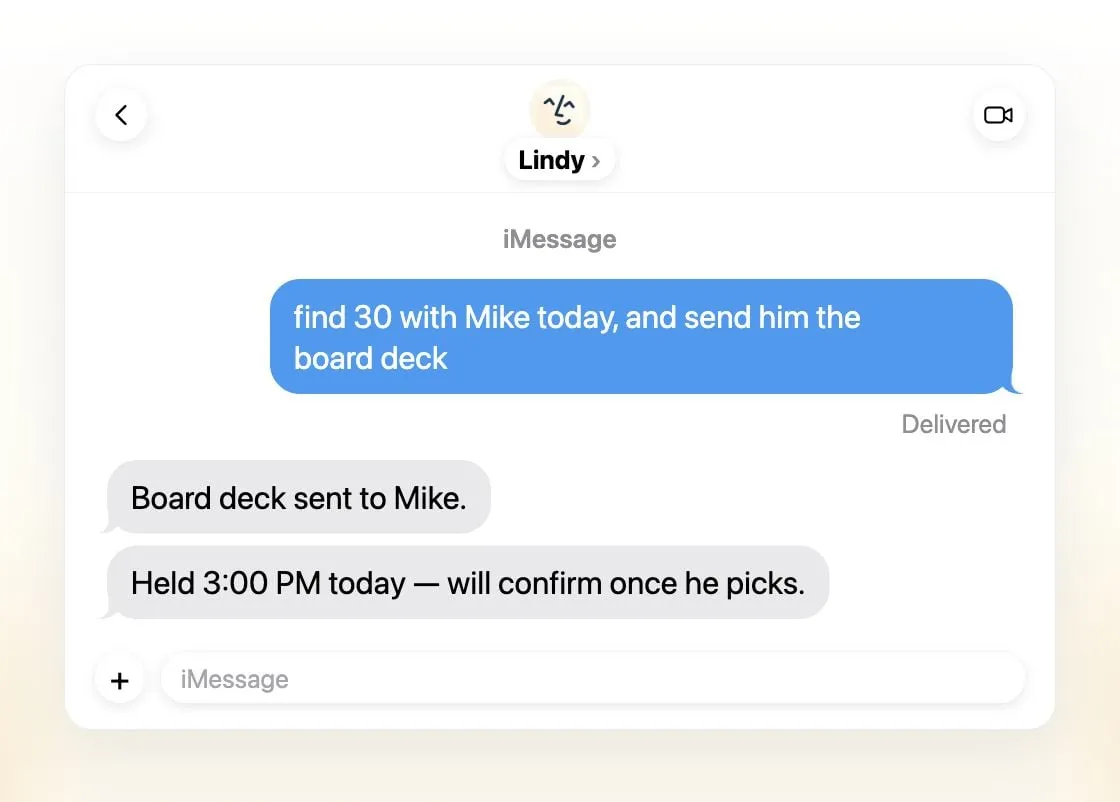
Lindyは、ここで紹介するホスト型ツールの中で、何も設定せずにiMessageやSMSでテキストを送れる唯一のツールで、Pokeと同じように振る舞います。パーソナライズされた最初のメッセージ、急ぎのメールの通知、毎日のブリーフィング。仕事の面ではさらに充実しており、メールの仕分けとあなたの口調での返信の下書き、スケジュール調整、会議の録音と準備、電話をかけられる専用の番号、1,500以上の連携とMCPサーバーがあります。外部に影響することの前には確認を求めます。Lindyはあなたのデータをモデルの学習に使うことは一切ないとしており、タスクごとにモデルを選べます。これはPokeから離れる主な理由の2つです。
諦めるもの: 料金と個人向けの側面。有料シートは1ユーザーあたり月$49.99から、無料クレジットは7日で失効し、Lindyは個人的な用事ではなく小規模チームと仕事のために作られています。モバイルアプリはありませんが、テキストで使うなら必要ありません。
2. OpenClaw:無料で、あらゆるチャットアプリに
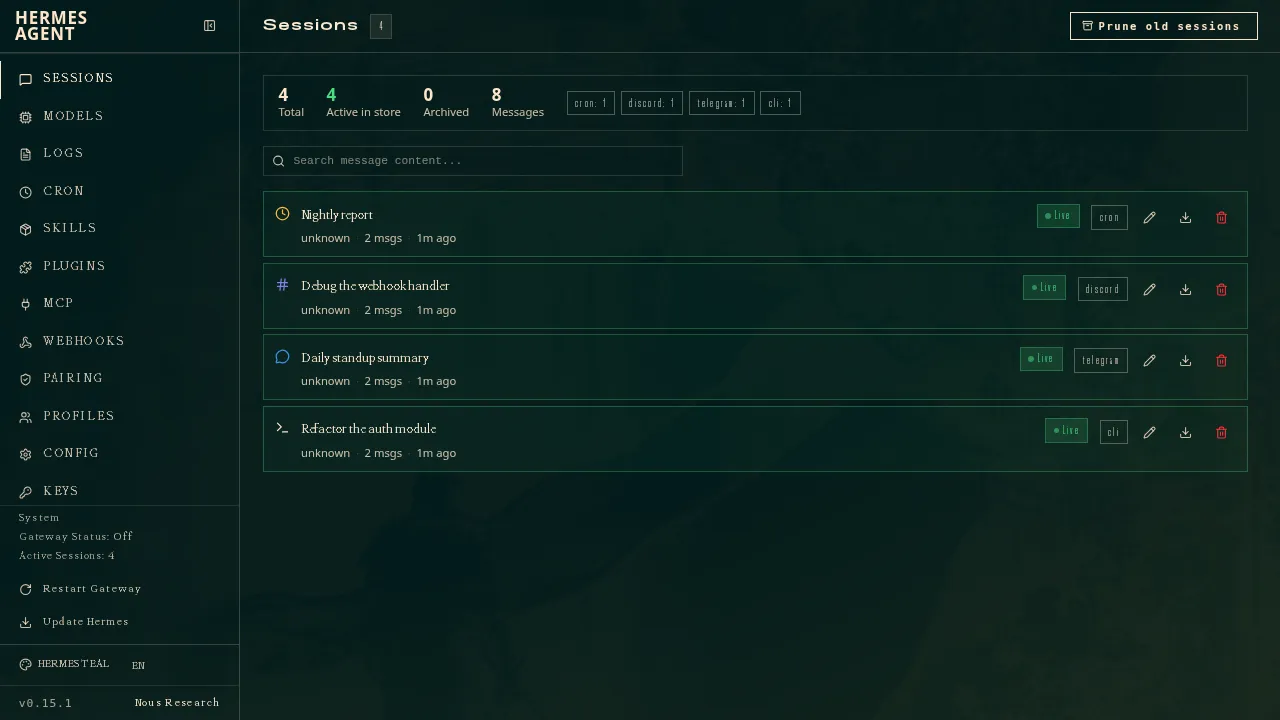
OpenClawは、iMessage、WhatsApp、Telegram、Slack、Discordを含む29のチャットチャネルで返信するため、普段いる場所からテキストを送れます。無料でMITライセンス、あなた自身のコンピューターで動き、64のモデル・メディアプロバイダーやローカルモデルで動作するため、どのモデルを使っているか常にわかります。OpenClaw自体はモデルの学習を一切行いません。
諦めるもの: 手軽さとデフォルトの安全性。自分で運用する必要があり、セットアップにはコマンドラインが前提で、サンドボックスはデフォルトでオフです。ソフトウェアは無料でもモデルは無料ではなく、高価なモデルでは1日$100の請求が発生した例もあります。

3. Hermes Agent:無料で、あなたのルーティンを学ぶ
Nous ResearchのHermes Agentもチャットアプリの中にいます。1つのゲートウェイで、Telegram、WhatsApp、Signal、SMS、メール、iMessageを含む20以上のプラットフォームにつながります。複雑なタスクの後に再利用できるスキルを書き、記憶とあなたのプロファイルを保持し、自分から様子をうかがってきます。MITライセンスでモデルを問わず、仕事の異なる複数のエージェントを動かせます。
OpenClawより下位なのは、対応するチャットアプリが少なく、iMessageにはMac上の別のBlueBubblesサーバーが必要なためです。主にiPhoneからテキストを送るPokeのユーザーにとっては、余分な手間になります。提供元を選びたくない場合は、オプションの$20のNous Portalプランでモデルとホスト型のクラウドエージェント1つがセットになります。
諦めるもの: 「何もインストールしない」という点。セットアップにはコマンドラインと自分のマシンが前提で、ネイティブのモバイルアプリはありません。
4. Rakazo:複数のボット、自分のモデル、セルフホストならテキストも
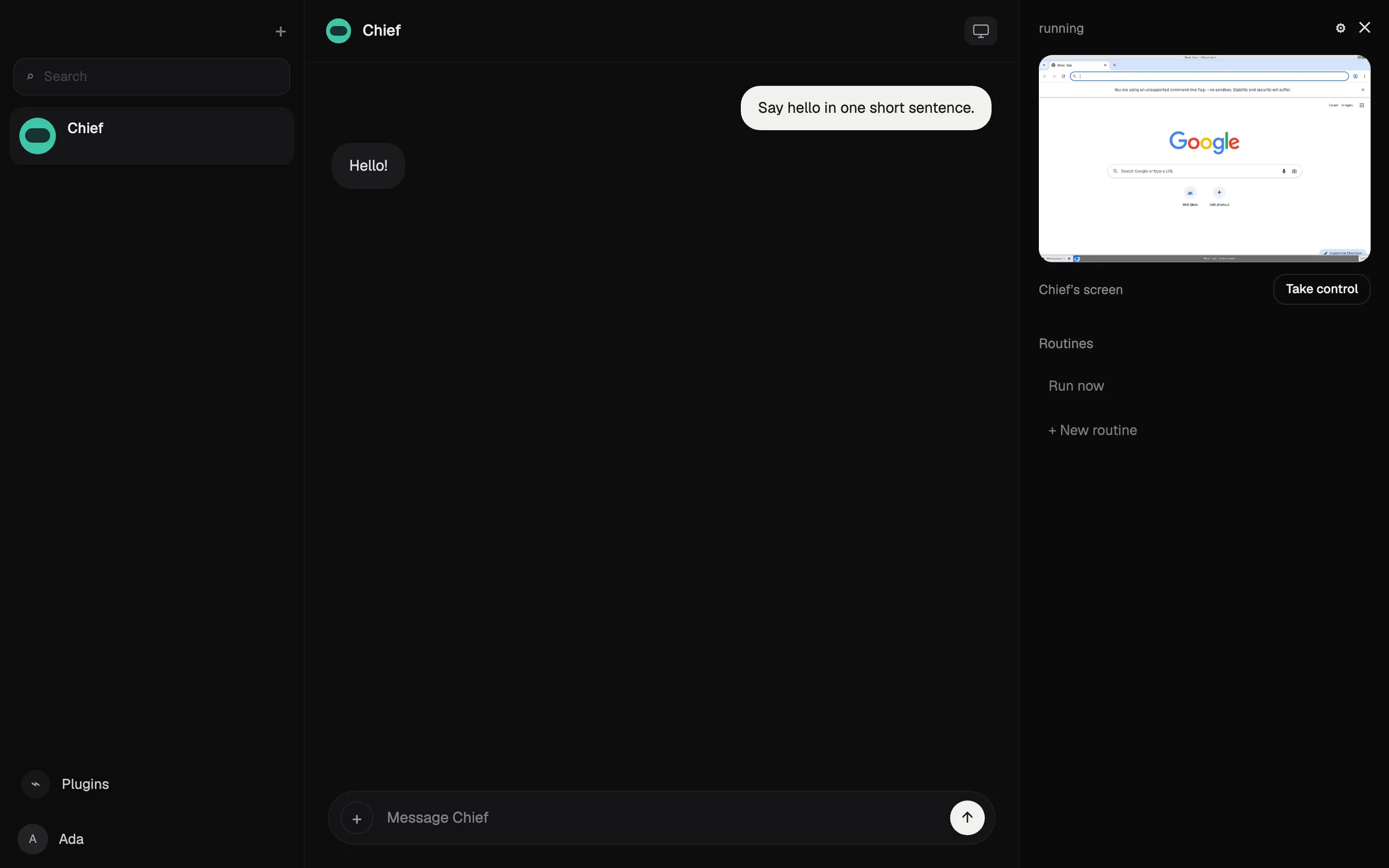
Rakazoは常駐するボットを動かし、各ボットは仕事、メモリ、ルーティン、そしてブラウザとターミナルを備えた独自のサンドボックス環境のコンピューターを持ちます。既存のClaudeやChatGPTのサブスクリプションやローカルモデルを含め、ボットごとにモデルを選べ、どの操作に承認が必要かはあなたが決めます。セルフホストは無料で、Telegram、WhatsApp、iMessageが加わります。
OpenClawやHermes Agentより下位なのは、対応するチャットアプリが少ないためです。月$15からのホスト型プランが対応するのはSlackとRakazo自身のアプリで、テキストでのやり取りはセルフホスト時にしか使えません。
諦めるもの: シンプルさ。Rakazoはベータ版で、番号にテキストを送るよりセットアップの手間がかかり、ホスト型プランではRakazoのクレジットを購入しない限りモデルの提供元に別途料金を払います。

5. Manus:無料プランあり、Telegramで使える
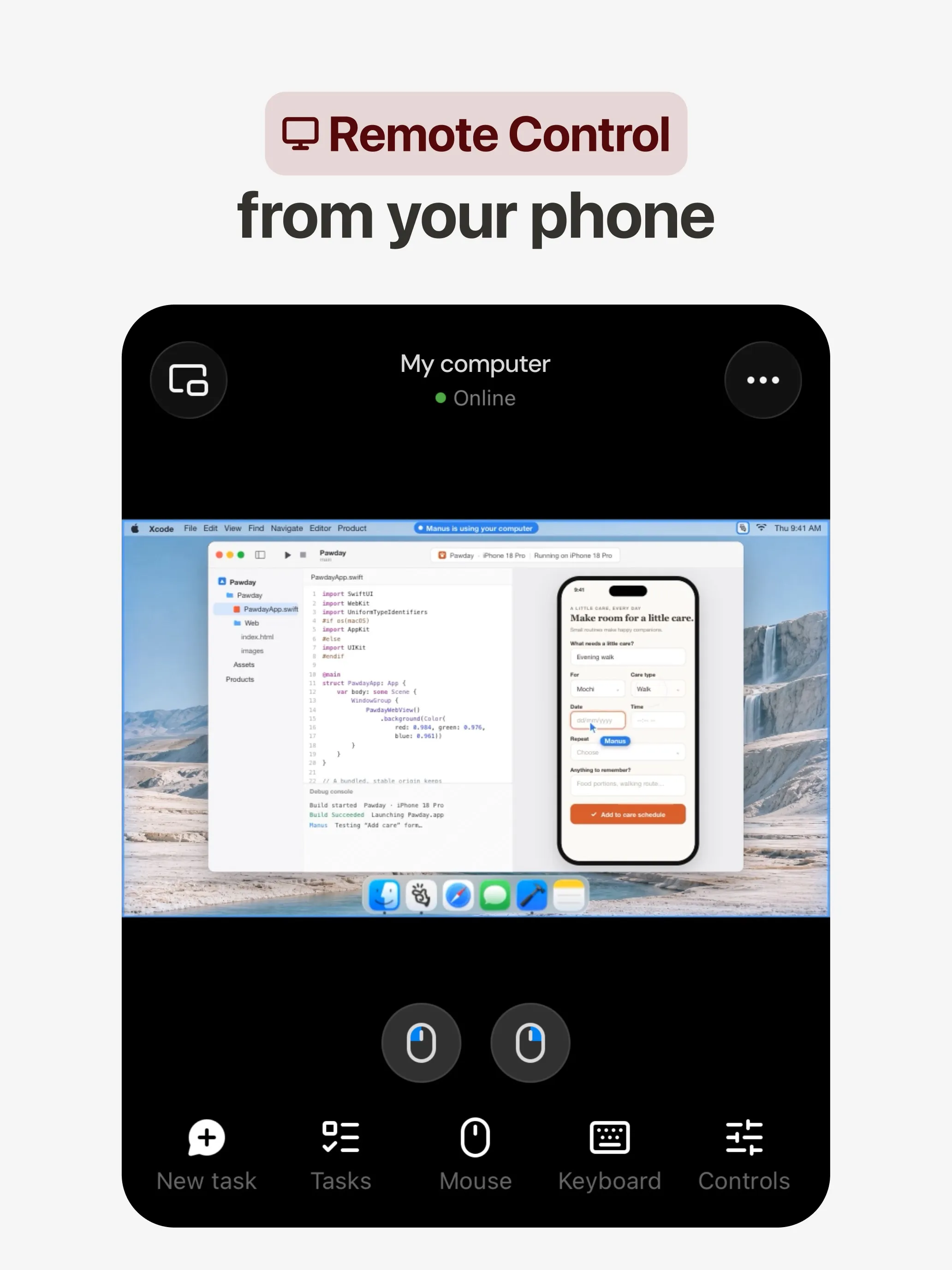
Manusは別の種類のアシスタントです。タスクを渡すと独自の環境で計画して完了させ、レポート、Webサイト、スライド、動画を返します。TelegramでもSlackでもメッセージを送れ、AutomationsはGmail、Slack、Notionのイベントで起動します。無料プランがあります。
諦めるもの: そばにいるアシスタントという感覚。Manusはプロジェクトのために作られており、受信トレイやカレンダーについて毎日知らせてくれるものではありません。クレジットはタスクの複雑さに応じて消費されるため、コストはPokeと同じくらい予測しにくいです。
6. Grok Bot:最も高機能、仕事向け
Grok Botは常設のクラウドPC上で名前付きのBotsを動かします。Botsはあなたのアプリにサインインし、スケジュールやトリガーでルーティンを実行し、あなたに代わって米国の企業に電話をかけることもできます。Pokeが$199のプランに限定している種類のタスクです。
諦めるもの: テキストでのやり取り。チャットアプリのチャネルはSlackなので、普段はデスクトップやモバイルのアプリで使います。無料プランはなく月$30から、モデルは選べず、ハロウィーンの週末には週ごとの利用量を早々に使い切ったユーザーもいました。

どれを選ぶべきか
- Pokeのようにテキストで使え、データで学習せず、仕事向け: Lindy。
- 無料で、あらゆるチャットアプリで使え、自分で運用できる: OpenClaw。
- 無料で、あなたのルーティンを学ぶエージェント: Hermes Agent。
- 自分のモデルで、それぞれサンドボックスを持つ複数のボット: Rakazo。
- 依頼が実質的にプロジェクト: Manus。
- $199を払わずに電話とルーティンが欲しい: Grok Bot。
Pokeを使い続けるなら、データを学習に使われたくない場合は、メールを接続する前にMaximum Privacyに切り替えましょう。
代替サービス
月額$49.99
An AI assistant for work that runs your inbox, calendar and meetings, takes requests by iMessage, Slack, phone or browser, and sends you daily briefs.
Lindyを開く長所
- Texts you first: a personalized first message, alerts on time-sensitive email, and daily briefs
- Reachable almost anywhere: iMessage or SMS, Slack, its own phone number, Gmail via a Chrome extension, and the web
- 1,500+ integrations plus any hosted MCP server, and a browser for tools without one
- Asks for approval before anything with outside impact
- Says it never uses your data to train models, with SOC 2 Type II, GDPR and PIPEDA compliance
短所
- Expensive for individuals: paid seats start at $49.99 per user a month, and free credits last only 7 days
- Credit-based usage is hard to predict, from 2 credits for a simple ask to 2,500 for a big build
- One shared Lindy per team rather than separate assistants for different jobs
- No mobile app; on phones you use iMessage, SMS or calls
- Plan names differ between its pricing page and its docs, so it is hard to tell what each tier includes
Free, MIT-licensed personal AI agent that runs on your own computer and takes orders from WhatsApp, Telegram, iMessage, Slack and 20+ other chat apps.
OpenClawを開く長所
- Free and MIT licensed, with no paid tier
- Runs on your own hardware; state, memory and credentials stay local, and it sends nothing home except an optional daily version check
- Works in 29 chat channels, including WhatsApp, Telegram, iMessage, Slack, Discord and Microsoft Teams
- Model-agnostic: 64 model and media providers, plus local models
- Large ecosystem of skills and 142 official plugins, and very active development
短所
- Model costs are on you and can run high: testers and users have reported spending over $100 in a day with expensive models
- Sandboxing is off by default and the agent can run commands on the host unless you turn on approvals
- Setup and upkeep expect comfort with the command line; maintainers warn it is risky for non-technical users
- Broad access to email, messages and the system makes prompt injection and malicious third-party skills a real risk
月額$20
Free, MIT-licensed AI agent from Nous Research that runs on your own machine or server, learns reusable skills, and chats with you on Telegram, Slack and more.
Hermes Agentを開く長所
- Free and MIT licensed, and runs on hardware you control
- Writes and refines its own skills from experience, on top of persistent memory and cross-session search
- One gateway for 20+ chat platforms, including Telegram, Discord, Slack, WhatsApp, Signal and email
- Run several separate agents as profiles, each with its own model, memory and skills, and let them talk in group chats
- Model-agnostic, with a one-command import from OpenClaw
短所
- Setup expects comfort with the command line and with running your own server
- Model costs are on you unless you use free models, and hosted web search, images and speech need a paid Nous Portal plan or your own keys
- iMessage needs a separate BlueBubbles server on a Mac
- No native mobile app; Android support is a command-line install through Termux
月額$10
Open-source, self-hostable platform for persistent AI bots that each get a job, a computer, memory and routines, using the model you choose.
Rakazoを開く長所
- Open source (Apache-2.0) and fully self-hostable, including with local models
- Choice of model per bot, including existing Claude or ChatGPT subscriptions
- Bots keep working on schedules and triggers with their own cloud computer
- Approval controls over which actions a bot may take on its own
短所
- Still in beta, with frequent releases
- You supply and pay for the model on the hosted plans, unless you buy Rakazo credits
- Telegram, WhatsApp and iMessage/SMS are only available when self-hosted
- More setup than a single chat app
月額$20
General-purpose AI agent that researches, builds websites, slides, videos and games, and runs automations on its own cloud computer.
Manusを開く長所
- Turns one prompt into finished output: research reports, websites, slides, videos and playable games
- Automations can start from a schedule or an event in a connected service such as Gmail, Slack or Notion
- Video Editor and Game Dev let you edit what the agent made instead of regenerating it
- Free plan to try it, with apps for web, iOS, Android, macOS and Windows
短所
- Credit-based pricing makes costs hard to predict, and long or failed runs can use up credits
- Free daily credits are capped at 1,500 a month and only work in the Lite mode
- A built-in training opt-out is listed only for Team plans
- Several plans share the Pro name and differ only by credit amount
月額$30
Always-on AI agents from SpaceXSI that run on a shared cloud computer, sign in to your apps and finish multi-step work while you're away.
Grok Botを開く長所
- Bots work on their own cloud computer, so tasks keep running when your laptop or phone is closed
- Can operate websites and apps that have no API, using saved logins it never sees in plain text
- Several Bots can run in parallel, message each other and share one workspace
- Routines can run on a schedule or after an event, and a Bot can learn a task from a recorded demonstration of up to 10 minutes
- Can place phone calls to US businesses for you and send a summary afterwards
- Native apps for macOS, Windows, Linux, iOS and Android, plus Slack
短所
- No free plan and no standalone price: the cheapest way in is the $30/month Premium plan
- Usage comes from a weekly pool shared with Grok and Cursor, and SpaceXSI does not publish how much work that pool covers
- No model picker: Grok Bot chooses the model for each task and does not show which one it used
- All Bots on an account share one computer, files and logins; the docs say not to use separate Bots as a security boundary
- Users report Amazon blocks it from shopping as an unauthorized AI agent; Amazon hasn't commented
- Still labelled beta, with no browser version
機能
| Poke | Lindy | OpenClaw | Hermes Agent | Rakazo | Manus | Grok Bot | |
|---|---|---|---|---|---|---|---|
| ウェブ検索 | あり | あり | あり | あり | あり | あり | あり |
| 画像生成 | 不明 | あり | あり | あり | あり | あり | あり |
| 音声モード | あり | あり | あり | あり | あり | あり | あり |
| ファイルのアップロード | あり | あり | あり | あり | あり | あり | あり |
| メモリー | あり | あり | あり | あり | あり | あり | あり |
| 代わりに操作を実行 | あり | あり | あり | あり | あり | あり | あり |
| アプリ連携 | あり | あり | あり | あり | あり | あり | あり |
| 自律的に動作 | あり | あり | あり | あり | あり | あり | あり |
| 自分から連絡してくる | あり | あり | あり | あり | あり | あり | あり |
| 複数のボット | 不明 | なし | あり | あり | あり | 不明 | あり |
出典
Poke
- Poke homepage2026/11/08確認
- Poke pricing2026/11/08確認
- Poke FAQ2026/11/08確認
- Poke privacy notice (last updated September 11, 2026)2026/11/08確認
- Cognition: welcoming The Interaction Company to Cognition (July 23, 2026)2026/11/08確認
- TechCrunch: Poke makes using AI agents as easy as sending a text2026/11/08確認
- TechCrunch: Apple approves Poke as the first AI agent on its Messages for Business platform2026/11/08確認
- Introducing Poke.com (launch announcement, September 8, 2025)2026/11/08確認
- Poke docs: Welcome (built-in web search)2026/11/08確認
- Poke release notes (web search, sharing images, attachments)2026/11/08確認
Lindy
- Lindy homepage2026/11/08確認
- Lindy pricing2026/11/08確認
- Lindy docs: What is Lindy?2026/11/08確認
- Lindy docs: iMessage & SMS2026/11/08確認
- Lindy docs: Phone Calls2026/11/08確認
- Lindy docs: Ad Hoc Tasks (research)2026/11/08確認
- Lindy docs: Pricing and credits2026/11/08確認
- Lindy Assistant: The AI that runs your work life2026/11/08確認
- Lindy docs: Set up Lindy (web search, image generation)2026/11/08確認
- Lindy docs: Files (drop files and folders in for Lindy to use)2026/11/08確認
- Lindy changelog (Creatives: on-brand images, Sep 16, 2026)2026/11/08確認
OpenClaw
- OpenClaw homepage and Foundation section2026/11/08確認
- OpenClaw integrations: channels, providers and plugins2026/11/08確認
- openclaw/openclaw on GitHub (MIT, v2026.11.1)2026/11/08確認
- OpenClaw docs: Sandboxing (off by default)2026/11/08確認
- Wikipedia: OpenClaw2026/11/08確認
- Notebookcheck: OpenClaw can burn through hundreds of dollars per day2026/11/08確認
- OpenClaw docs: Memory overview2026/11/08確認
- OpenClaw docs: Automations2026/11/08確認
- OpenClaw docs: Chat channels2026/11/08確認
- OpenClaw docs: iMessage2026/11/08確認
- OpenClaw docs: Heartbeat, now a default Proactive check job2026/11/08確認
- OpenClaw docs: Multi-agent routing2026/11/08確認
- OpenClaw docs: Platforms (macOS, Windows, Linux, iOS and Android apps)2026/11/08確認
- OpenClaw docs: Tools (exec, browser, web search)2026/11/08確認
- OpenClaw docs: Audio and voice notes (inbound transcription)2026/11/08確認
- OpenClaw docs: Image and media support (inbound media)2026/11/08確認
Hermes Agent
- NousResearch/hermes-agent on GitHub (MIT, v0.23.0)2026/11/08確認
- Hermes Agent homepage and Nous Portal pricing2026/11/08確認
- Hermes Agent documentation2026/11/08確認
- Hermes Agent docs: Profiles, running multiple agents2026/11/08確認
- Hermes Agent docs: Bot Mode2026/11/08確認
- Hermes Agent docs: Voice mode2026/11/08確認
- Hermes Agent docs: Vision and image paste2026/11/08確認
- Hermes Agent docs: iMessage via BlueBubbles2026/11/08確認
- Nous Research on X: Meet Hermes Agent (February 25, 2026)2026/11/08確認
- Hermes Agent docs: Session heartbeats and cron watchdogs2026/11/08確認
- Hermes Agent docs: FAQ (Is my data sent anywhere?)2026/11/08確認
Rakazo
- Rakazo homepage2026/11/08確認
- Rakazo pricing2026/11/08確認
- Rakazo privacy policy2026/11/08確認
- Rakazo on GitHub (README and license)2026/11/08確認
- Rakazo changelog2026/11/08確認
- Rakazo releases2026/11/08確認
- Rakazo docs: Image and video generation2026/11/08確認
- Rakazo docs: Memory2026/11/08確認
- Rakazo docs: Connect apps2026/11/08確認
- Rakazo docs: Routines2026/11/08確認
- Rakazo docs: Chat apps2026/11/08確認
- Rakazo docs: Messaging apps (self-hosting)2026/11/08確認
- Rakazo docs: Bots and chats (add another bot, bot templates)2026/11/08確認
- Rakazo docs: Groups (several bots in one chat)2026/11/08確認
- Rakazo docs: Mobile app (notifications)2026/11/08確認
- Rakazo privacy policy (updated Sep 14, 2026)2026/11/08確認
- Rakazo privacy policy source on GitHub2026/11/08確認
Manus
- Manus Plans & Pricing2026/11/08確認
- Manus Help Center: What is the current membership pricing for Manus?2026/11/08確認
- Manus Help Center: rules for credit consumption2026/11/08確認
- Introducing Manus 2.0 (Sep 28, 2026)2026/11/08確認
- Download Manus: macOS, Windows, iOS and Android2026/11/08確認
- Tech Xplore/AFP: Manus raises $500 million after Meta acquisition blocked by China2026/11/08確認
- Wikipedia: Manus (AI agent)2026/11/08確認
- Manus for Slack: Turn Your Workspace into an Autonomous Engine2026/11/08確認
- Manus docs: Automations2026/11/08確認
- Is my data safe when using Manus Agents in Telegram?2026/11/08確認
- Chatting with Manus Agent on Slack: Channels, DMs, and File Delivery2026/11/08確認
- Manus Agents in Telegram (available to all users)2026/11/08確認
- Manus Help Center: What's new in Manus 2.0 (Cue requires an invitation code)2026/11/08確認
- Manus API docs: Agents (default agent plus agents you create)2026/11/08確認
- Manus privacy policy (updated Sep 28, 2026)2026/11/08確認
Grok Bot
- Grok Bot product page and FAQ2026/11/08確認
- SpaceXSI pricing: The X Subscription plans2026/11/08確認
- Introducing Grok Bot (launch post, Aug 11, 2026)2026/11/08確認
- Grok Bot FAQ: plans, platforms, memory, privacy and limits2026/11/08確認
- Grok Bot docs: Create and manage Bots2026/11/08確認
- Grok Bot changelog (v0.78.1, Oct 27, 2026)2026/11/08確認
- Cursor help: Grok Bot plans and usage2026/11/08確認
- Teslarati: Grok Bot can now call US businesses (Nov 2026)2026/11/08確認
- Teslarati: Amazon shuts out Grok Bot (Oct 15, 2026)2026/11/08確認
- Grok Bot docs: Overview (proactive teammate, morning briefing)2026/11/08確認
- Grok Bot docs: Chat and collaboration (Slack DMs, X Chat rolling out)2026/11/08確認
- Grok Bot docs: Get started (desktop and mobile apps)2026/11/08確認
- Grok Bot docs: Skills, routines and automations2026/11/08確認
- SpaceXSI: Team Bots in public beta (Sep 28, 2026)2026/11/08確認
- Wikipedia: SpaceXAI (xAI renamed SpaceXAI, then SpaceXSI)2026/11/08確認
- Cursor: Data Use & Privacy Overview (Privacy Mode and training)2026/11/08確認