2026 के सबसे अच्छे AI असिस्टेंट: जो सच में काम करते हैं
बारह AI असिस्टेंट जो आपके लिए काम करते हैं, इस पर रैंक कि वे खुद क्या करते हैं और कितनी आसानी से मिलते हैं: Grok Bot, Rakazo, OpenClaw, Hermes Agent, Muse और अन्य।
एक नज़र में
| असिस्टेंट | मुफ़्त प्लान | ओपन सोर्स | सेल्फ़-होस्ट हो सकता है | डिफ़ॉल्ट रूप से आपकी चैट पर ट्रेनिंग करता है | ||
|---|---|---|---|---|---|---|
| Grok Bot | नहीं | $30/माह | नहीं | नहीं | नहीं | |
| Rakazo | हाँ | $10/माह | हाँ | हाँ | नहीं | |
| OpenClaw | हाँ | – | हाँ | हाँ | नहीं | |
| Hermes Agent | हाँ | $20/माह | हाँ | हाँ | नहीं | |
| Muse | हाँ | $20/माह | नहीं | नहीं | हाँ | |
| Poke | हाँ | $19/माह | नहीं | नहीं | हाँ | |
| Instinct | हाँ | – | नहीं | नहीं | हाँ | |
| Claude Duet | नहीं | $20/माह | नहीं | नहीं | अज्ञात | |
| Lindy | हाँ | $49.99/माह | नहीं | नहीं | नहीं | |
| Manus | हाँ | $20/माह | नहीं | नहीं | अज्ञात | |
| Perplexity Teammates | नहीं | $200/माह | नहीं | नहीं | हाँ | |
| dots | नहीं | $100/माह | नहीं | नहीं | हाँ |












नवंबर 2026 में काम सौंपना चाहने वाले ज़्यादातर लोगों के लिए Grok Bot सबसे अच्छा AI असिस्टेंट है: यह वह सब करता है जो एक असिस्टेंट को करना चाहिए, इसके ऐप हर प्लेटफ़ॉर्म पर हैं, और कोई सेटअप नहीं चाहिए, हालाँकि इसकी कीमत $30 प्रति माह है। Rakazo वही काम आपके चुने हुए मॉडल के साथ करता है, और इसका होस्टेड प्लान $15 से शुरू होता है। अगर आप तकनीकी हैं और इसे अपने हार्डवेयर पर मुफ़्त चाहते हैं, तो OpenClaw और Hermes Agent दो ओपन-सोर्स विकल्प हैं। अगर आप बस किसी असिस्टेंट को मैसेज करना चाहते हैं, तो Poke से शुरू करें, जो मुफ़्त है।
खुलासा: Rakazo उसी कंपनी का बनाया हुआ है जो यह साइट चलाती है। इसे बाकी सबकी तरह उन्हीं शर्तों पर रेट किया गया है, और इसकी कमज़ोरियाँ नीचे दी गई हैं।
ChatGPT, Claude और Gemini इस सूची में क्यों नहीं हैं
चैट ऐप तब जवाब देता है जब आप उसे खोलकर पूछते हैं। यह उपयोगी है, लेकिन यह उस अर्थ में असिस्टेंट नहीं है जैसे कोई आपके लिए काम करने वाला व्यक्ति। एक असली असिस्टेंट आपके अकाउंट में साइन इन करके काम पूरे करता है, आपके विंडो बंद करने के बाद भी चलता रहता है, और जब किसी चीज़ में आपकी ज़रूरत हो तो आपको बताता है।
इसलिए इस सूची में सिर्फ़ वे प्रोडक्ट हैं जो आपके लिए काम करने के लिए बनाए गए हैं। जहाँ किसी बड़ी AI कंपनी के पास ऐसा प्रोडक्ट है, वहाँ हमने उसके चैटबॉट की जगह वह प्रोडक्ट रखा है: dots ChatGPT के अंदर OpenAI का एजेंट है, Claude Duet Anthropic का है, Perplexity Teammates Perplexity का है, Grok Bot Grok चैटबॉट से अलग ऐप है, और Muse Meta AI से अलग है।
हमने कैसे रैंक किया
रैंकिंग हमारी रेटिंग के हिसाब से है, जो इस पेज की टेबल में एक लाइन के कारण के साथ दिखाई गई है। इसकी शुरुआत उन पाँच चीज़ों से होती है जो एक असिस्टेंट को करनी चाहिए, जिन्हें उसकी कैटलॉग एंट्री और उसके नीचे दिए स्रोतों से जाँचा गया है। हमने अपना कोई बेंचमार्क नहीं चलाया।
- आपके अकाउंट में काम करता है: आपकी ओर से ईमेल भेजता है, बुकिंग करता है, खरीदता है या एडिट करता है।
- आपके न रहने पर भी काम करता है: आपका डिवाइस बंद होने पर भी काम और रूटीन चलाता रहता है।
- पहले खुद मैसेज करता है: बिना पूछे ब्रीफ़िंग, अलर्ट और फ़ॉलो-अप।
- आपके चैट ऐप्स में रहता है: सबके लिए उपलब्ध WhatsApp, Telegram, iMessage, Slack या Discord चैनल। बीटा और वेटलिस्ट नहीं गिने जाते।
- कई बॉट चलाता है: अलग-अलग कामों के लिए अलग-अलग असिस्टेंट।
सिर्फ़ यह चेकलिस्ट रेटिंग तय नहीं करती। हम सेटअप की मेहनत (खुद इंस्टॉल करना, चलाना और सुरक्षित रखना नुकसान में गिना जाता है), कीमत, और उपलब्धता (सिर्फ़ इनवाइट से एक्सेस, वेटलिस्ट और क्षेत्रीय पाबंदियाँ नुकसान में गिनी जाती हैं) को भी तौलते हैं। ज़्यादा रेटिंग वाले असिस्टेंट पहले आते हैं।
1. Grok Bot: कुल मिलाकर सबसे अच्छा
Grok Bot आपको नाम वाले Bots बनाने, हर एक को कोई काम देने, और उन्हें ब्राउज़र, फ़ाइलों और टर्मिनल वाले क्लाउड कंप्यूटर पर काम करने देने की सुविधा देता है (Grok Bot)। वे आपके टूल्स में साइन इन करते हैं, शेड्यूल पर या किसी इवेंट के बाद रूटीन चलाते हैं, संवेदनशील कामों से पहले पूछते हैं, और रिकॉर्ड किए गए डेमो से कोई काम सीख सकते हैं। macOS, Windows, Linux, iOS और Android के लिए नेटिव ऐप हैं, साथ में Slack भी।
यह पहले स्थान पर है क्योंकि यह चेकलिस्ट की हर चीज़ करता है, इसमें कोई सेटअप नहीं चाहिए और मॉडल शामिल है। पेंच: कोई मुफ़्त प्लान नहीं (सबसे सस्ता रास्ता X का $30 वाला Premium प्लान है), Grok और Cursor के साथ साझा एक साप्ताहिक उपयोग पूल जिसका आकार SpaceXSI प्रकाशित नहीं करता, और सभी Bots एक ही कंप्यूटर और लॉगिन का एक ही सेट साझा करते हैं, इसलिए डॉक्स कहते हैं कि अलग-अलग Bots को सुरक्षा सीमा न मानें। यह अभी भी बीटा में है।
इसे चुनें अगर आप इनबॉक्स और ब्राउज़र का बार-बार होने वाला काम करवाना चाहते हैं और $30 प्रति माह से आपको दिक्कत नहीं। देखें Grok Bot के विकल्प।

2. Rakazo: अपने मॉडल के साथ सबसे अच्छा
Rakazo स्थायी बॉट चलाता है, हर एक की अपनी मेमोरी, रूटीन और सैंडबॉक्स्ड कंप्यूटर होता है, जो शेड्यूल, वेबहुक या GitHub इवेंट पर चलते हैं और आपके चुने हुए कामों पर अनुमति माँगते हैं (Rakazo)। मॉडल आप लाते हैं: Claude या ChatGPT सब्सक्रिप्शन, API key, या लोकल मॉडल। यह Apache-2.0 के तहत ओपन सोर्स है और खुद होस्ट करना मुफ़्त है; होस्टेड प्लान $15 प्रति माह से शुरू होता है, 7 दिन के ट्रायल के साथ (प्राइसिंग)।
यह Grok Bot से नीचे है क्योंकि आमतौर पर मॉडल आप खुद लाते हैं और उसका भुगतान करते हैं, जब तक आप Rakazo क्रेडिट न खरीदें, यह बीटा में है, और Telegram, WhatsApp और iMessage सिर्फ़ सेल्फ़-होस्ट करने पर काम करते हैं। विवरण के लिए Rakazo की समीक्षा पढ़ें।
इसे चुनें अगर आप अलग-अलग कंप्यूटर वाले कई बॉट चाहते हैं, या मॉडल खुद चुनना चाहते हैं।
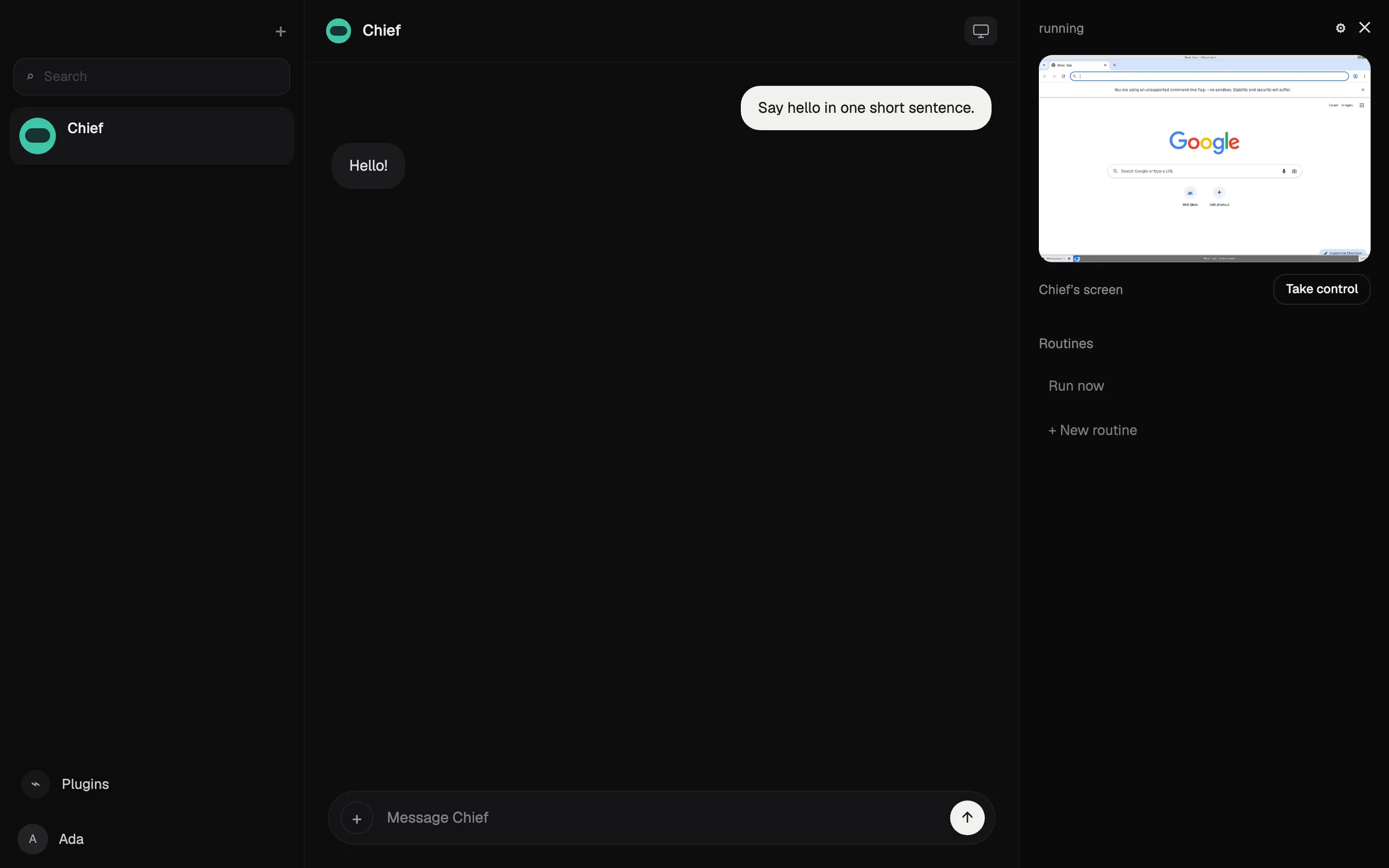

3. OpenClaw: सबसे अच्छा मुफ़्त और ओपन सोर्स
OpenClaw एक मुफ़्त, MIT-लाइसेंस वाला एजेंट है जो आपके अपने कंप्यूटर पर चलता है और WhatsApp, Telegram, iMessage, Slack, Discord और कई अन्य चैट ऐप्स से निर्देश लेता है (OpenClaw)। आप कोई भी क्लाउड मॉडल या लोकल मॉडल लाते हैं, और स्टेट, मेमोरी और क्रेडेंशियल आपके हार्डवेयर पर रहते हैं।
यह चेकलिस्ट की हर चीज़ करता है, लेकिन इसकी रेटिंग होस्टेड विकल्पों से नीचे है क्योंकि इसे आप खुद इंस्टॉल करते, चलाते और सुरक्षित रखते हैं: यह कमांड लाइन से सहज होने की अपेक्षा करता है, सैंडबॉक्सिंग डिफ़ॉल्ट रूप से बंद है, और मॉडल का बिल आपका है। टेस्टर्स ने महंगे मॉडलों के साथ एक दिन में $100 से ज़्यादा खर्च होने की बात बताई है।
इसे चुनें अगर आप तकनीकी हैं और पूरा नियंत्रण चाहते हैं। देखें OpenClaw क्या है और OpenClaw के विकल्प।

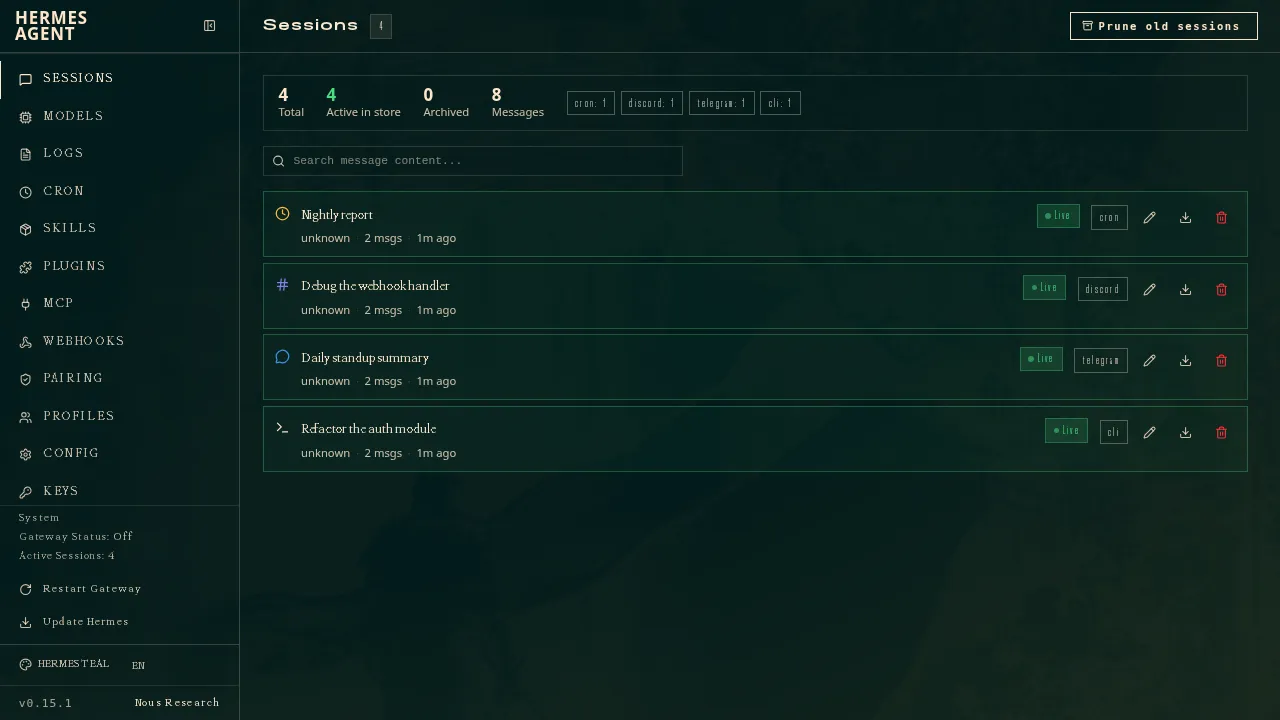
4. Hermes Agent: सीखने वाले एजेंट के लिए सबसे अच्छा
Nous Research का Hermes Agent मुफ़्त और MIT-लाइसेंस वाला है, और आपके कंप्यूटर, किसी सस्ते सर्वर या सर्वरलेस इंफ्रास्ट्रक्चर पर चलता है (GitHub)। जटिल कामों के बाद यह दोबारा इस्तेमाल होने वाली स्किल्स लिखता है और उन्हें बेहतर करता है, और एक गेटवे इसे Telegram, Discord, Slack, WhatsApp, Signal, ईमेल और अन्य से जोड़ता है। आप कई एजेंट अलग-अलग प्रोफ़ाइल के रूप में चला सकते हैं, और यह OpenClaw से सेटिंग्स, मेमोरी और स्किल्स इंपोर्ट करता है।
OpenClaw की तरह, यह चेकलिस्ट की हर चीज़ करता है, लेकिन इसे आप खुद चलाते और सुरक्षित रखते हैं। यह OpenClaw से ठीक नीचे है क्योंकि इसका कोई नेटिव मोबाइल ऐप नहीं है और iMessage के लिए Mac पर एक अलग BlueBubbles सर्वर चाहिए। $20 से शुरू होने वाला वैकल्पिक Nous Portal सब्सक्रिप्शन मॉडल, होस्टेड टूल्स और एक क्लाउड एजेंट साथ देता है (Hermes Agent)।
इसे चुनें अगर आप अपना सर्वर चलाते हैं और ऐसा एजेंट चाहते हैं जो इस्तेमाल के साथ बेहतर हो।
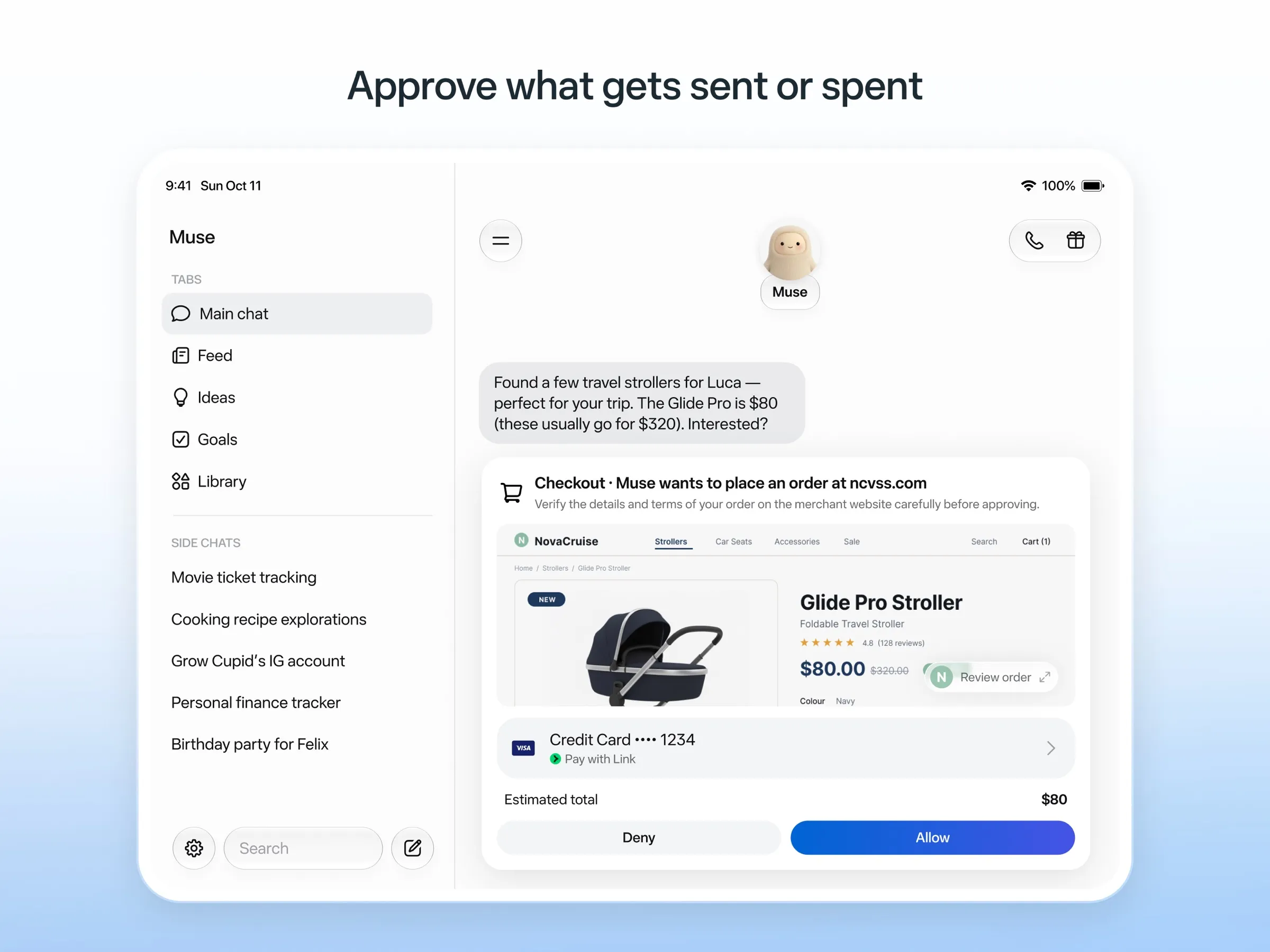
5. Muse: रोज़मर्रा के कामों के लिए सबसे अच्छा मुफ़्त असिस्टेंट
Muse, Meta का पर्सनल एजेंट है: आप इसे किसी इंसान की तरह मैसेज करते हैं, यह अपने क्लाउड कंप्यूटर पर काम करता है, ईमेल भेजने या खरीदारी से पहले पूछता है, और एक बार इस्तेमाल होने वाले कार्ड नंबरों से भुगतान करता है (Meta)। यह एक अप्रकाशित सीमा तक मुफ़्त है, और पेड प्लान $20 से शुरू होते हैं।
इसकी रेटिंग अच्छी है क्योंकि यह मुफ़्त है और बिना किसी सेटअप के अपने क्लाउड कंप्यूटर से काम करता है। यह चैट-ऐप वाला पॉइंट चूकता है क्योंकि WhatsApp एक्सेस अभी सीमित टेस्टिंग में है, और Meta यह नहीं बताता कि आप कई Muse चला सकते हैं या नहीं। यह सिर्फ़ अमेरिका, कनाडा, जापान, सिंगापुर और मेक्सिको में है, मुफ़्त टियर पर भी पेमेंट कार्ड माँगता है, और जब तक आप ऑप्ट आउट न करें, आपकी चैट Meta के मॉडल ट्रेन करती हैं। देखें Muse क्या है और Muse के विकल्प।
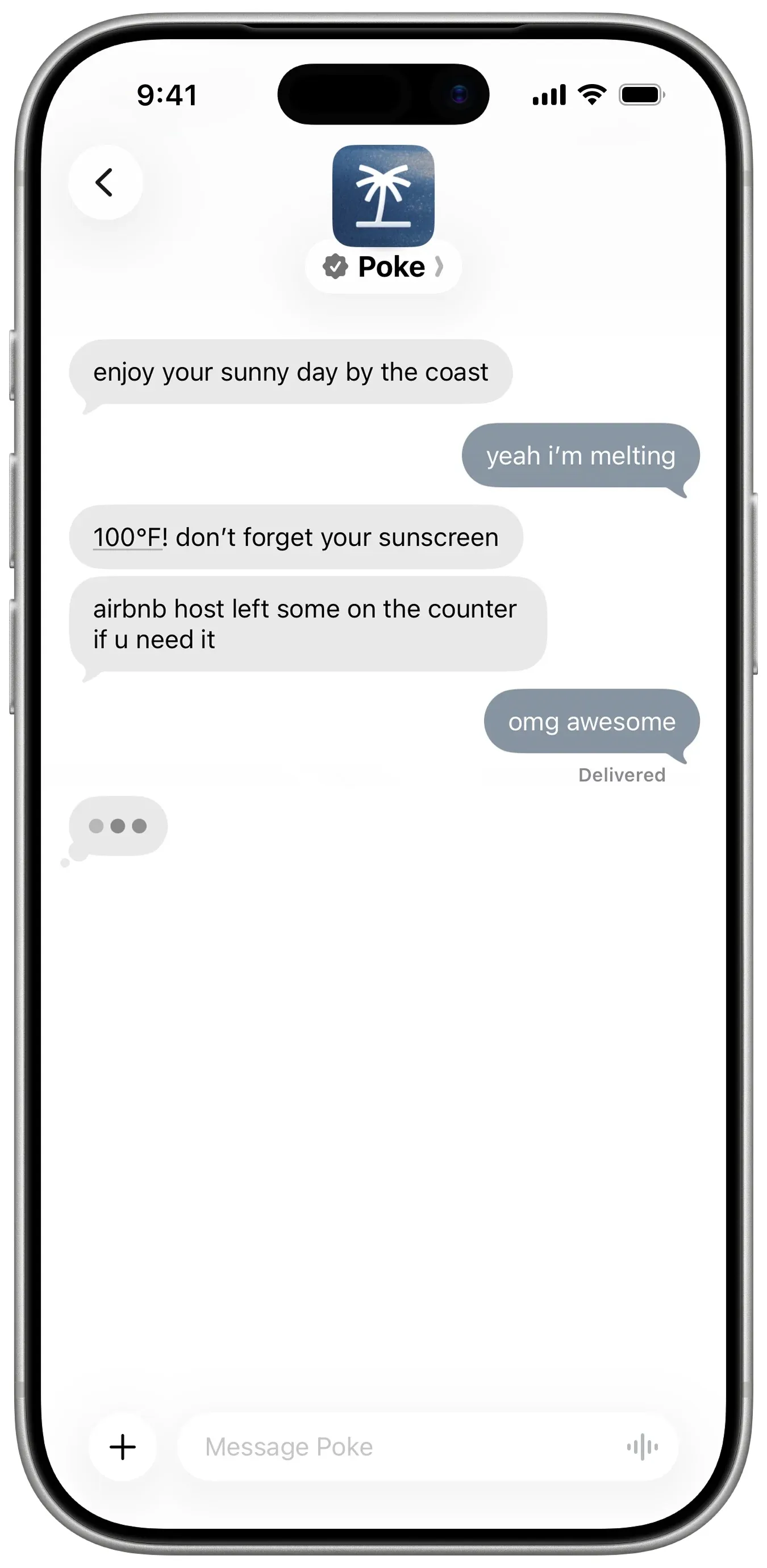
6. Poke: सबसे अच्छा असिस्टेंट जिसे बस मैसेज करना है
Poke में कुछ इंस्टॉल नहीं करना: आप अपने फ़ोन नंबर से साइन अप करते हैं और इसे iMessage, SMS या Telegram पर मैसेज करते हैं (Poke)। यह Gmail, Outlook, Google Calendar और कई अन्य ऐप्स से जुड़ता है, recipes नाम के शेयर किए जा सकने वाले ऑटोमेशन चलाता है, और पहले खुद मैसेज करता है। मुफ़्त प्लान के लिए कार्ड नहीं चाहिए, और Pro $19 का है (प्राइसिंग)।
यह सिर्फ़ कई बॉट वाला पॉइंट चूकता है, जिसे Poke डॉक्यूमेंट नहीं करता। इसकी प्राइवेसी नोटिस कहती है कि जब तक आप Maximum Privacy न चुनें, आपके डेटा से इसके मॉडल ट्रेन हो सकते हैं, और अब इसका मालिक Cognition है।
इसे चुनें अगर आप बिना किसी लागत के अपने टेक्स्ट मैसेज में असिस्टेंट चाहते हैं। देखें Poke के विकल्प।
7. Instinct: सबसे ज़्यादा चर्चित, पाना सबसे मुश्किल
Instinct एक असिस्टेंट है जिसे आप मैसेज या कॉल करते हैं, और जो फ़ोन और कंप्यूटर का इस्तेमाल करके यात्रा बुक करता है, किराने का सामान ऑर्डर करता है और काम निपटाता है, ग्रुप चैट में भी (TechCrunch)। यह बैकग्राउंड में काम करता रहता है और खुद आपसे फ़ॉलो-अप करता है (Built In), लेकिन यह सिर्फ़ इनवाइट से मिलता है, इसलिए कोई चैट चैनल सबके लिए उपलब्ध नहीं है। इसकी शर्तें भी इसे आपकी सामग्री पर ट्रेनिंग करने देती हैं, जब तक आप ऑप्ट आउट न करें। देखें Instinct क्या है और Instinct के विकल्प।
8. Claude Duet: सबसे अच्छी सुबह की ब्रीफ़िंग, अगर आपको एंट्री मिले
Claude Duet, Anthropic का प्रोएक्टिव एजेंट ऐप है। हर सुबह यह आपका ईमेल और कैलेंडर देखकर ब्रीफ़िंग भेजता है, हर कुछ घंटों में आपके अकाउंट जाँचता है, और कुछ भी भेजने, भुगतान करने, साइन करने या डिलीट करने से पहले पूछता है (Anthropic)।
यह पेड Claude प्लान के लिए सिर्फ़-अमेरिका वाला वेटलिस्ट प्रीव्यू है, आप इस तक चैट ऐप्स से नहीं पहुँच सकते, और यह Claude की उपयोग सीमाएँ साझा करता है। देखें Claude Duet क्या है।
9. Lindy: काम के ईमेल और मीटिंग के लिए सबसे अच्छा
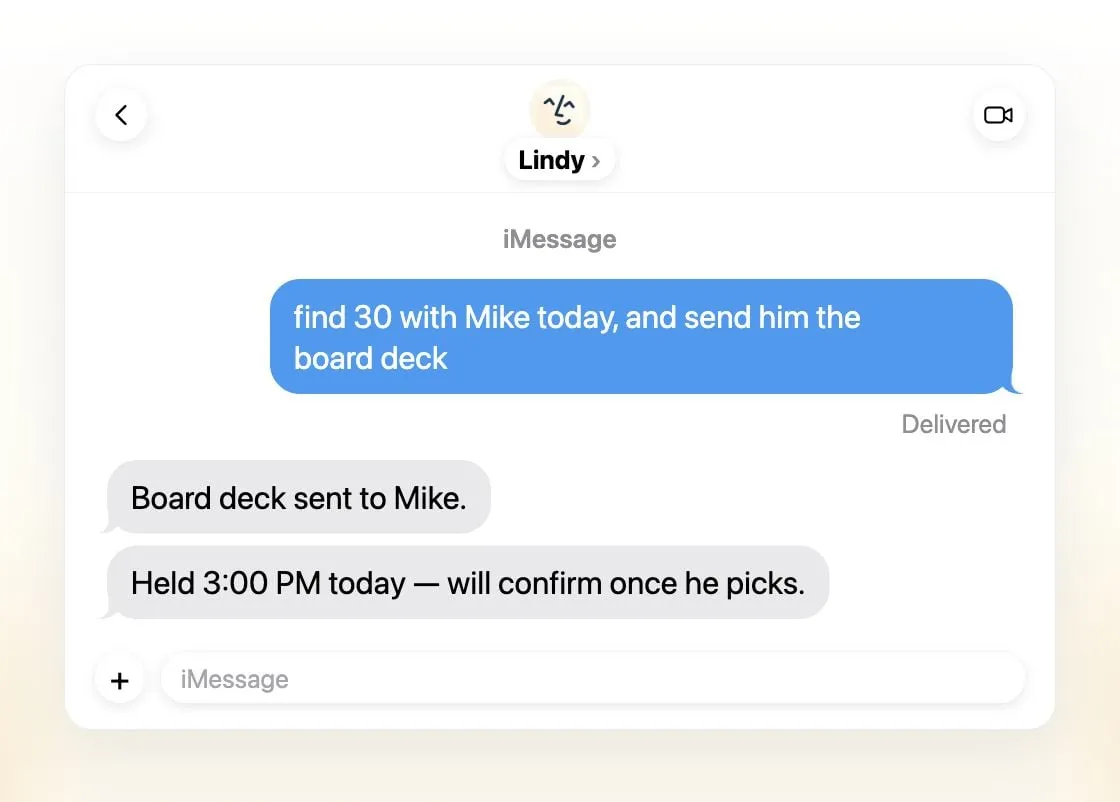
Lindy ईमेल छाँटता है, जवाब का ड्राफ़्ट बनाता है, मीटिंग शेड्यूल करता है और आपको कॉल के लिए तैयार करता है, और आप इस तक iMessage, SMS, Slack, फ़ोन या Gmail एक्सटेंशन से पहुँचते हैं (Lindy)। यह रोज़ ब्रीफ़िंग भेजता है, बाहरी असर वाले किसी भी काम से पहले पूछता है, और कहता है कि यह कभी आपके डेटा पर ट्रेनिंग नहीं करता।
यह कई नहीं, बल्कि प्रति टीम एक साझा असिस्टेंट है, मुफ़्त क्रेडिट सात दिन चलते हैं, और पेड सीट $49.99 प्रति उपयोगकर्ता प्रति माह से शुरू होती हैं (प्राइसिंग)।
इसे चुनें अगर आप एक छोटी टीम हैं जो Slack और ईमेल में रहती है।
10. Manus: तैयार डिलीवरेबल के लिए सबसे अच्छा
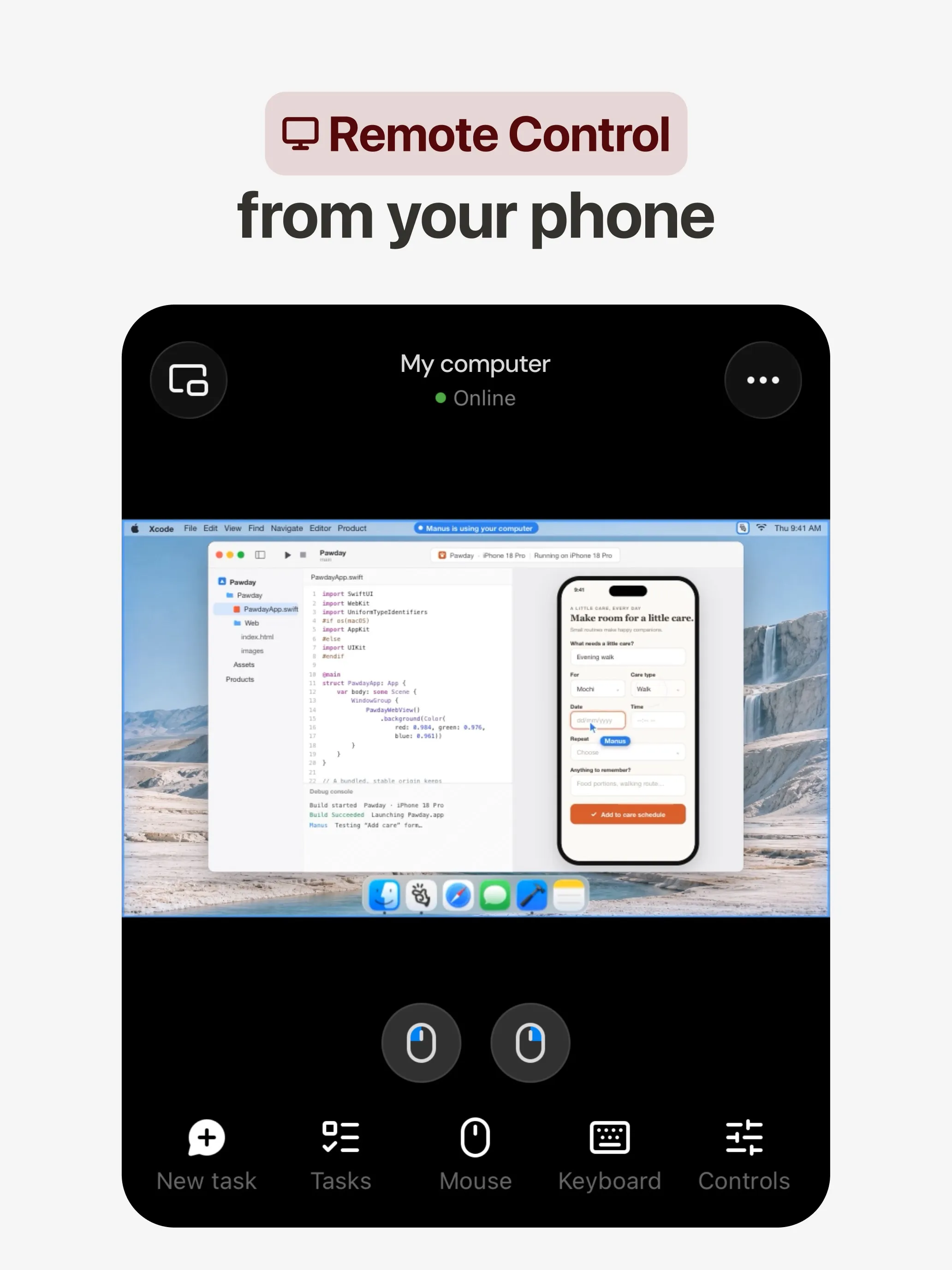
Manus अपने क्लाउड कंप्यूटर पर किसी काम की योजना बनाकर उसे पूरा करता है और रिसर्च रिपोर्ट, वेबसाइट, स्लाइड डेक या वीडियो लौटाता है, और इसके ऑटोमेशन शेड्यूल पर या Gmail, Slack या Notion के किसी इवेंट से शुरू होते हैं (Manus 2.0)। इसके ऐप वेब, iOS, Android, macOS और Windows के लिए हैं, साथ में Slack और Telegram, और एक मुफ़्त प्लान भी है।
यह कई बॉट वाला पॉइंट चूकता है, जिसे Manus डॉक्यूमेंट नहीं करता। क्रेडिट काम की जटिलता के हिसाब से लगते हैं, इसलिए लागत का अनुमान मुश्किल है और विफल रन भी क्रेडिट खर्च करते हैं, और ट्रेनिंग से ऑप्ट-आउट सिर्फ़ Team प्लान में दिया गया है।
इसे चुनें अगर आप एक प्रॉम्प्ट से ठोस नतीजा चाहते हैं। देखें Manus के विकल्प।
11. Perplexity Teammates: लंबे प्रोजेक्ट्स के लिए सबसे अच्छा
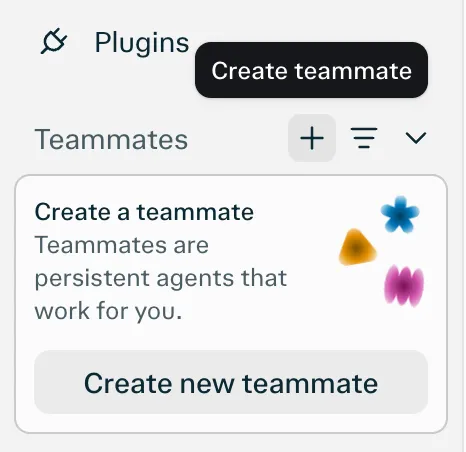
Teammates स्थायी एजेंट हैं, हर एक अपने अलग कंप्यूटर पर, जो Slack, GitHub, Linear और Gmail पर नज़र रखते हैं, कुछ बदलने पर कार्रवाई करते हैं, और इनपुट की ज़रूरत होने पर आपसे संपर्क करते हैं (Perplexity)। आप हर teammate के लिए मॉडल चुनते हैं।
यह चैट-ऐप वाला पॉइंट चूकता है क्योंकि इसका एकमात्र सूचीबद्ध प्लेटफ़ॉर्म वेब है। यह Perplexity Max ($200 प्रति माह) के लिए रिसर्च प्रीव्यू भी है, और प्रति काम क्रेडिट की कोई प्रकाशित लागत नहीं है।
12. dots: अगर आप पहले से ChatGPT Pro के लिए भुगतान करते हैं तो सबसे अच्छा
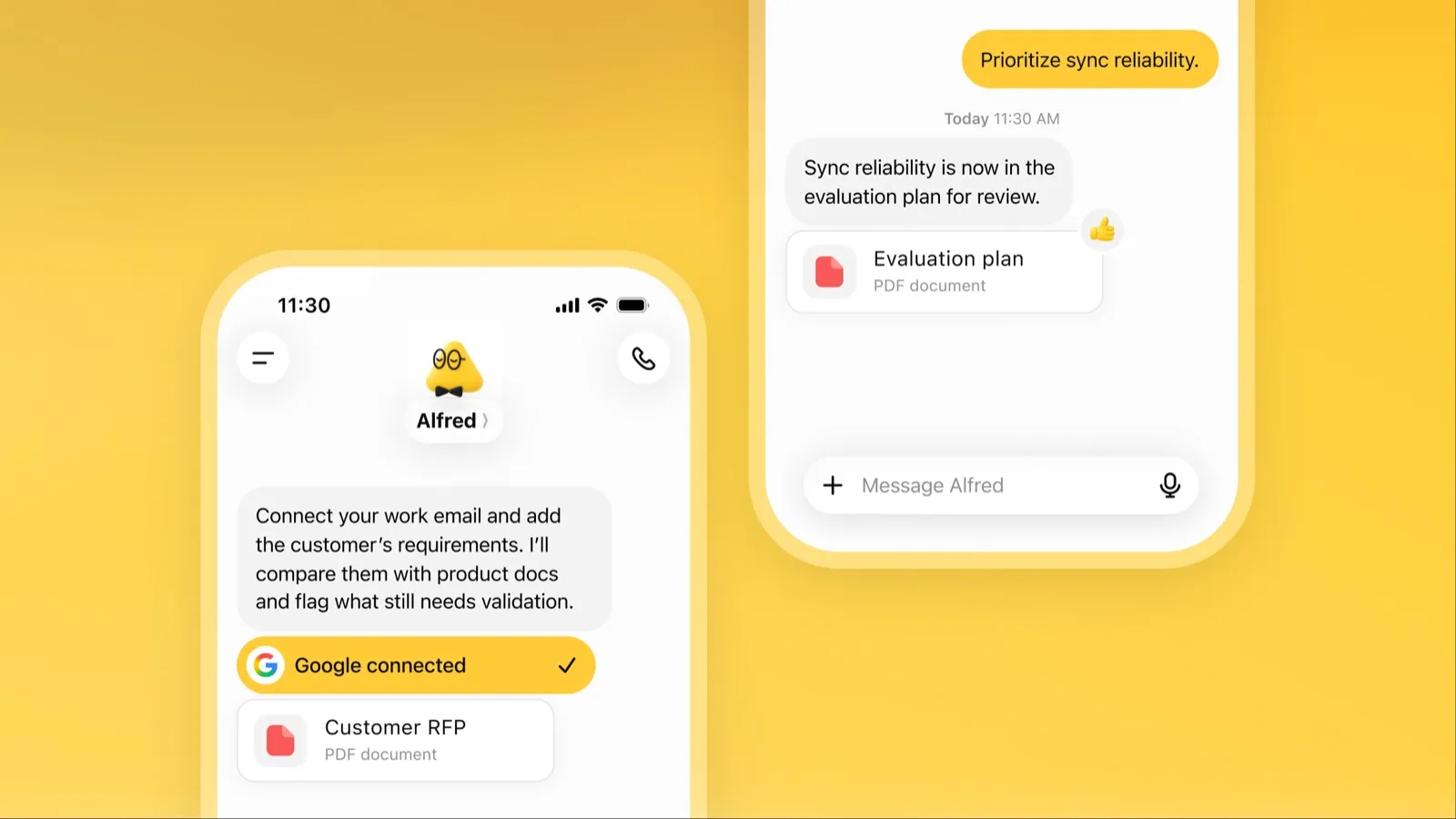
dot, ChatGPT के अंदर OpenAI का हमेशा चालू रहने वाला एजेंट है, जिसका अपना क्लाउड कंप्यूटर है, 4,000 से ज़्यादा जुड़े ऐप्स हैं, और ChatGPT, Slack और Microsoft Teams में एक ही मेमोरी है (OpenAI)। खाली होने पर यह आपके जुड़े ऐप्स को खंगालता है और समीक्षा के लिए काम लेकर लौटता है।
उपलब्धता और लागत के कारण यह आखिरी स्थान पर है: इसके लिए $100 प्रति माह से शुरू होने वाला ChatGPT Pro या Business Premium चाहिए, Pro एक्सेस में EEA, UK और स्विट्ज़रलैंड शामिल नहीं हैं, आपको एक dot मिलता है, और जब तक आप ऑप्ट आउट न करें, Pro का कंटेंट OpenAI के मॉडल ट्रेन करता है। देखें dots क्या है।
कौन-सा चुनें
- काम सौंपें, बिना सेटअप: Grok Bot.
- अपना मॉडल, या अलग-अलग कंप्यूटर वाले कई बॉट: Rakazo.
- मुफ़्त, अपने हार्डवेयर पर: OpenClaw या Hermes Agent.
- अमेरिका में मुफ़्त काम: Muse.
- बस मैसेज करें: Poke.
- टीम का इनबॉक्स और मीटिंग: Lindy.
- एक प्रॉम्प्ट से रिपोर्ट, साइट या डेक: Manus.
- पहले से ChatGPT Pro या Claude Pro पर: dots या Claude Duet.
आप जो भी चुनें, ऐसे कामों से शुरू करें जिनमें गलती सस्ती पड़े, और ईमेल और भुगतान के लिए अनुमतियाँ चालू रखें। इस आधार पर रैंक किए गए एजेंट के लिए कि वे अकेले कितना कर सकते हैं, देखें सबसे अच्छा AI एजेंट; अपना डेटा अपनी मशीन पर रखने के लिए, सबसे अच्छा निजी AI असिस्टेंट।
सबसे अच्छे विकल्प
$30/माह
Always-on AI agents from SpaceXSI that run on a shared cloud computer, sign in to your apps and finish multi-step work while you're away.
Grok Bot पर जाएँखूबियाँ
- Bots work on their own cloud computer, so tasks keep running when your laptop or phone is closed
- Can operate websites and apps that have no API, using saved logins it never sees in plain text
- Several Bots can run in parallel, message each other and share one workspace
- Routines can run on a schedule or after an event, and a Bot can learn a task from a recorded demonstration of up to 10 minutes
- Can place phone calls to US businesses for you and send a summary afterwards
- Native apps for macOS, Windows, Linux, iOS and Android, plus Slack
कमियाँ
- No free plan and no standalone price: the cheapest way in is the $30/month Premium plan
- Usage comes from a weekly pool shared with Grok and Cursor, and SpaceXSI does not publish how much work that pool covers
- No model picker: Grok Bot chooses the model for each task and does not show which one it used
- All Bots on an account share one computer, files and logins; the docs say not to use separate Bots as a security boundary
- Users report Amazon blocks it from shopping as an unauthorized AI agent; Amazon hasn't commented
- Still labelled beta, with no browser version
$10/माह
Open-source, self-hostable platform for persistent AI bots that each get a job, a computer, memory and routines, using the model you choose.
Rakazo पर जाएँखूबियाँ
- Open source (Apache-2.0) and fully self-hostable, including with local models
- Choice of model per bot, including existing Claude or ChatGPT subscriptions
- Bots keep working on schedules and triggers with their own cloud computer
- Approval controls over which actions a bot may take on its own
कमियाँ
- Still in beta, with frequent releases
- You supply and pay for the model on the hosted plans, unless you buy Rakazo credits
- Telegram, WhatsApp and iMessage/SMS are only available when self-hosted
- More setup than a single chat app
Free, MIT-licensed personal AI agent that runs on your own computer and takes orders from WhatsApp, Telegram, iMessage, Slack and 20+ other chat apps.
OpenClaw पर जाएँखूबियाँ
- Free and MIT licensed, with no paid tier
- Runs on your own hardware; state, memory and credentials stay local, and it sends nothing home except an optional daily version check
- Works in 29 chat channels, including WhatsApp, Telegram, iMessage, Slack, Discord and Microsoft Teams
- Model-agnostic: 64 model and media providers, plus local models
- Large ecosystem of skills and 142 official plugins, and very active development
कमियाँ
- Model costs are on you and can run high: testers and users have reported spending over $100 in a day with expensive models
- Sandboxing is off by default and the agent can run commands on the host unless you turn on approvals
- Setup and upkeep expect comfort with the command line; maintainers warn it is risky for non-technical users
- Broad access to email, messages and the system makes prompt injection and malicious third-party skills a real risk
$20/माह
Free, MIT-licensed AI agent from Nous Research that runs on your own machine or server, learns reusable skills, and chats with you on Telegram, Slack and more.
Hermes Agent पर जाएँखूबियाँ
- Free and MIT licensed, and runs on hardware you control
- Writes and refines its own skills from experience, on top of persistent memory and cross-session search
- One gateway for 20+ chat platforms, including Telegram, Discord, Slack, WhatsApp, Signal and email
- Run several separate agents as profiles, each with its own model, memory and skills, and let them talk in group chats
- Model-agnostic, with a one-command import from OpenClaw
कमियाँ
- Setup expects comfort with the command line and with running your own server
- Model costs are on you unless you use free models, and hosted web search, images and speech need a paid Nous Portal plan or your own keys
- iMessage needs a separate BlueBubbles server on a Mac
- No native mobile app; Android support is a command-line install through Termux
$20/माह
Meta's personal AI agent that sends email, books travel and shops for you from its own cloud computer, in the Muse app or on the web.
Muse पर जाएँखूबियाँ
- Free tier, and no technical setup: you message it like a person in the app or on the web
- Runs on its own cloud computer and keeps working after you close the app
- Asks before sending email or buying, and shows an audit trail of what it did and plans to do
- Purchases go through a one-time card number with Link's purchase protections, so the agent never sees your real card
- Connects to email, calendar and Instagram, and can use a browser for sites without an API
कमियाँ
- Only in the US, Canada, Japan, Singapore and Mexico so far, and Meta says Muse is still in limited testing
- Requires a payment card even for the free tier, and the stronger Muse Wonder model is for paid plans only
- Your interactions train Meta's AI models unless you opt out
- Free usage limit is not published, so it is hard to know when you will hit it
- Early users and press reported it overstepping permissions, such as reading messages it was not meant to
- Requires a Meta account and asks for broad access to email, calendars and payments
$19/माह
A personal AI assistant you text in iMessage or Telegram that connects to your email, calendar and apps and messages you first when something needs attention.
Poke पर जाएँखूबियाँ
- Nothing to install: you sign up with a phone number and text it like a contact
- Messages you first, using your connected services and memory
- Free plan with no credit card, and email and calendar included
- Connects to Gmail, Outlook, Google Calendar, Notion, GitHub, Linear and many more apps, plus custom integrations through MCP
- Shareable automation recipes, and developers can build their own
कमियाँ
- Uses your data to train its AI models unless you choose Maximum Privacy
- WhatsApp support is limited to some markets
- Only one phone number per account
- Does not say which AI models it uses, and does not publish how many credits each plan includes
- Now owned by Cognition, so the product's direction may change
Invite-only personal AI assistant you text or call. It uses a phone and computer for you to book travel, order groceries and handle errands.
Instinct पर जाएँखूबियाँ
- No new interface: you text or call it like a person
- Handles real-world errands end to end, such as travel bookings, groceries and subscription cancellations
- Group chats can use one shared Instinct, even for friends without an account
- Free during the beta
कमियाँ
- Invite-only, with no public sign-up or published pricing
- Terms let it use your materials to train AI models unless you opt out, and the opt-out only applies going forward
- Terms appoint it as your agent to enter agreements and transactions on your behalf, and require binding arbitration with a class action waiver
- Early testers reported it sending an email without asking and keeping inbox data after Google access was revoked
- No choice of model, and the company does not say which models it uses
$20/माह
Anthropic's proactive agent app: briefs you each morning, works on its own cloud computer and asks before acting. US waitlist preview for paid Claude plans.
Claude Duet पर जाएँखूबियाँ
- Messages you first: a morning brief from your email and calendar, then check-ins every few hours
- Works with over 6,000 connectors and plugins, and uses a cloud browser for sites without one
- Brings your existing Claude memory, skills and connectors from the first message
- Asks before sending, paying, signing or deleting, and blocks trading and moving money even with approval
- Pays through one-time card numbers via Link and Shop Pay, and turns larger jobs into editable briefs, decks and dashboards
कमियाँ
- Waitlist-only research preview, US only, and not on Team or Enterprise plans yet
- Uses the same Claude usage limits as chat, and background checks count too
- One model only, Claude Opus 5.5, with no choice of model
- Anthropic's docs say you can't yet watch or take over its browser
- Microsoft 365 isn't available yet, and it can misread threads, misjudge urgency or miss things between check-ins
$49.99/माह
An AI assistant for work that runs your inbox, calendar and meetings, takes requests by iMessage, Slack, phone or browser, and sends you daily briefs.
Lindy पर जाएँखूबियाँ
- Texts you first: a personalized first message, alerts on time-sensitive email, and daily briefs
- Reachable almost anywhere: iMessage or SMS, Slack, its own phone number, Gmail via a Chrome extension, and the web
- 1,500+ integrations plus any hosted MCP server, and a browser for tools without one
- Asks for approval before anything with outside impact
- Says it never uses your data to train models, with SOC 2 Type II, GDPR and PIPEDA compliance
कमियाँ
- Expensive for individuals: paid seats start at $49.99 per user a month, and free credits last only 7 days
- Credit-based usage is hard to predict, from 2 credits for a simple ask to 2,500 for a big build
- One shared Lindy per team rather than separate assistants for different jobs
- No mobile app; on phones you use iMessage, SMS or calls
- Plan names differ between its pricing page and its docs, so it is hard to tell what each tier includes
$20/माह
General-purpose AI agent that researches, builds websites, slides, videos and games, and runs automations on its own cloud computer.
Manus पर जाएँखूबियाँ
- Turns one prompt into finished output: research reports, websites, slides, videos and playable games
- Automations can start from a schedule or an event in a connected service such as Gmail, Slack or Notion
- Video Editor and Game Dev let you edit what the agent made instead of regenerating it
- Free plan to try it, with apps for web, iOS, Android, macOS and Windows
कमियाँ
- Credit-based pricing makes costs hard to predict, and long or failed runs can use up credits
- Free daily credits are capped at 1,500 a month and only work in the Lite mode
- A built-in training opt-out is listed only for Team plans
- Several plans share the Pro name and differ only by credit amount
$200/माह
Persistent Perplexity agents, each with its own computer, browser and memory, that own ongoing work and watch Slack, GitHub and Linear. Max-only web preview.
Perplexity Teammates पर जाएँखूबियाँ
- Run several teammates, each on its own isolated computer and browser with separate sessions
- Watches Slack, GitHub, Linear and other connected tools, acts on changes and reaches out when it needs you
- Pick the model per teammate or task, with Claude Opus 5.5 as the default
- Splits a goal into parallel agent tasks, and teammates in a Project share context and hand work to each other
- You can take over a teammate's desktop and steer it, and it can't view your saved credentials
कमियाँ
- Only on Perplexity Max at $200 a month; Pro and Enterprise plans are excluded by default
- Research preview whose behavior may change
- Web only for now; the iOS app is only promised soon
- Usage draws on credits, and parallel agents, large files and frequent automations use more
- No published cap on teammates and no published credit cost per task
$100/माह
OpenAI's always-on agent inside ChatGPT, with its own cloud computer, that works on your goals between chats and reaches you in ChatGPT, Slack or Teams.
dots पर जाएँखूबियाँ
- Runs on its own cloud computer and browser and keeps working when your devices are off
- Connects to over 4,000 apps through ChatGPT plugins and can hand work to Codex and ChatGPT Work
- Reachable in ChatGPT, Slack and Microsoft Teams, and you can call it, with one memory across channels
- Researches your connected apps on its own and brings you finished work or decisions to review
- Custom Rules and Auto-review gate sensitive actions, and some steps always stay with you
कमियाँ
- No free, Go or Plus access: it needs ChatGPT Pro from $100 a month or Business Premium
- Pro access excludes the EEA, the UK and Switzerland
- One dot per user for now; teams of dots are only planned
- Texting over iMessage or RCS is a US-only beta, and your dot cannot call you yet
- Stopping a task does not undo actions it already took, and tasks it starts in Codex or ChatGPT Work count toward those limits
फ़ीचर
| Grok Bot | Rakazo | OpenClaw | Hermes Agent | Muse | Poke | Instinct | Claude Duet | Lindy | Manus | Perplexity Teammates | dots | |
|---|---|---|---|---|---|---|---|---|---|---|---|---|
| वेब सर्च | हाँ | हाँ | हाँ | हाँ | हाँ | हाँ | हाँ | हाँ | हाँ | हाँ | हाँ | हाँ |
| इमेज बनाना | हाँ | हाँ | हाँ | हाँ | हाँ | अज्ञात | अज्ञात | अज्ञात | हाँ | हाँ | हाँ | हाँ |
| वॉइस मोड | हाँ | हाँ | हाँ | हाँ | हाँ | हाँ | हाँ | हाँ | हाँ | हाँ | अज्ञात | हाँ |
| फ़ाइल अपलोड | हाँ | हाँ | हाँ | हाँ | हाँ | हाँ | हाँ | हाँ | हाँ | हाँ | हाँ | हाँ |
| मेमोरी | हाँ | हाँ | हाँ | हाँ | हाँ | हाँ | हाँ | हाँ | हाँ | हाँ | हाँ | हाँ |
| आपके लिए काम करता है | हाँ | हाँ | हाँ | हाँ | हाँ | हाँ | हाँ | हाँ | हाँ | हाँ | हाँ | हाँ |
| ऐप इंटीग्रेशन | हाँ | हाँ | हाँ | हाँ | हाँ | हाँ | हाँ | हाँ | हाँ | हाँ | हाँ | हाँ |
| खुद से काम करता है | हाँ | हाँ | हाँ | हाँ | हाँ | हाँ | हाँ | हाँ | हाँ | हाँ | हाँ | हाँ |
| पहले ख़ुद मैसेज करता है | हाँ | हाँ | हाँ | हाँ | हाँ | हाँ | हाँ | हाँ | हाँ | हाँ | हाँ | हाँ |
| कई बॉट | हाँ | हाँ | हाँ | हाँ | अज्ञात | अज्ञात | अज्ञात | नहीं | नहीं | अज्ञात | हाँ | नहीं |
स्रोत
Grok Bot
- Grok Bot product page and FAQ8 नव॰ 2026 को जाँचा गया
- SpaceXSI pricing: The X Subscription plans8 नव॰ 2026 को जाँचा गया
- Introducing Grok Bot (launch post, Aug 11, 2026)8 नव॰ 2026 को जाँचा गया
- Grok Bot FAQ: plans, platforms, memory, privacy and limits8 नव॰ 2026 को जाँचा गया
- Grok Bot docs: Create and manage Bots8 नव॰ 2026 को जाँचा गया
- Grok Bot changelog (v0.78.1, Oct 27, 2026)8 नव॰ 2026 को जाँचा गया
- Cursor help: Grok Bot plans and usage8 नव॰ 2026 को जाँचा गया
- Teslarati: Grok Bot can now call US businesses (Nov 2026)8 नव॰ 2026 को जाँचा गया
- Teslarati: Amazon shuts out Grok Bot (Oct 15, 2026)8 नव॰ 2026 को जाँचा गया
- Grok Bot docs: Overview (proactive teammate, morning briefing)8 नव॰ 2026 को जाँचा गया
- Grok Bot docs: Chat and collaboration (Slack DMs, X Chat rolling out)8 नव॰ 2026 को जाँचा गया
- Grok Bot docs: Get started (desktop and mobile apps)8 नव॰ 2026 को जाँचा गया
- Grok Bot docs: Skills, routines and automations8 नव॰ 2026 को जाँचा गया
- SpaceXSI: Team Bots in public beta (Sep 28, 2026)8 नव॰ 2026 को जाँचा गया
- Wikipedia: SpaceXAI (xAI renamed SpaceXAI, then SpaceXSI)8 नव॰ 2026 को जाँचा गया
- Cursor: Data Use & Privacy Overview (Privacy Mode and training)8 नव॰ 2026 को जाँचा गया
Rakazo
- Rakazo homepage8 नव॰ 2026 को जाँचा गया
- Rakazo pricing8 नव॰ 2026 को जाँचा गया
- Rakazo privacy policy8 नव॰ 2026 को जाँचा गया
- Rakazo on GitHub (README and license)8 नव॰ 2026 को जाँचा गया
- Rakazo changelog8 नव॰ 2026 को जाँचा गया
- Rakazo releases8 नव॰ 2026 को जाँचा गया
- Rakazo docs: Image and video generation8 नव॰ 2026 को जाँचा गया
- Rakazo docs: Memory8 नव॰ 2026 को जाँचा गया
- Rakazo docs: Connect apps8 नव॰ 2026 को जाँचा गया
- Rakazo docs: Routines8 नव॰ 2026 को जाँचा गया
- Rakazo docs: Chat apps8 नव॰ 2026 को जाँचा गया
- Rakazo docs: Messaging apps (self-hosting)8 नव॰ 2026 को जाँचा गया
- Rakazo docs: Bots and chats (add another bot, bot templates)8 नव॰ 2026 को जाँचा गया
- Rakazo docs: Groups (several bots in one chat)8 नव॰ 2026 को जाँचा गया
- Rakazo docs: Mobile app (notifications)8 नव॰ 2026 को जाँचा गया
- Rakazo privacy policy (updated Sep 14, 2026)8 नव॰ 2026 को जाँचा गया
- Rakazo privacy policy source on GitHub8 नव॰ 2026 को जाँचा गया
OpenClaw
- OpenClaw homepage and Foundation section8 नव॰ 2026 को जाँचा गया
- OpenClaw integrations: channels, providers and plugins8 नव॰ 2026 को जाँचा गया
- openclaw/openclaw on GitHub (MIT, v2026.11.1)8 नव॰ 2026 को जाँचा गया
- OpenClaw docs: Sandboxing (off by default)8 नव॰ 2026 को जाँचा गया
- Wikipedia: OpenClaw8 नव॰ 2026 को जाँचा गया
- Notebookcheck: OpenClaw can burn through hundreds of dollars per day8 नव॰ 2026 को जाँचा गया
- OpenClaw docs: Memory overview8 नव॰ 2026 को जाँचा गया
- OpenClaw docs: Automations8 नव॰ 2026 को जाँचा गया
- OpenClaw docs: Chat channels8 नव॰ 2026 को जाँचा गया
- OpenClaw docs: iMessage8 नव॰ 2026 को जाँचा गया
- OpenClaw docs: Heartbeat, now a default Proactive check job8 नव॰ 2026 को जाँचा गया
- OpenClaw docs: Multi-agent routing8 नव॰ 2026 को जाँचा गया
- OpenClaw docs: Platforms (macOS, Windows, Linux, iOS and Android apps)8 नव॰ 2026 को जाँचा गया
- OpenClaw docs: Tools (exec, browser, web search)8 नव॰ 2026 को जाँचा गया
- OpenClaw docs: Audio and voice notes (inbound transcription)8 नव॰ 2026 को जाँचा गया
- OpenClaw docs: Image and media support (inbound media)8 नव॰ 2026 को जाँचा गया
Hermes Agent
- NousResearch/hermes-agent on GitHub (MIT, v0.23.0)8 नव॰ 2026 को जाँचा गया
- Hermes Agent homepage and Nous Portal pricing8 नव॰ 2026 को जाँचा गया
- Hermes Agent documentation8 नव॰ 2026 को जाँचा गया
- Hermes Agent docs: Profiles, running multiple agents8 नव॰ 2026 को जाँचा गया
- Hermes Agent docs: Bot Mode8 नव॰ 2026 को जाँचा गया
- Hermes Agent docs: Voice mode8 नव॰ 2026 को जाँचा गया
- Hermes Agent docs: Vision and image paste8 नव॰ 2026 को जाँचा गया
- Hermes Agent docs: iMessage via BlueBubbles8 नव॰ 2026 को जाँचा गया
- Nous Research on X: Meet Hermes Agent (February 25, 2026)8 नव॰ 2026 को जाँचा गया
- Hermes Agent docs: Session heartbeats and cron watchdogs8 नव॰ 2026 को जाँचा गया
- Hermes Agent docs: FAQ (Is my data sent anywhere?)8 नव॰ 2026 को जाँचा गया
Muse
- Meta: Introducing Muse, the world's first personal AI agent built for everyone8 नव॰ 2026 को जाँचा गया
- Muse homepage8 नव॰ 2026 को जाँचा गया
- Meta Help Center: About Muse subscriptions8 नव॰ 2026 को जाँचा गया
- Meta Help Center: Meta AI, Muse and Vibes are separate apps8 नव॰ 2026 को जाँचा गया
- TechCrunch: Meta debuts its Muse AI agent. Will consumers trust it?8 नव॰ 2026 को जाँचा गया
- 9to5Mac: Muse personal agent gets apps for iPhone and Mac8 नव॰ 2026 को जाँचा गया
- The Guardian TechScape: early Muse users report the agent overstepping permissions8 नव॰ 2026 को जाँचा गया
- iPhone in Canada: Meta's Muse AI agent is now available in Canada8 नव॰ 2026 को जाँचा गया
- Superpower Daily: Meta launches Muse in Japan (Oct 23, 2026)8 नव॰ 2026 को जाँचा गया
- Meta: Muse is now available in Singapore (Oct 27, 2026)8 नव॰ 2026 को जाँचा गया
- Mexico News Daily: Meta launches its Muse AI agent in Mexico (Nov 6, 2026)8 नव॰ 2026 को जाँचा गया
- Meta Q3 2026 earnings call transcript: Muse Wonder in the paid tier, free tier on Muse Spark8 नव॰ 2026 को जाँचा गया
- How to manage reminders and scheduled tasks with Muse8 नव॰ 2026 को जाँचा गया
- WhatsApp Help Center: About chatting with your Muse agent through WhatsApp8 नव॰ 2026 को जाँचा गया
- TechCrunch: Meta's Muse hits Mac8 नव॰ 2026 को जाँचा गया
- Meta AI: Muse features and FAQ (browses the web, generates images)8 नव॰ 2026 को जाँचा गया
- Meta Help Center: How your Muse agent browses the web8 नव॰ 2026 को जाँचा गया
- Meta Help Center: How to use Muse with artifacts (uploads, image generation)8 नव॰ 2026 को जाँचा गया
- Meta Help Center: How to get started with Muse8 नव॰ 2026 को जाँचा गया
Poke
- Poke homepage8 नव॰ 2026 को जाँचा गया
- Poke pricing8 नव॰ 2026 को जाँचा गया
- Poke FAQ8 नव॰ 2026 को जाँचा गया
- Poke privacy notice (last updated September 11, 2026)8 नव॰ 2026 को जाँचा गया
- Cognition: welcoming The Interaction Company to Cognition (July 23, 2026)8 नव॰ 2026 को जाँचा गया
- TechCrunch: Poke makes using AI agents as easy as sending a text8 नव॰ 2026 को जाँचा गया
- TechCrunch: Apple approves Poke as the first AI agent on its Messages for Business platform8 नव॰ 2026 को जाँचा गया
- Introducing Poke.com (launch announcement, September 8, 2025)8 नव॰ 2026 को जाँचा गया
- Poke docs: Welcome (built-in web search)8 नव॰ 2026 को जाँचा गया
- Poke release notes (web search, sharing images, attachments)8 नव॰ 2026 को जाँचा गया
Instinct
- Instinct homepage8 नव॰ 2026 को जाँचा गया
- Instinct Terms of Service (last revised Aug 26, 2026)8 नव॰ 2026 को जाँचा गया
- TechCrunch: Instinct brings its AI agent to group chats8 नव॰ 2026 को जाँचा गया
- Fortune: Noah Shinn's viral AI assistant Instinct raises $1B Series C8 नव॰ 2026 को जाँचा गया
- Vellum: Instinct breakdown (competitor; summary of early tester reports)8 नव॰ 2026 को जाँचा गया
- Digit: Instinct clarifies WhatsApp outage (works through WhatsApp and iMessage)8 नव॰ 2026 को जाँचा गया
- RuntimeWire: Instinct brings its group AI agent to iMessage for all users (Oct 29, 2026)8 नव॰ 2026 को जाँचा गया
- Privacy Policy | Instinct8 नव॰ 2026 को जाँचा गया
- Built In: What Is Instinct AI? (Oct 21, 2026)8 नव॰ 2026 को जाँचा गया
Claude Duet
- Anthropic: Introducing Claude Duet (October 21, 2026)8 नव॰ 2026 को जाँचा गया
- Claude Help Center: Get started with Claude Duet8 नव॰ 2026 को जाँचा गया
- Claude Duet product page8 नव॰ 2026 को जाँचा गया
- Claude pricing: Pro, Max and Ultra8 नव॰ 2026 को जाँचा गया
- Inc.: I Tried Claude Duet (reviewer sent it a screenshot)8 नव॰ 2026 को जाँचा गया
Lindy
- Lindy homepage8 नव॰ 2026 को जाँचा गया
- Lindy pricing8 नव॰ 2026 को जाँचा गया
- Lindy docs: What is Lindy?8 नव॰ 2026 को जाँचा गया
- Lindy docs: iMessage & SMS8 नव॰ 2026 को जाँचा गया
- Lindy docs: Phone Calls8 नव॰ 2026 को जाँचा गया
- Lindy docs: Ad Hoc Tasks (research)8 नव॰ 2026 को जाँचा गया
- Lindy docs: Pricing and credits8 नव॰ 2026 को जाँचा गया
- Lindy Assistant: The AI that runs your work life8 नव॰ 2026 को जाँचा गया
- Lindy docs: Set up Lindy (web search, image generation)8 नव॰ 2026 को जाँचा गया
- Lindy docs: Files (drop files and folders in for Lindy to use)8 नव॰ 2026 को जाँचा गया
- Lindy changelog (Creatives: on-brand images, Sep 16, 2026)8 नव॰ 2026 को जाँचा गया
Manus
- Manus Plans & Pricing8 नव॰ 2026 को जाँचा गया
- Manus Help Center: What is the current membership pricing for Manus?8 नव॰ 2026 को जाँचा गया
- Manus Help Center: rules for credit consumption8 नव॰ 2026 को जाँचा गया
- Introducing Manus 2.0 (Sep 28, 2026)8 नव॰ 2026 को जाँचा गया
- Download Manus: macOS, Windows, iOS and Android8 नव॰ 2026 को जाँचा गया
- Tech Xplore/AFP: Manus raises $500 million after Meta acquisition blocked by China8 नव॰ 2026 को जाँचा गया
- Wikipedia: Manus (AI agent)8 नव॰ 2026 को जाँचा गया
- Manus for Slack: Turn Your Workspace into an Autonomous Engine8 नव॰ 2026 को जाँचा गया
- Manus docs: Automations8 नव॰ 2026 को जाँचा गया
- Is my data safe when using Manus Agents in Telegram?8 नव॰ 2026 को जाँचा गया
- Chatting with Manus Agent on Slack: Channels, DMs, and File Delivery8 नव॰ 2026 को जाँचा गया
- Manus Agents in Telegram (available to all users)8 नव॰ 2026 को जाँचा गया
- Manus Help Center: What's new in Manus 2.0 (Cue requires an invitation code)8 नव॰ 2026 को जाँचा गया
- Manus API docs: Agents (default agent plus agents you create)8 नव॰ 2026 को जाँचा गया
- Manus privacy policy (updated Sep 28, 2026)8 नव॰ 2026 को जाँचा गया
Perplexity Teammates
- Perplexity blog: Teammates are agents for complex, ongoing work (November 4, 2026)8 नव॰ 2026 को जाँचा गया
- Perplexity Help Center: Perplexity Teammates8 नव॰ 2026 को जाँचा गया
- Perplexity Help Center: Perplexity Max ($200 a month)8 नव॰ 2026 को जाँचा गया
- Perplexity Help Center: Data Collection at Perplexity8 नव॰ 2026 को जाँचा गया
- Perplexity Help Center: Generating Images with Perplexity8 नव॰ 2026 को जाँचा गया
dots
- ChatGPT: Dots feature page8 नव॰ 2026 को जाँचा गया
- ChatGPT docs: Meet dots8 नव॰ 2026 को जाँचा गया
- ChatGPT docs: Dot channels (Slack, Teams, calls, texting beta)8 नव॰ 2026 को जाँचा गया
- ChatGPT pricing: Dots on Pro only; training opt-out8 नव॰ 2026 को जाँचा गया
- TechCrunch: OpenAI launches dots, its bubbly agentic avatar8 नव॰ 2026 को जाँचा गया
- DataCamp: OpenAI Dots, always-on agents in ChatGPT, explained8 नव॰ 2026 को जाँचा गया
- eesel: OpenAI Dots pricing by Pro tier and limits8 नव॰ 2026 को जाँचा गया
- ChatGPT docs: Dot computers and apps (cloud browser for research)8 नव॰ 2026 को जाँचा गया
- OpenAI Help Center: Images in ChatGPT (image generation on all tiers)8 नव॰ 2026 को जाँचा गया