Los mejores asistentes de IA en 2026: los que de verdad hacen cosas
Doce asistentes de IA que actúan por ti, ordenados por lo que hacen solos y lo fácil que es conseguirlos: Grok Bot, Rakazo, OpenClaw, Hermes Agent, Muse y más.
De un vistazo
| Asistente | Plan gratis | Código abierto | Autoalojable | Entrena con tus chats por defecto | ||
|---|---|---|---|---|---|---|
| Grok Bot | No | 30 US$/mes | No | No | No | |
| Rakazo | Sí | 10 US$/mes | Sí | Sí | No | |
| OpenClaw | Sí | – | Sí | Sí | No | |
| Hermes Agent | Sí | 20 US$/mes | Sí | Sí | No | |
| Muse | Sí | 20 US$/mes | No | No | Sí | |
| Poke | Sí | 19 US$/mes | No | No | Sí | |
| Instinct | Sí | – | No | No | Sí | |
| Claude Duet | No | 20 US$/mes | No | No | Desconocido | |
| Lindy | Sí | 49,99 US$/mes | No | No | No | |
| Manus | Sí | 20 US$/mes | No | No | Desconocido | |
| Perplexity Teammates | No | 200 US$/mes | No | No | Sí | |
| dots | No | 100 US$/mes | No | No | Sí |












Grok Bot es el mejor asistente de IA para la mayoría de quienes quieren delegar trabajo en noviembre de 2026: hace todo lo que debería hacer un asistente, tiene apps para todas las plataformas y no necesita configuración, aunque cuesta $30 al mes. Rakazo hace los mismos trabajos con el modelo que elijas y un plan alojado desde $15. Si tienes perfil técnico y lo quieres gratis en tu propio hardware, OpenClaw y Hermes Agent son las dos opciones de código abierto. Si solo quieres escribirle a un asistente, empieza por Poke, que es gratis.
Aviso: Rakazo lo desarrolla la empresa que gestiona este sitio. Se califica con los mismos criterios que los demás, y sus puntos débiles aparecen más abajo.
Por qué ChatGPT, Claude y Gemini no están en esta lista
Una app de chat responde cuando la abres y le preguntas. Es útil, pero no es un asistente en el sentido de alguien que trabaja para ti. Un asistente de verdad inicia sesión en tus cuentas y hace las cosas, sigue trabajando después de que cierres la ventana y te avisa cuando algo requiere tu atención.
Por eso esta lista solo incluye productos pensados para actuar por ti. Cuando una gran empresa de IA tiene uno, incluimos ese producto en lugar de su chatbot: dots es el agente de OpenAI dentro de ChatGPT, Claude Duet es el de Anthropic, Perplexity Teammates es el de Perplexity, Grok Bot es una app separada del chatbot Grok y Muse es independiente de Meta AI.
Cómo los clasificamos
La clasificación sigue nuestra calificación, que aparece con una razón de una línea en la tabla de esta página. Parte de cinco cosas que debería hacer un asistente, comprobadas con su ficha del catálogo y las fuentes que figuran en ella. No hicimos un benchmark propio.
- Actúa en tus cuentas: envía correos, reserva, compra o edita en tu nombre.
- Trabaja mientras no estás: sigue ejecutando tareas y rutinas con tu dispositivo apagado.
- Te escribe primero: resúmenes, avisos y seguimientos sin que se lo pidas.
- Vive en tus apps de chat: un canal de WhatsApp, Telegram, iMessage, Slack o Discord disponible para todos. Las betas y listas de espera no cuentan.
- Ejecuta varios bots: asistentes separados para trabajos separados.
La lista de comprobación por sí sola no decide la calificación. También tenemos en cuenta el esfuerzo de configuración (instalarlo, gestionarlo y protegerlo tú mismo resta), el precio y la disponibilidad (el acceso solo por invitación, las listas de espera y los bloqueos por región restan). Los asistentes mejor calificados van primero.
1. Grok Bot: el mejor en general
Grok Bot te permite crear Bots con nombre, darle a cada uno un trabajo y dejar que trabajen en un ordenador en la nube con navegador, archivos y terminal (Grok Bot). Inician sesión en tus herramientas, ejecutan rutinas según un horario o tras un evento, preguntan antes de acciones sensibles y pueden aprender una tarea a partir de una demostración grabada. Hay apps nativas para macOS, Windows, Linux, iOS y Android, además de Slack.
Queda primero porque cumple todo lo de la lista de comprobación, no necesita configuración y el modelo está incluido. Las pegas: no hay plan gratuito (la forma más barata de entrar es el plan Premium de X de $30), una bolsa de uso semanal compartida con Grok y Cursor cuyo tamaño SpaceXSI no publica, y todos los Bots comparten un ordenador y un mismo conjunto de inicios de sesión, por lo que la documentación dice que no se traten Bots separados como barrera de seguridad. Sigue en beta.
Elígelo si quieres que se encargue del trabajo recurrente de correo y navegador y no te importa pagar $30 al mes. Consulta alternativas a Grok Bot.

2. Rakazo: el mejor con tu propio modelo
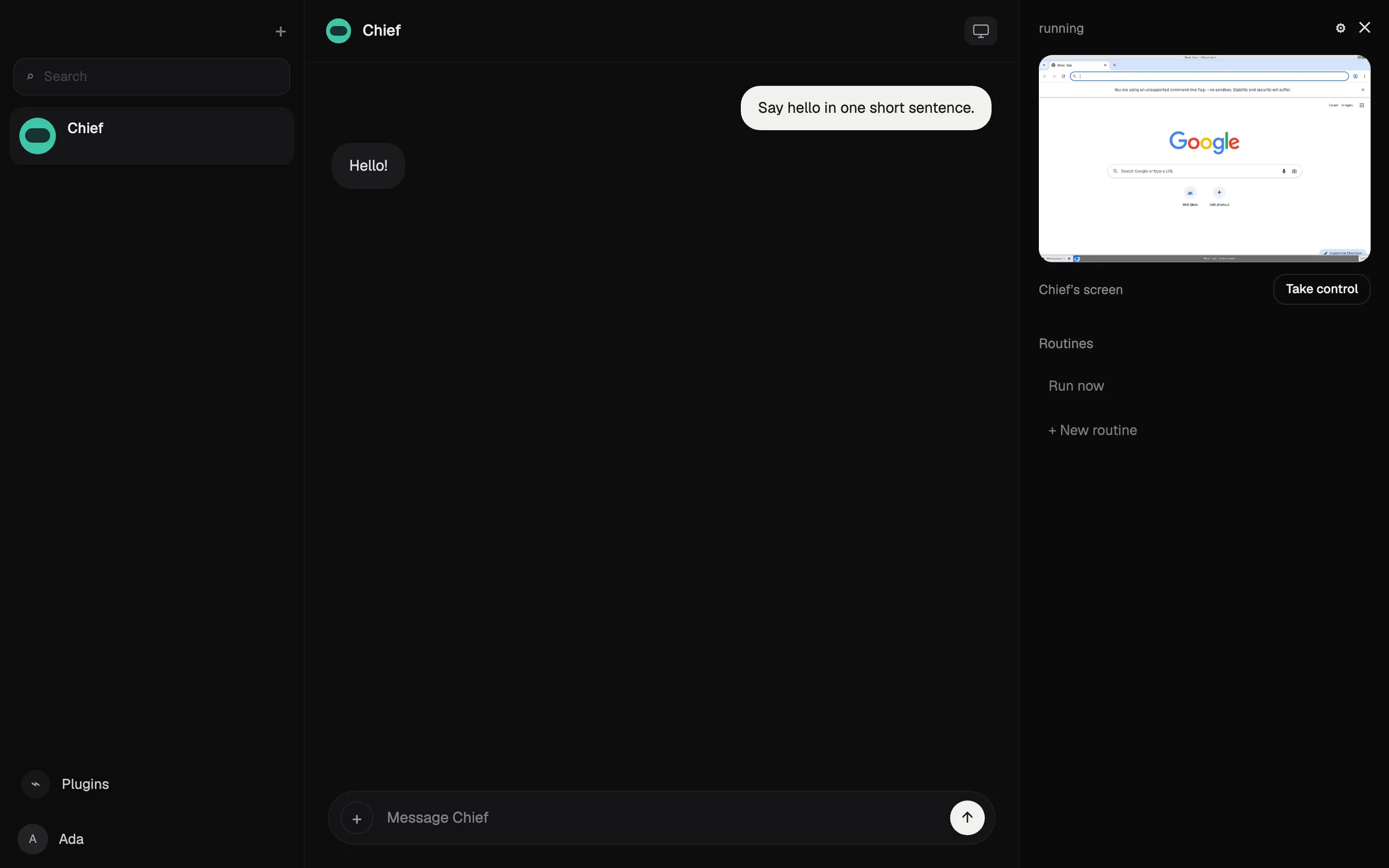
Rakazo ejecuta bots persistentes, cada uno con su propia memoria, sus rutinas y su ordenador aislado, que funcionan según un horario, un webhook o un evento de GitHub y piden aprobación en las acciones que elijas (Rakazo). Tú aportas el modelo: una suscripción a Claude o ChatGPT, una clave de API o modelos locales. Es de código abierto bajo Apache-2.0 y gratis si lo alojas tú mismo; el plan alojado empieza en $15 al mes con 7 días de prueba (precios).
Queda por debajo de Grok Bot porque normalmente aportas y pagas tú el modelo salvo que compres créditos de Rakazo, porque está en beta y porque Telegram, WhatsApp e iMessage solo funcionan si lo alojas tú. Lee la reseña de Rakazo para más detalles.
Elígelo si quieres varios bots con ordenadores separados o elegir el modelo.

3. OpenClaw: el mejor gratuito y de código abierto
OpenClaw es un agente gratuito con licencia MIT que funciona en tu propio ordenador y recibe instrucciones por WhatsApp, Telegram, iMessage, Slack, Discord y muchas otras apps de chat (OpenClaw). Aportas cualquier modelo en la nube o uno local, y el estado, la memoria y las credenciales se quedan en tu hardware.
Cumple todo lo de la lista de comprobación, pero tiene una calificación inferior a las opciones alojadas porque lo instalas, lo gestionas y lo proteges tú: da por hecho que te manejas con la línea de comandos, el sandboxing está desactivado por defecto y las facturas del modelo corren de tu cuenta. Hay testers que contaron haber gastado más de $100 en un día con modelos caros.
Elígelo si tienes perfil técnico y quieres control total. Consulta qué es OpenClaw y alternativas a OpenClaw.

4. Hermes Agent: el mejor para un agente que aprende
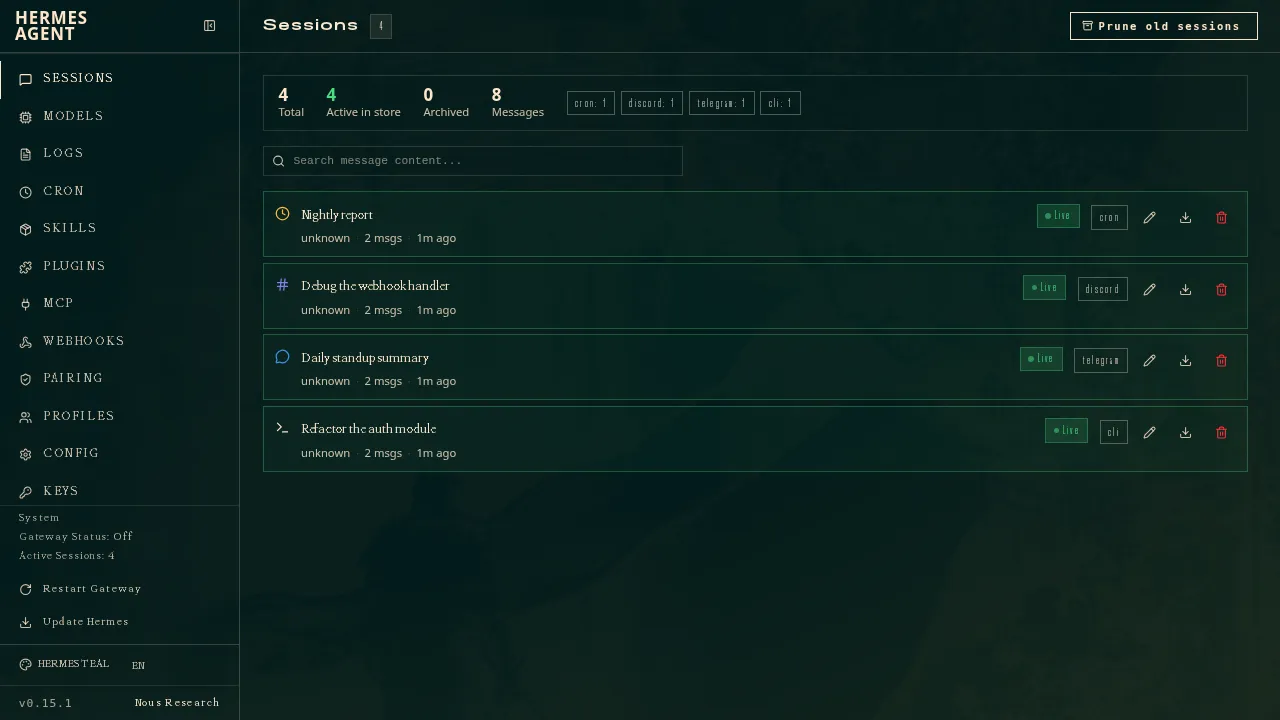
Hermes Agent, de Nous Research, es gratuito, con licencia MIT, y funciona en tu ordenador, en un servidor barato o en infraestructura serverless (GitHub). Tras tareas complejas escribe skills reutilizables y las va refinando, y una sola pasarela lo conecta con Telegram, Discord, Slack, WhatsApp, Signal, correo y más. Puedes ejecutar varios agentes como perfiles separados, e importa ajustes, recuerdos y skills de OpenClaw.
Como OpenClaw, cumple todo lo de la lista de comprobación, pero lo gestionas y lo proteges tú. Queda justo detrás de OpenClaw porque no tiene app móvil nativa e iMessage necesita un servidor BlueBubbles aparte en un Mac. Una suscripción opcional a Nous Portal desde $20 incluye modelos, herramientas alojadas y un agente en la nube (Hermes Agent).
Elígelo si tienes tu propio servidor y quieres un agente que mejore con el uso.
5. Muse: el mejor asistente gratuito para recados diarios
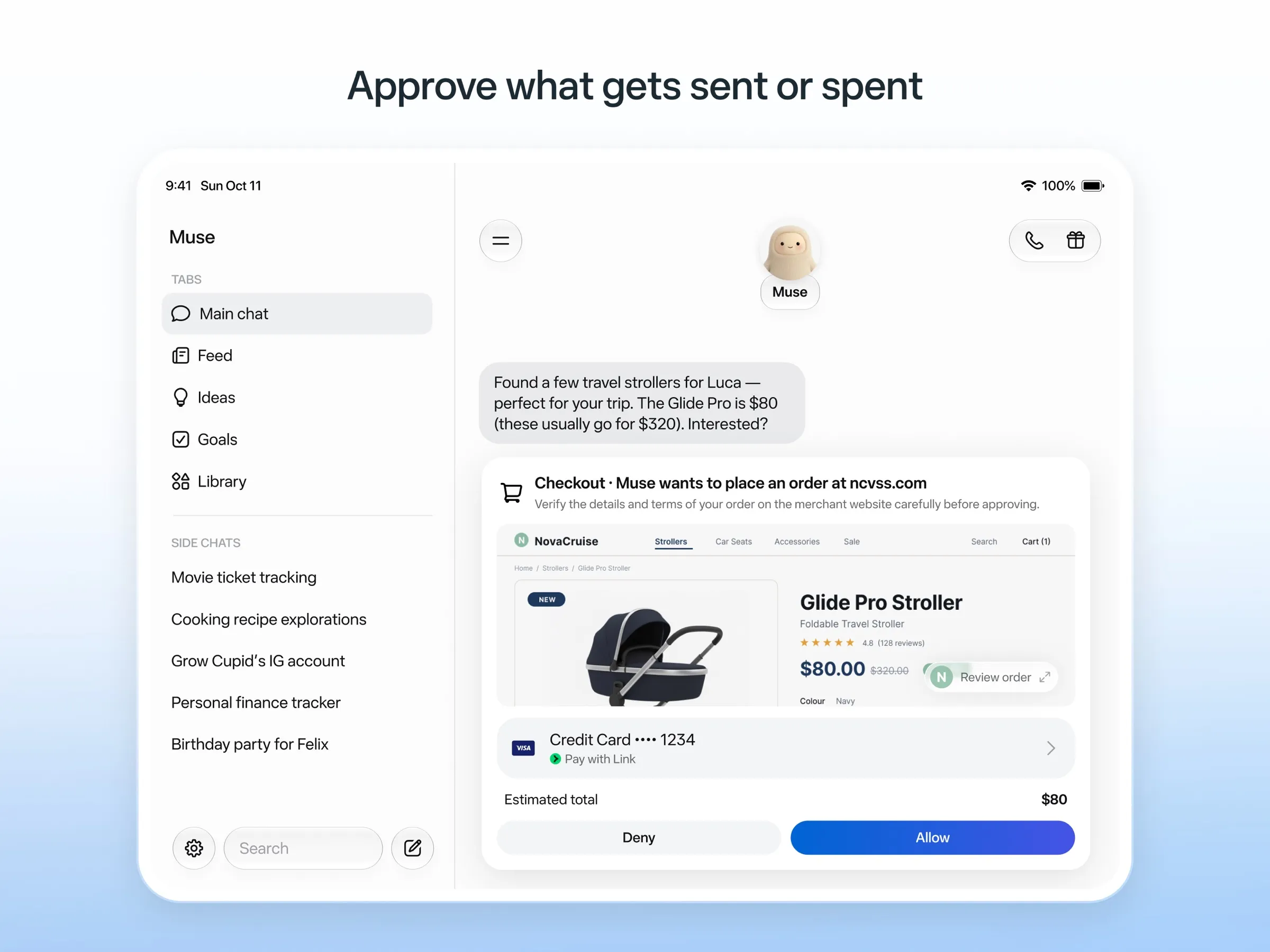
Muse es el agente personal de Meta: le escribes como a una persona, trabaja en su propio ordenador en la nube, pregunta antes de enviar correos o comprar y paga con números de tarjeta de un solo uso (Meta). Es gratis hasta un límite no publicado, con planes de pago desde $20.
Tiene una buena calificación porque es gratis y hace el trabajo desde su propio ordenador en la nube sin que tengas que configurar nada. Se queda sin el punto de apps de chat porque el acceso por WhatsApp sigue en pruebas limitadas, y Meta no dice si puedes tener varios Muses. Solo está disponible en EE. UU., Canadá, Japón, Singapur y México, exige una tarjeta de pago incluso en el nivel gratuito, y tus chats entrenan los modelos de Meta salvo que te excluyas. Consulta qué es Muse y alternativas a Muse.
6. Poke: el mejor asistente al que solo tienes que escribir
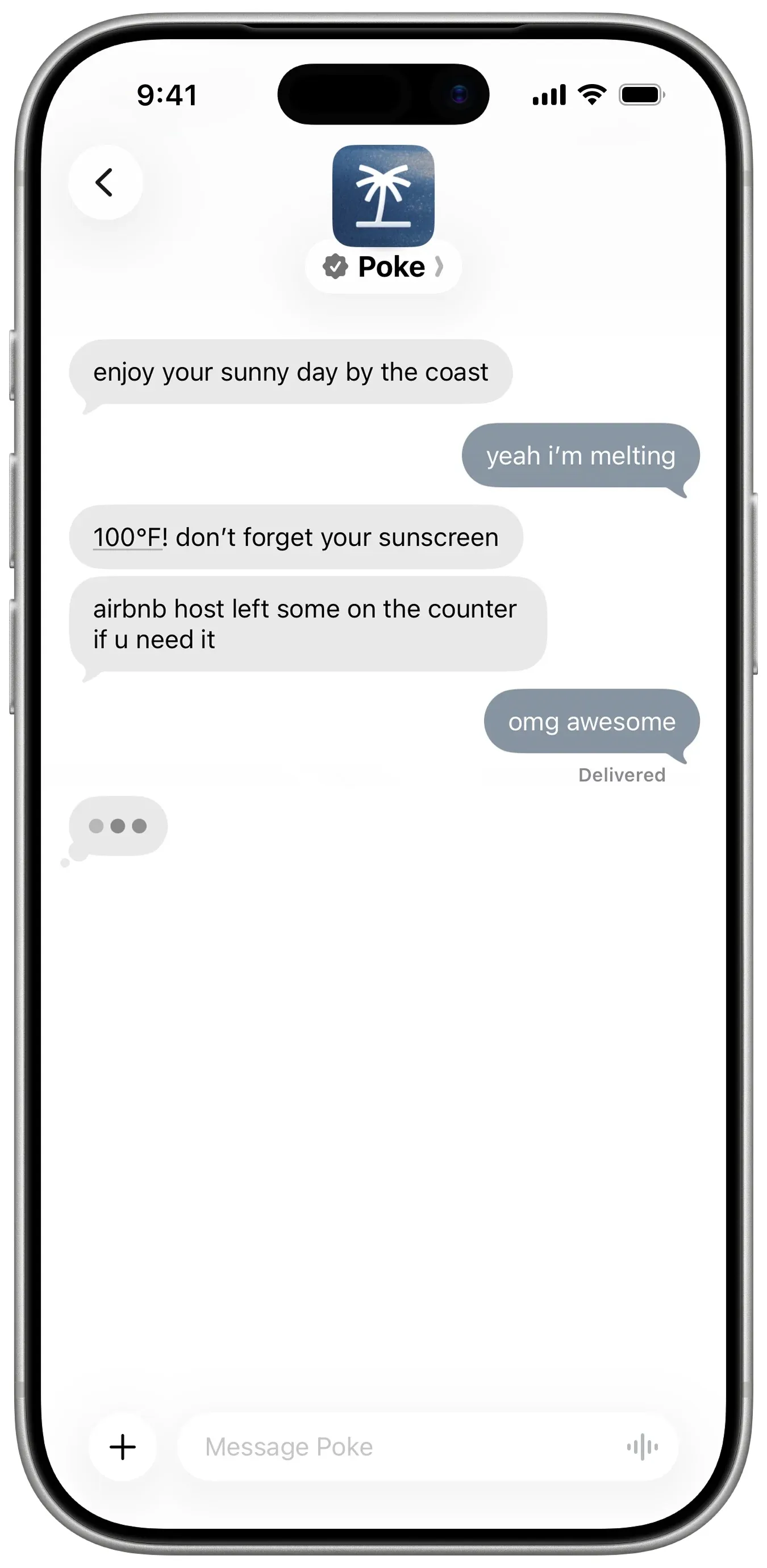
Poke no requiere instalar nada: te registras con tu número de teléfono y le escribes por iMessage, SMS o Telegram (Poke). Se conecta con Gmail, Outlook, Google Calendar y muchas otras apps, ejecuta automatizaciones compartibles llamadas recipes y te escribe primero. El plan gratuito no pide tarjeta, y Pro cuesta $19 (precios).
Solo le falta el punto de varios bots, algo que Poke no documenta. Su aviso de privacidad dice que tus datos pueden entrenar sus modelos salvo que elijas Maximum Privacy, y ahora pertenece a Cognition.
Elígelo si quieres un asistente en tus mensajes sin coste. Consulta alternativas a Poke.
7. Instinct: el más comentado, el más difícil de conseguir
Instinct es un asistente al que escribes o llamas, que usa un teléfono y un ordenador para reservar viajes, pedir la compra y hacer recados, también en chats de grupo (TechCrunch). Sigue trabajando en segundo plano y te hace seguimiento por su cuenta (Built In), pero solo se accede por invitación, así que ningún canal de chat está disponible para todos. Sus términos también le permiten entrenar con tus materiales salvo que te excluyas. Consulta qué es Instinct y alternativas a Instinct.
8. Claude Duet: el mejor resumen matutino, si consigues entrar
Claude Duet es la app de agente proactivo de Anthropic. Cada mañana revisa tu correo y tu calendario y te envía un resumen, comprueba tus cuentas cada pocas horas y pregunta antes de enviar, pagar, firmar o borrar nada (Anthropic).
Es una preview con lista de espera solo en EE. UU. para planes de pago de Claude, no se puede usar desde apps de chat y comparte los límites de uso de Claude. Consulta qué es Claude Duet.
9. Lindy: el mejor para correo de trabajo y reuniones
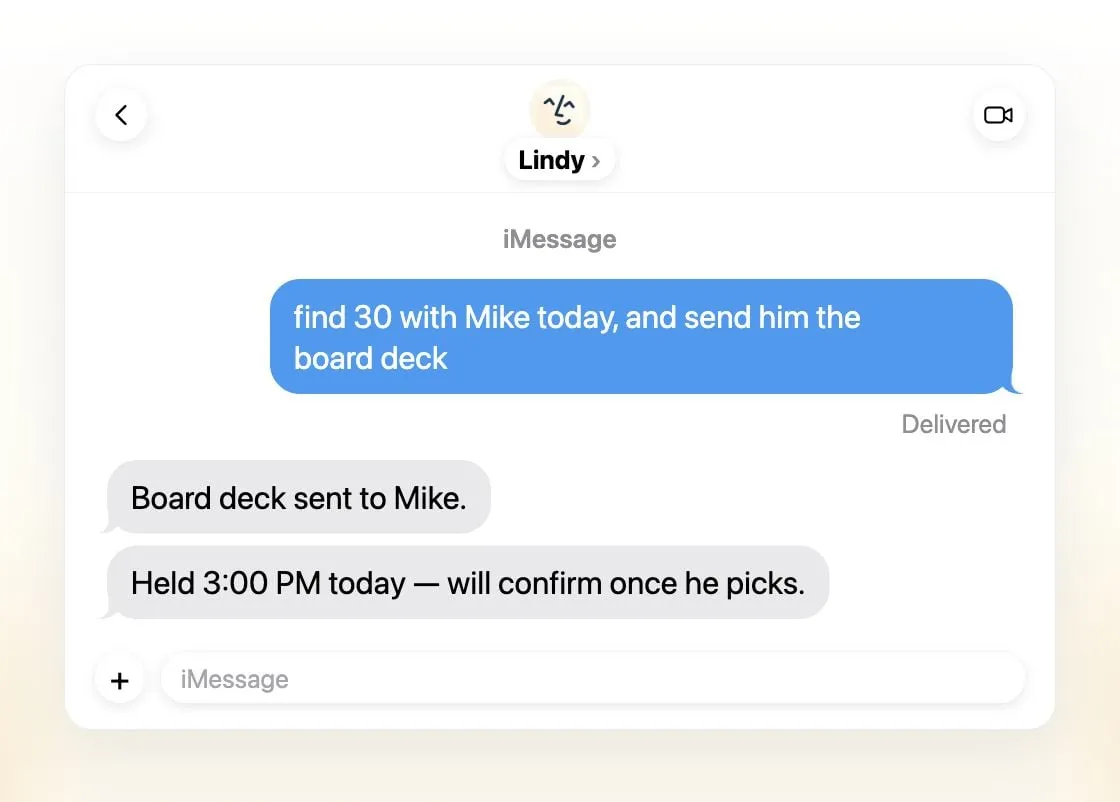
Lindy clasifica el correo, redacta respuestas, programa reuniones y te prepara para llamadas, y te comunicas con él por iMessage, SMS, Slack, teléfono o una extensión de Gmail (Lindy). Envía resúmenes diarios, pregunta antes de cualquier cosa con impacto externo y afirma que nunca entrena con tus datos.
Es un único asistente compartido por equipo en lugar de varios, los créditos gratuitos duran siete días y las licencias de pago empiezan en $49.99 por usuario al mes (precios).
Elígelo si eres un equipo pequeño que vive en Slack y el correo.
10. Manus: el mejor para entregables terminados
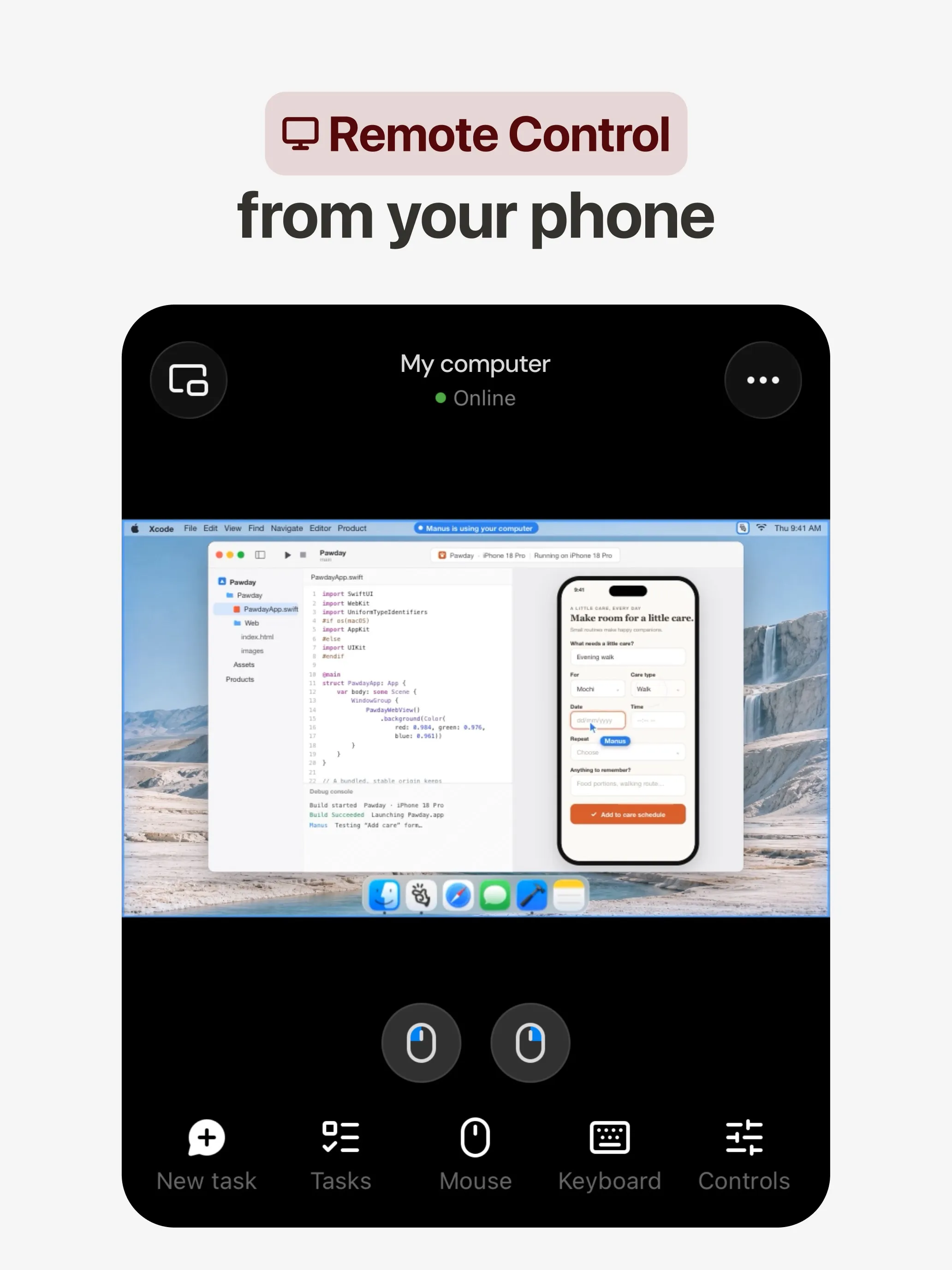
Manus planifica y ejecuta una tarea en su propio ordenador en la nube y te devuelve un informe de investigación, una web, una presentación o un vídeo, y sus automatizaciones empiezan según un horario o por un evento en Gmail, Slack o Notion (Manus 2.0). Tiene apps para web, iOS, Android, macOS y Windows, además de Slack y Telegram, y un plan gratuito.
Le falta el punto de varios bots, algo que Manus no documenta. Los créditos se cobran según la complejidad de la tarea, así que el coste es difícil de prever y las ejecuciones fallidas también los consumen, y la opción de excluirse del entrenamiento solo figura en los planes Team.
Elígelo si quieres un resultado concreto a partir de un prompt. Consulta alternativas a Manus.
11. Perplexity Teammates: el mejor para proyectos de largo recorrido
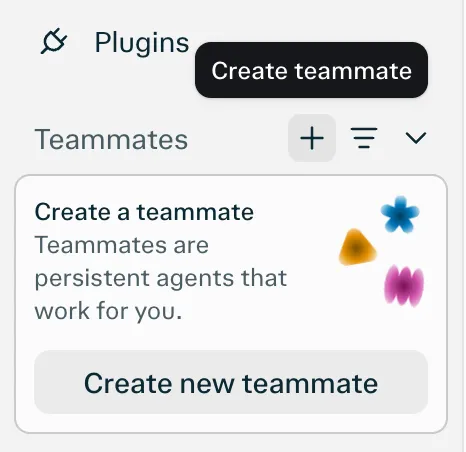
Los teammates son agentes persistentes, cada uno en su propio ordenador aislado, que vigilan Slack, GitHub, Linear y Gmail, actúan cuando algo cambia y te contactan cuando necesitan tu opinión (Perplexity). Eliges el modelo para cada teammate.
Se queda sin el punto de apps de chat porque la única plataforma que figura es la web. Además es una research preview para Perplexity Max a $200 al mes, sin un coste en créditos por tarea publicado.
12. dots: el mejor si ya pagas ChatGPT Pro
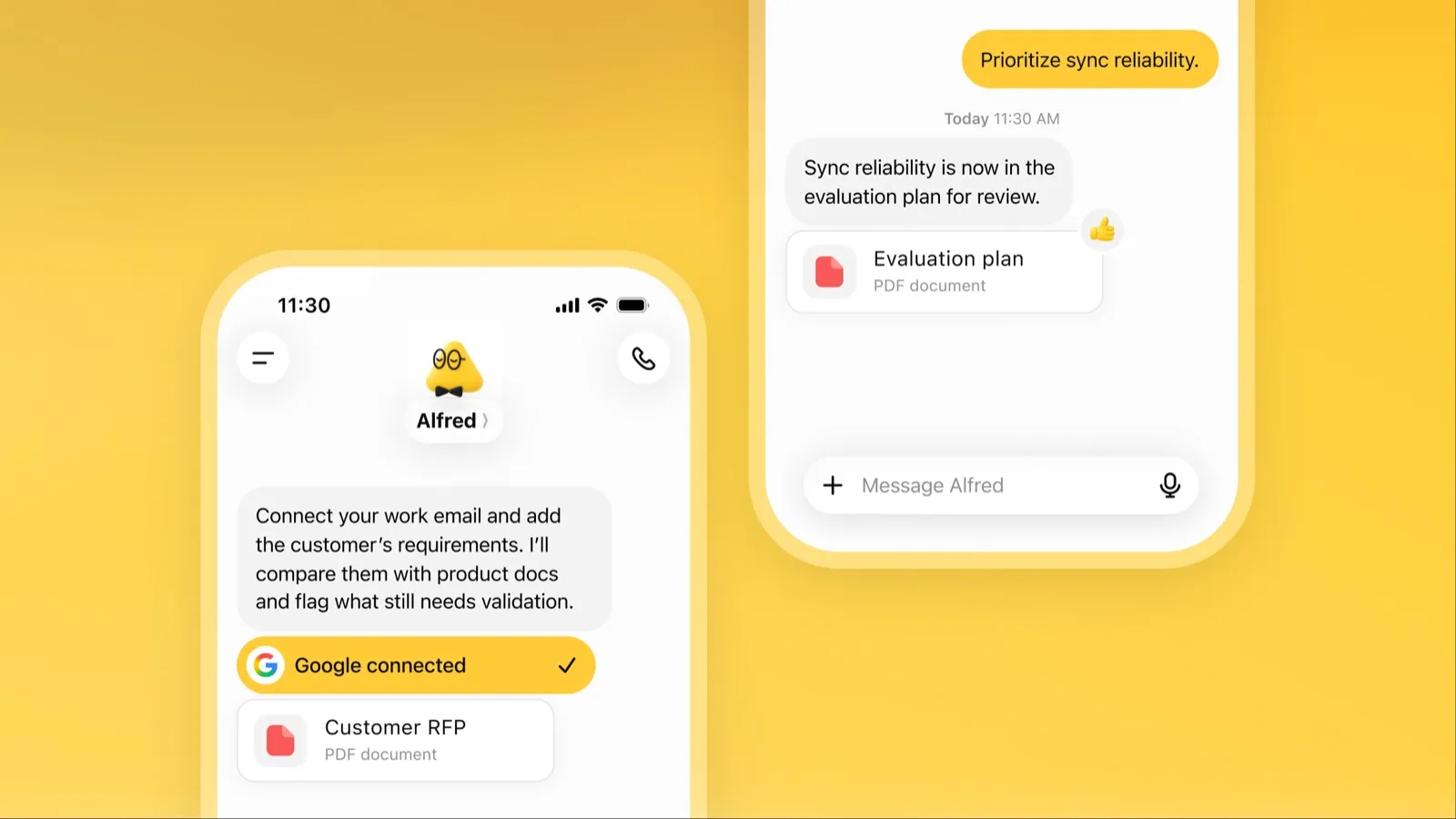
Un dot es el agente siempre activo de OpenAI dentro de ChatGPT, con su propio ordenador en la nube, más de 4.000 apps conectadas y la misma memoria en ChatGPT, Slack y Microsoft Teams (OpenAI). Cuando está inactivo, investiga tus apps conectadas y vuelve con trabajo para revisar.
Queda último por acceso y coste: necesita ChatGPT Pro desde $100 al mes o Business Premium, el acceso a Pro excluye el EEE, el Reino Unido y Suiza, tienes un solo dot, y el contenido de Pro entrena los modelos de OpenAI salvo que te excluyas. Consulta qué es dots.
Cuál elegir
- Delegar trabajo, sin configuración: Grok Bot.
- Tu propio modelo, o varios bots con ordenadores separados: Rakazo.
- Gratis, en tu propio hardware: OpenClaw o Hermes Agent.
- Recados gratis en EE. UU.: Muse.
- Solo escribirle: Poke.
- Correo de equipo y reuniones: Lindy.
- Un informe, una web o una presentación con un solo prompt: Manus.
- Ya tienes ChatGPT Pro o Claude Pro: dots o Claude Duet.
Elijas el que elijas, empieza con tareas en las que un error salga barato y mantén activadas las aprobaciones para correos y pagos. Para agentes clasificados según cuánto pueden hacer solos, consulta el mejor agente de IA; para mantener tus datos en tu propia máquina, el mejor asistente de IA privado.
Los mejores
30 US$/mes
Always-on AI agents from SpaceXSI that run on a shared cloud computer, sign in to your apps and finish multi-step work while you're away.
Ir a Grok BotPuntos fuertes
- Bots work on their own cloud computer, so tasks keep running when your laptop or phone is closed
- Can operate websites and apps that have no API, using saved logins it never sees in plain text
- Several Bots can run in parallel, message each other and share one workspace
- Routines can run on a schedule or after an event, and a Bot can learn a task from a recorded demonstration of up to 10 minutes
- Can place phone calls to US businesses for you and send a summary afterwards
- Native apps for macOS, Windows, Linux, iOS and Android, plus Slack
Puntos débiles
- No free plan and no standalone price: the cheapest way in is the $30/month Premium plan
- Usage comes from a weekly pool shared with Grok and Cursor, and SpaceXSI does not publish how much work that pool covers
- No model picker: Grok Bot chooses the model for each task and does not show which one it used
- All Bots on an account share one computer, files and logins; the docs say not to use separate Bots as a security boundary
- Users report Amazon blocks it from shopping as an unauthorized AI agent; Amazon hasn't commented
- Still labelled beta, with no browser version
10 US$/mes
Open-source, self-hostable platform for persistent AI bots that each get a job, a computer, memory and routines, using the model you choose.
Ir a RakazoPuntos fuertes
- Open source (Apache-2.0) and fully self-hostable, including with local models
- Choice of model per bot, including existing Claude or ChatGPT subscriptions
- Bots keep working on schedules and triggers with their own cloud computer
- Approval controls over which actions a bot may take on its own
Puntos débiles
- Still in beta, with frequent releases
- You supply and pay for the model on the hosted plans, unless you buy Rakazo credits
- Telegram, WhatsApp and iMessage/SMS are only available when self-hosted
- More setup than a single chat app
Free, MIT-licensed personal AI agent that runs on your own computer and takes orders from WhatsApp, Telegram, iMessage, Slack and 20+ other chat apps.
Ir a OpenClawPuntos fuertes
- Free and MIT licensed, with no paid tier
- Runs on your own hardware; state, memory and credentials stay local, and it sends nothing home except an optional daily version check
- Works in 29 chat channels, including WhatsApp, Telegram, iMessage, Slack, Discord and Microsoft Teams
- Model-agnostic: 64 model and media providers, plus local models
- Large ecosystem of skills and 142 official plugins, and very active development
Puntos débiles
- Model costs are on you and can run high: testers and users have reported spending over $100 in a day with expensive models
- Sandboxing is off by default and the agent can run commands on the host unless you turn on approvals
- Setup and upkeep expect comfort with the command line; maintainers warn it is risky for non-technical users
- Broad access to email, messages and the system makes prompt injection and malicious third-party skills a real risk
20 US$/mes
Free, MIT-licensed AI agent from Nous Research that runs on your own machine or server, learns reusable skills, and chats with you on Telegram, Slack and more.
Ir a Hermes AgentPuntos fuertes
- Free and MIT licensed, and runs on hardware you control
- Writes and refines its own skills from experience, on top of persistent memory and cross-session search
- One gateway for 20+ chat platforms, including Telegram, Discord, Slack, WhatsApp, Signal and email
- Run several separate agents as profiles, each with its own model, memory and skills, and let them talk in group chats
- Model-agnostic, with a one-command import from OpenClaw
Puntos débiles
- Setup expects comfort with the command line and with running your own server
- Model costs are on you unless you use free models, and hosted web search, images and speech need a paid Nous Portal plan or your own keys
- iMessage needs a separate BlueBubbles server on a Mac
- No native mobile app; Android support is a command-line install through Termux
20 US$/mes
Meta's personal AI agent that sends email, books travel and shops for you from its own cloud computer, in the Muse app or on the web.
Ir a MusePuntos fuertes
- Free tier, and no technical setup: you message it like a person in the app or on the web
- Runs on its own cloud computer and keeps working after you close the app
- Asks before sending email or buying, and shows an audit trail of what it did and plans to do
- Purchases go through a one-time card number with Link's purchase protections, so the agent never sees your real card
- Connects to email, calendar and Instagram, and can use a browser for sites without an API
Puntos débiles
- Only in the US, Canada, Japan, Singapore and Mexico so far, and Meta says Muse is still in limited testing
- Requires a payment card even for the free tier, and the stronger Muse Wonder model is for paid plans only
- Your interactions train Meta's AI models unless you opt out
- Free usage limit is not published, so it is hard to know when you will hit it
- Early users and press reported it overstepping permissions, such as reading messages it was not meant to
- Requires a Meta account and asks for broad access to email, calendars and payments
19 US$/mes
A personal AI assistant you text in iMessage or Telegram that connects to your email, calendar and apps and messages you first when something needs attention.
Ir a PokePuntos fuertes
- Nothing to install: you sign up with a phone number and text it like a contact
- Messages you first, using your connected services and memory
- Free plan with no credit card, and email and calendar included
- Connects to Gmail, Outlook, Google Calendar, Notion, GitHub, Linear and many more apps, plus custom integrations through MCP
- Shareable automation recipes, and developers can build their own
Puntos débiles
- Uses your data to train its AI models unless you choose Maximum Privacy
- WhatsApp support is limited to some markets
- Only one phone number per account
- Does not say which AI models it uses, and does not publish how many credits each plan includes
- Now owned by Cognition, so the product's direction may change
Invite-only personal AI assistant you text or call. It uses a phone and computer for you to book travel, order groceries and handle errands.
Ir a InstinctPuntos fuertes
- No new interface: you text or call it like a person
- Handles real-world errands end to end, such as travel bookings, groceries and subscription cancellations
- Group chats can use one shared Instinct, even for friends without an account
- Free during the beta
Puntos débiles
- Invite-only, with no public sign-up or published pricing
- Terms let it use your materials to train AI models unless you opt out, and the opt-out only applies going forward
- Terms appoint it as your agent to enter agreements and transactions on your behalf, and require binding arbitration with a class action waiver
- Early testers reported it sending an email without asking and keeping inbox data after Google access was revoked
- No choice of model, and the company does not say which models it uses
20 US$/mes
Anthropic's proactive agent app: briefs you each morning, works on its own cloud computer and asks before acting. US waitlist preview for paid Claude plans.
Ir a Claude DuetPuntos fuertes
- Messages you first: a morning brief from your email and calendar, then check-ins every few hours
- Works with over 6,000 connectors and plugins, and uses a cloud browser for sites without one
- Brings your existing Claude memory, skills and connectors from the first message
- Asks before sending, paying, signing or deleting, and blocks trading and moving money even with approval
- Pays through one-time card numbers via Link and Shop Pay, and turns larger jobs into editable briefs, decks and dashboards
Puntos débiles
- Waitlist-only research preview, US only, and not on Team or Enterprise plans yet
- Uses the same Claude usage limits as chat, and background checks count too
- One model only, Claude Opus 5.5, with no choice of model
- Anthropic's docs say you can't yet watch or take over its browser
- Microsoft 365 isn't available yet, and it can misread threads, misjudge urgency or miss things between check-ins
49,99 US$/mes
An AI assistant for work that runs your inbox, calendar and meetings, takes requests by iMessage, Slack, phone or browser, and sends you daily briefs.
Ir a LindyPuntos fuertes
- Texts you first: a personalized first message, alerts on time-sensitive email, and daily briefs
- Reachable almost anywhere: iMessage or SMS, Slack, its own phone number, Gmail via a Chrome extension, and the web
- 1,500+ integrations plus any hosted MCP server, and a browser for tools without one
- Asks for approval before anything with outside impact
- Says it never uses your data to train models, with SOC 2 Type II, GDPR and PIPEDA compliance
Puntos débiles
- Expensive for individuals: paid seats start at $49.99 per user a month, and free credits last only 7 days
- Credit-based usage is hard to predict, from 2 credits for a simple ask to 2,500 for a big build
- One shared Lindy per team rather than separate assistants for different jobs
- No mobile app; on phones you use iMessage, SMS or calls
- Plan names differ between its pricing page and its docs, so it is hard to tell what each tier includes
20 US$/mes
General-purpose AI agent that researches, builds websites, slides, videos and games, and runs automations on its own cloud computer.
Ir a ManusPuntos fuertes
- Turns one prompt into finished output: research reports, websites, slides, videos and playable games
- Automations can start from a schedule or an event in a connected service such as Gmail, Slack or Notion
- Video Editor and Game Dev let you edit what the agent made instead of regenerating it
- Free plan to try it, with apps for web, iOS, Android, macOS and Windows
Puntos débiles
- Credit-based pricing makes costs hard to predict, and long or failed runs can use up credits
- Free daily credits are capped at 1,500 a month and only work in the Lite mode
- A built-in training opt-out is listed only for Team plans
- Several plans share the Pro name and differ only by credit amount
200 US$/mes
Persistent Perplexity agents, each with its own computer, browser and memory, that own ongoing work and watch Slack, GitHub and Linear. Max-only web preview.
Ir a Perplexity TeammatesPuntos fuertes
- Run several teammates, each on its own isolated computer and browser with separate sessions
- Watches Slack, GitHub, Linear and other connected tools, acts on changes and reaches out when it needs you
- Pick the model per teammate or task, with Claude Opus 5.5 as the default
- Splits a goal into parallel agent tasks, and teammates in a Project share context and hand work to each other
- You can take over a teammate's desktop and steer it, and it can't view your saved credentials
Puntos débiles
- Only on Perplexity Max at $200 a month; Pro and Enterprise plans are excluded by default
- Research preview whose behavior may change
- Web only for now; the iOS app is only promised soon
- Usage draws on credits, and parallel agents, large files and frequent automations use more
- No published cap on teammates and no published credit cost per task
100 US$/mes
OpenAI's always-on agent inside ChatGPT, with its own cloud computer, that works on your goals between chats and reaches you in ChatGPT, Slack or Teams.
Ir a dotsPuntos fuertes
- Runs on its own cloud computer and browser and keeps working when your devices are off
- Connects to over 4,000 apps through ChatGPT plugins and can hand work to Codex and ChatGPT Work
- Reachable in ChatGPT, Slack and Microsoft Teams, and you can call it, with one memory across channels
- Researches your connected apps on its own and brings you finished work or decisions to review
- Custom Rules and Auto-review gate sensitive actions, and some steps always stay with you
Puntos débiles
- No free, Go or Plus access: it needs ChatGPT Pro from $100 a month or Business Premium
- Pro access excludes the EEA, the UK and Switzerland
- One dot per user for now; teams of dots are only planned
- Texting over iMessage or RCS is a US-only beta, and your dot cannot call you yet
- Stopping a task does not undo actions it already took, and tasks it starts in Codex or ChatGPT Work count toward those limits
Funciones
| Grok Bot | Rakazo | OpenClaw | Hermes Agent | Muse | Poke | Instinct | Claude Duet | Lindy | Manus | Perplexity Teammates | dots | |
|---|---|---|---|---|---|---|---|---|---|---|---|---|
| Búsqueda web | Sí | Sí | Sí | Sí | Sí | Sí | Sí | Sí | Sí | Sí | Sí | Sí |
| Generación de imágenes | Sí | Sí | Sí | Sí | Sí | Desconocido | Desconocido | Desconocido | Sí | Sí | Sí | Sí |
| Modo de voz | Sí | Sí | Sí | Sí | Sí | Sí | Sí | Sí | Sí | Sí | Desconocido | Sí |
| Subida de archivos | Sí | Sí | Sí | Sí | Sí | Sí | Sí | Sí | Sí | Sí | Sí | Sí |
| Memoria | Sí | Sí | Sí | Sí | Sí | Sí | Sí | Sí | Sí | Sí | Sí | Sí |
| Hace tareas por ti | Sí | Sí | Sí | Sí | Sí | Sí | Sí | Sí | Sí | Sí | Sí | Sí |
| Integraciones con apps | Sí | Sí | Sí | Sí | Sí | Sí | Sí | Sí | Sí | Sí | Sí | Sí |
| Trabaja por su cuenta | Sí | Sí | Sí | Sí | Sí | Sí | Sí | Sí | Sí | Sí | Sí | Sí |
| Te escribe primero | Sí | Sí | Sí | Sí | Sí | Sí | Sí | Sí | Sí | Sí | Sí | Sí |
| Varios bots | Sí | Sí | Sí | Sí | Desconocido | Desconocido | Desconocido | No | No | Desconocido | Sí | No |
Fuentes
Grok Bot
- Grok Bot product page and FAQVerificado el 8 nov 2026
- SpaceXSI pricing: The X Subscription plansVerificado el 8 nov 2026
- Introducing Grok Bot (launch post, Aug 11, 2026)Verificado el 8 nov 2026
- Grok Bot FAQ: plans, platforms, memory, privacy and limitsVerificado el 8 nov 2026
- Grok Bot docs: Create and manage BotsVerificado el 8 nov 2026
- Grok Bot changelog (v0.78.1, Oct 27, 2026)Verificado el 8 nov 2026
- Cursor help: Grok Bot plans and usageVerificado el 8 nov 2026
- Teslarati: Grok Bot can now call US businesses (Nov 2026)Verificado el 8 nov 2026
- Teslarati: Amazon shuts out Grok Bot (Oct 15, 2026)Verificado el 8 nov 2026
- Grok Bot docs: Overview (proactive teammate, morning briefing)Verificado el 8 nov 2026
- Grok Bot docs: Chat and collaboration (Slack DMs, X Chat rolling out)Verificado el 8 nov 2026
- Grok Bot docs: Get started (desktop and mobile apps)Verificado el 8 nov 2026
- Grok Bot docs: Skills, routines and automationsVerificado el 8 nov 2026
- SpaceXSI: Team Bots in public beta (Sep 28, 2026)Verificado el 8 nov 2026
- Wikipedia: SpaceXAI (xAI renamed SpaceXAI, then SpaceXSI)Verificado el 8 nov 2026
- Cursor: Data Use & Privacy Overview (Privacy Mode and training)Verificado el 8 nov 2026
Rakazo
- Rakazo homepageVerificado el 8 nov 2026
- Rakazo pricingVerificado el 8 nov 2026
- Rakazo privacy policyVerificado el 8 nov 2026
- Rakazo on GitHub (README and license)Verificado el 8 nov 2026
- Rakazo changelogVerificado el 8 nov 2026
- Rakazo releasesVerificado el 8 nov 2026
- Rakazo docs: Image and video generationVerificado el 8 nov 2026
- Rakazo docs: MemoryVerificado el 8 nov 2026
- Rakazo docs: Connect appsVerificado el 8 nov 2026
- Rakazo docs: RoutinesVerificado el 8 nov 2026
- Rakazo docs: Chat appsVerificado el 8 nov 2026
- Rakazo docs: Messaging apps (self-hosting)Verificado el 8 nov 2026
- Rakazo docs: Bots and chats (add another bot, bot templates)Verificado el 8 nov 2026
- Rakazo docs: Groups (several bots in one chat)Verificado el 8 nov 2026
- Rakazo docs: Mobile app (notifications)Verificado el 8 nov 2026
- Rakazo privacy policy (updated Sep 14, 2026)Verificado el 8 nov 2026
- Rakazo privacy policy source on GitHubVerificado el 8 nov 2026
OpenClaw
- OpenClaw homepage and Foundation sectionVerificado el 8 nov 2026
- OpenClaw integrations: channels, providers and pluginsVerificado el 8 nov 2026
- openclaw/openclaw on GitHub (MIT, v2026.11.1)Verificado el 8 nov 2026
- OpenClaw docs: Sandboxing (off by default)Verificado el 8 nov 2026
- Wikipedia: OpenClawVerificado el 8 nov 2026
- Notebookcheck: OpenClaw can burn through hundreds of dollars per dayVerificado el 8 nov 2026
- OpenClaw docs: Memory overviewVerificado el 8 nov 2026
- OpenClaw docs: AutomationsVerificado el 8 nov 2026
- OpenClaw docs: Chat channelsVerificado el 8 nov 2026
- OpenClaw docs: iMessageVerificado el 8 nov 2026
- OpenClaw docs: Heartbeat, now a default Proactive check jobVerificado el 8 nov 2026
- OpenClaw docs: Multi-agent routingVerificado el 8 nov 2026
- OpenClaw docs: Platforms (macOS, Windows, Linux, iOS and Android apps)Verificado el 8 nov 2026
- OpenClaw docs: Tools (exec, browser, web search)Verificado el 8 nov 2026
- OpenClaw docs: Audio and voice notes (inbound transcription)Verificado el 8 nov 2026
- OpenClaw docs: Image and media support (inbound media)Verificado el 8 nov 2026
Hermes Agent
- NousResearch/hermes-agent on GitHub (MIT, v0.23.0)Verificado el 8 nov 2026
- Hermes Agent homepage and Nous Portal pricingVerificado el 8 nov 2026
- Hermes Agent documentationVerificado el 8 nov 2026
- Hermes Agent docs: Profiles, running multiple agentsVerificado el 8 nov 2026
- Hermes Agent docs: Bot ModeVerificado el 8 nov 2026
- Hermes Agent docs: Voice modeVerificado el 8 nov 2026
- Hermes Agent docs: Vision and image pasteVerificado el 8 nov 2026
- Hermes Agent docs: iMessage via BlueBubblesVerificado el 8 nov 2026
- Nous Research on X: Meet Hermes Agent (February 25, 2026)Verificado el 8 nov 2026
- Hermes Agent docs: Session heartbeats and cron watchdogsVerificado el 8 nov 2026
- Hermes Agent docs: FAQ (Is my data sent anywhere?)Verificado el 8 nov 2026
Muse
- Meta: Introducing Muse, the world's first personal AI agent built for everyoneVerificado el 8 nov 2026
- Muse homepageVerificado el 8 nov 2026
- Meta Help Center: About Muse subscriptionsVerificado el 8 nov 2026
- Meta Help Center: Meta AI, Muse and Vibes are separate appsVerificado el 8 nov 2026
- TechCrunch: Meta debuts its Muse AI agent. Will consumers trust it?Verificado el 8 nov 2026
- 9to5Mac: Muse personal agent gets apps for iPhone and MacVerificado el 8 nov 2026
- The Guardian TechScape: early Muse users report the agent overstepping permissionsVerificado el 8 nov 2026
- iPhone in Canada: Meta's Muse AI agent is now available in CanadaVerificado el 8 nov 2026
- Superpower Daily: Meta launches Muse in Japan (Oct 23, 2026)Verificado el 8 nov 2026
- Meta: Muse is now available in Singapore (Oct 27, 2026)Verificado el 8 nov 2026
- Mexico News Daily: Meta launches its Muse AI agent in Mexico (Nov 6, 2026)Verificado el 8 nov 2026
- Meta Q3 2026 earnings call transcript: Muse Wonder in the paid tier, free tier on Muse SparkVerificado el 8 nov 2026
- How to manage reminders and scheduled tasks with MuseVerificado el 8 nov 2026
- WhatsApp Help Center: About chatting with your Muse agent through WhatsAppVerificado el 8 nov 2026
- TechCrunch: Meta's Muse hits MacVerificado el 8 nov 2026
- Meta AI: Muse features and FAQ (browses the web, generates images)Verificado el 8 nov 2026
- Meta Help Center: How your Muse agent browses the webVerificado el 8 nov 2026
- Meta Help Center: How to use Muse with artifacts (uploads, image generation)Verificado el 8 nov 2026
- Meta Help Center: How to get started with MuseVerificado el 8 nov 2026
Poke
- Poke homepageVerificado el 8 nov 2026
- Poke pricingVerificado el 8 nov 2026
- Poke FAQVerificado el 8 nov 2026
- Poke privacy notice (last updated September 11, 2026)Verificado el 8 nov 2026
- Cognition: welcoming The Interaction Company to Cognition (July 23, 2026)Verificado el 8 nov 2026
- TechCrunch: Poke makes using AI agents as easy as sending a textVerificado el 8 nov 2026
- TechCrunch: Apple approves Poke as the first AI agent on its Messages for Business platformVerificado el 8 nov 2026
- Introducing Poke.com (launch announcement, September 8, 2025)Verificado el 8 nov 2026
- Poke docs: Welcome (built-in web search)Verificado el 8 nov 2026
- Poke release notes (web search, sharing images, attachments)Verificado el 8 nov 2026
Instinct
- Instinct homepageVerificado el 8 nov 2026
- Instinct Terms of Service (last revised Aug 26, 2026)Verificado el 8 nov 2026
- TechCrunch: Instinct brings its AI agent to group chatsVerificado el 8 nov 2026
- Fortune: Noah Shinn's viral AI assistant Instinct raises $1B Series CVerificado el 8 nov 2026
- Vellum: Instinct breakdown (competitor; summary of early tester reports)Verificado el 8 nov 2026
- Digit: Instinct clarifies WhatsApp outage (works through WhatsApp and iMessage)Verificado el 8 nov 2026
- RuntimeWire: Instinct brings its group AI agent to iMessage for all users (Oct 29, 2026)Verificado el 8 nov 2026
- Privacy Policy | InstinctVerificado el 8 nov 2026
- Built In: What Is Instinct AI? (Oct 21, 2026)Verificado el 8 nov 2026
Claude Duet
- Anthropic: Introducing Claude Duet (October 21, 2026)Verificado el 8 nov 2026
- Claude Help Center: Get started with Claude DuetVerificado el 8 nov 2026
- Claude Duet product pageVerificado el 8 nov 2026
- Claude pricing: Pro, Max and UltraVerificado el 8 nov 2026
- Inc.: I Tried Claude Duet (reviewer sent it a screenshot)Verificado el 8 nov 2026
Lindy
- Lindy homepageVerificado el 8 nov 2026
- Lindy pricingVerificado el 8 nov 2026
- Lindy docs: What is Lindy?Verificado el 8 nov 2026
- Lindy docs: iMessage & SMSVerificado el 8 nov 2026
- Lindy docs: Phone CallsVerificado el 8 nov 2026
- Lindy docs: Ad Hoc Tasks (research)Verificado el 8 nov 2026
- Lindy docs: Pricing and creditsVerificado el 8 nov 2026
- Lindy Assistant: The AI that runs your work lifeVerificado el 8 nov 2026
- Lindy docs: Set up Lindy (web search, image generation)Verificado el 8 nov 2026
- Lindy docs: Files (drop files and folders in for Lindy to use)Verificado el 8 nov 2026
- Lindy changelog (Creatives: on-brand images, Sep 16, 2026)Verificado el 8 nov 2026
Manus
- Manus Plans & PricingVerificado el 8 nov 2026
- Manus Help Center: What is the current membership pricing for Manus?Verificado el 8 nov 2026
- Manus Help Center: rules for credit consumptionVerificado el 8 nov 2026
- Introducing Manus 2.0 (Sep 28, 2026)Verificado el 8 nov 2026
- Download Manus: macOS, Windows, iOS and AndroidVerificado el 8 nov 2026
- Tech Xplore/AFP: Manus raises $500 million after Meta acquisition blocked by ChinaVerificado el 8 nov 2026
- Wikipedia: Manus (AI agent)Verificado el 8 nov 2026
- Manus for Slack: Turn Your Workspace into an Autonomous EngineVerificado el 8 nov 2026
- Manus docs: AutomationsVerificado el 8 nov 2026
- Is my data safe when using Manus Agents in Telegram?Verificado el 8 nov 2026
- Chatting with Manus Agent on Slack: Channels, DMs, and File DeliveryVerificado el 8 nov 2026
- Manus Agents in Telegram (available to all users)Verificado el 8 nov 2026
- Manus Help Center: What's new in Manus 2.0 (Cue requires an invitation code)Verificado el 8 nov 2026
- Manus API docs: Agents (default agent plus agents you create)Verificado el 8 nov 2026
- Manus privacy policy (updated Sep 28, 2026)Verificado el 8 nov 2026
Perplexity Teammates
- Perplexity blog: Teammates are agents for complex, ongoing work (November 4, 2026)Verificado el 8 nov 2026
- Perplexity Help Center: Perplexity TeammatesVerificado el 8 nov 2026
- Perplexity Help Center: Perplexity Max ($200 a month)Verificado el 8 nov 2026
- Perplexity Help Center: Data Collection at PerplexityVerificado el 8 nov 2026
- Perplexity Help Center: Generating Images with PerplexityVerificado el 8 nov 2026
dots
- ChatGPT: Dots feature pageVerificado el 8 nov 2026
- ChatGPT docs: Meet dotsVerificado el 8 nov 2026
- ChatGPT docs: Dot channels (Slack, Teams, calls, texting beta)Verificado el 8 nov 2026
- ChatGPT pricing: Dots on Pro only; training opt-outVerificado el 8 nov 2026
- TechCrunch: OpenAI launches dots, its bubbly agentic avatarVerificado el 8 nov 2026
- DataCamp: OpenAI Dots, always-on agents in ChatGPT, explainedVerificado el 8 nov 2026
- eesel: OpenAI Dots pricing by Pro tier and limitsVerificado el 8 nov 2026
- ChatGPT docs: Dot computers and apps (cloud browser for research)Verificado el 8 nov 2026
- OpenAI Help Center: Images in ChatGPT (image generation on all tiers)Verificado el 8 nov 2026